It doesn’t always have to be Kali Linux!

Kali Linux [1] and Parrot Linux [2] are considered the first choice among Linux distributions when it comes to security and penetration testing. Many relevant programs are already preinstalled on these distributions and can be used out of the box, so to speak.
However, it must also be said that Kali and Parrot are not necessarily the most suitable Linux distributions for everyday use due to their specialization. For daily use, Ubuntu for beginners and Debian for advanced users are more common. For this reason, Kali and Parrot are usually set up and used as virtual machines with VirtualBox or VMWare Player. A very practical approach, especially when it comes to looking at the distribution first before installing it natively on the computer.

In my opinion, the so-called distribution hopping that some people do under Linux is more of a hindrance to getting used to a system in order to be able to work with it efficiently. Which Linux you choose depends primarily on your own taste and the requirements of what you want to do with it. Developers and system administrators will likely have an inclination toward Debian, a version from which many other distributions were derived. Windows switchers often enjoy Linux Mint, and the list goes on.

If you want to feel like a hacker, you can opt for a Kali installation. Things like privacy and anonymous surfing on the Internet are often the actual motives. I had already introduced Kodachi Linux, which specializes in anonymous surfing on the Internet. Of course, it must be made very clear that there is no real anonymous communication on the Internet. However, you can massively reduce the number of possible eavesdroppers with a few easy-to-implement measures. I have addressed the topic of privacy in several articles on this blog. Even if it is an unpopular opinion for many. But a Linux VM that is used for anonymous surfing via an Apple or Windows operating system completely misses its usefulness.

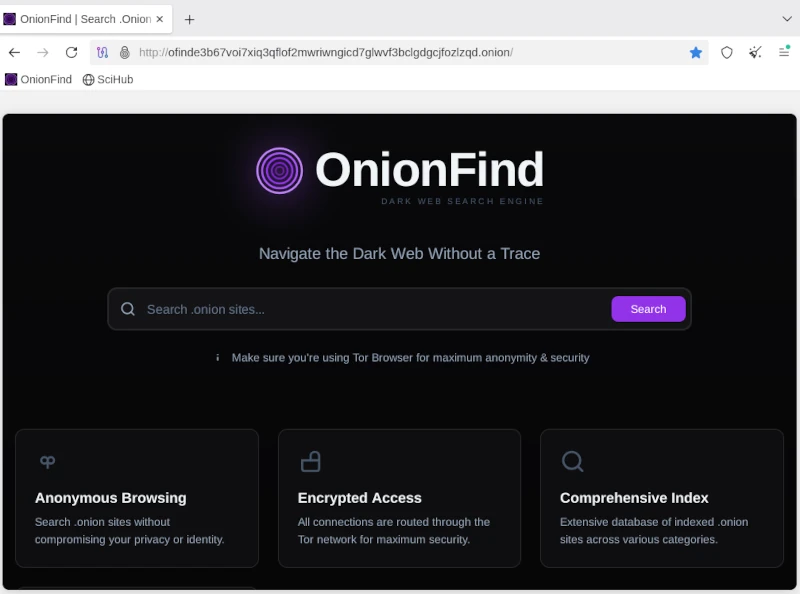
he first point in the “privacy” section is the internet browser. No matter which one you use and how much the different manufacturers emphasize privacy protection, the reality is like the fairy tale “The Emperor’s New Clothes”. Most users know the Tor / Onion network by name. Behind it is the Tor browser, which you can easily download from the Tor Project website [3]. After downloading and unzipping the directory, the Tor Browser can be opened using the start script on the console.

./Browser/start-tor-browser

Anyone using the Tor network can visit URLs ending in .onion. A large number of these sites are known as the so-called dark web and should be surfed with great caution. You can come across very disturbing and illegal content here, but you can also fall victim to phishing attacks and the like. Without going into too much detail about exactly how the Tor network works, you should be aware that you are not completely anonymous here either. Even if the big tech companies are largely ignored, authorities certainly have resources and options, especially when it comes to illegal actions. There are enough examples of this in the relevant press.
If you now think about how the Internet works in broad terms, you will find the next important point: proxy servers. Proxy servers are so-called representatives that, similar to the Tor network, do not send requests to the Internet directly to the homepage, but rather via a third-party server that forwards this request and then returns the answer. For example, if you access the Google website via a proxy, Google will only see the IP address of the proxy server. Even your own provider only sees that you have sent a request to a specific server. The provider does not see in its own log files that this server then makes a request to Google. Only the proxy server appears on both sides, at the provider and on the target website. As a rule, proxy server operators ensure that they do not store any logs with the original IP of their clients. Unfortunately, there is no guarantee for these statements. In order to further reduce the probability of being detected, you can connect several proxy connections in series. With the console program proxychain, this project can be easily implemented. ProxyChain is quickly installed on Debian distributions using the APT package manager.

sudo apt-get install proxychains4

Using it is just as easy. The behavior for proxychain is specified via the configuration file /etc/proxychain.conf. If you change the working mode from stricht_chain to random_chain, a different variation of each proxy server will be randomly assembled for each connection. At the end of the configuration file you can enter the individual proxy servers. Some examples are included in the file. To use proxychain, you simply call it via the console, followed by the application (the browser), which establishes the connection to the Internet via the proxies.

Proxychanin firefox
## RFC6890 Loopback address range
## if you enable this, you have to make sure remote_dns_subnet is not 127
## you'll need to enable it if you want to use an application that 
## connects to localhost.
# localnet 127.0.0.0/255.0.0.0
# localnet ::1/128

The real challenge is finding suitable proxy servers. To get started, you can find a large selection of free proxies worldwide at [4].

Using proxies alone for connections to the Internet only offers limited anonymity. In order for two computers to communicate, an IP address is required that can be linked via the Internet access provider to the correct geographical address where the computer is located. However, additional information is sent to the network via the network card. The so-called MAC address, with which you can directly identify a computer. Since you don’t have to install a new network card every time you restart your computer to get a different MAC address, you can use a small, simple tool called macchanger. Like proxychain, this can also be easily installed via APT. After installation you can set the autostart and you have to decide whether you want to always use the same MAC address or a randomly generated MAC address each time.

Of course, the measures presented so far are only of any use if the connection to the Internet is encrypted. This happens via the so-called Secure Socket Layer (SSL). If you do not connect to the Internet via a VPN and the websites you access only use http instead of https, you can use any packet sniffer (e.g. the Wireshark program) to record the communication and read the content of the communication in plain text. In this way, passwords or confidential messages are spied on on public networks (WiFi). We can safely assume that Internet providers run all of their customers’ communications through so-called packet filters in order to detect suspicious actions. With https connections, these filters cannot look into the packets.

Now you could come up with the idea of ​​illegally connecting to a foreign network using all the measures described so far. After all, no one knows that you are there and all activities on the Internet are assigned to the connection owner. For this reason, I would like to expressly point out that in pretty much all countries such actions are punishable by law and if you are caught doing so, you can quickly end up in prison. If you would like to find out more about the topic of WiFi security in order to protect your own network from illegal access, you will find a detailed workshop on Aircrack-ng in the members’ area (subscription).

The next item on the privacy list is email. For most people, running their own email server is simply not possible. The effort is enormous and not entirely cost-effective. That’s why offers from Google, Microsoft and Co. to provide an email service are gladly accepted. Anyone who does not use this service via a local client and does not cryptographically encrypt the emails sent can be sure that the email provider will scan and read the emails. Without exception! Since configuring a mail client with functioning encryption is more of a geek topic, just like running your own mail server, the options here are very limited. The only solution is the Swiss provider Proton [5], which also provides free email accounts. Proton promotes the protection of its customers’ privacy and implements this through strict encryption. Everyone has to decide for themselves whether they should still send confidential messages via email. Of course, this also applies to the available messengers, which are now used a lot for telephony.

Many people have googled themselves to find out what digital traces they have left behind on the Internet. Of course, this is only scratching the surface, as HR people at larger companies and corporations use more effective ways. Matego is a very professional tool, but there is also a powerful tool in the open source area that can reveal a lot of things. There is also a corresponding workshop for subscribers on this subject. Because if you find your traces, you can also start to cover them up.

As you can see, the topic of privacy and anonymity is very extensive and is only covered superficially in this short article. Nevertheless, the depth of information is sufficient to get a first impression of the matter. It’s not nearly enough to set up a system like Kali if you don’t know the basics to use the tools correctly. Because if you don’t put the different pieces of the puzzle together accurately, the hoped-for effect of providing more privacy on the Internet through anonymity will remain. This article also explains my personal point of view on a technical level as to why there is no such thing as secure, anonymous electronic communication. Anyone who wants to familiarize themselves with the topic will achieve success more quickly with a sensible strategy and their own system, which is gradually expanded, than with a ready-made all-round tool like Kali Linux.

Resources

Abonnement / Subscription

[English] This content is only available to subscribers.

[Deutsch] Diese Inhalte sind nur für Abonnenten verfügbar.

Age verification via systemd in Linux distributions

Since 2025, several countries have already introduced age verification for using social media and the internet in general. Australia and the United Kingdom are leading the way in this trend. Several US states have also followed suit. Age verification is slated to be rolled out across the EU by 2027. Italy and France have already passed corresponding laws. The new government that has been in power in Germany since the beginning of 2025 also favors this form of paternalism. This was demonstrated by a clause in the coalition agreement that stipulates the nationwide introduction of eID in Germany. In this article, I will outline the social and technical aspects that will inevitably affect us citizens.

Under the guise of protecting minors, children and young people under 16 are to be denied access to harmful content such as pornography. Social media platforms like Facebook, X, and others will also be affected by these measures. Already, various types of content on YouTube are only accessible to registered users.

If the well-being of children were truly the priority, the focus would be on fostering their development into stable and healthy personalities. This begins with balanced, healthy school meals, which should be available to every student at an affordable price. Teaching media literacy in schools would also be a step in the right direction. These are just a few examples demonstrating that the justification for introducing age verification is a smokescreen and that fundamentally different goals are being pursued.

It’s about paternalism and control over every single citizen. It’s a violation of the right to self-determination. Because one thing must be clear to everyone: to ensure that a person is indeed of legal age for accessing restricted content, everyone who wants to view it must provide proof of age. This proof will only be possible with an eID. Once a critical mass is reached using their eID, this will become the standard for payments and all sorts of other things. It sounds somewhat prophetic, especially if you’re familiar with the Book of Revelation in the New Testament.

The second beast caused everyone—great and small, rich and poor, master and slave—to receive a mark on their right hand or forehead. Without this mark, no one could buy or sell anything. Revelation 13:16

It is therefore foreseeable that an individual’s refusal to accept the eID will completely exclude them from the digital world. Simultaneously, opportunities that provide alternatives in real life, the so-called analog realm, will disappear. However, I don’t want to be too prophetic here. Everyone can imagine for themselves what consequences the introduction of the digital ID will have on their own lives. I will now delve into some technical details and offer some food for thought regarding civic self-defense. Because I am quite certain that there is broad acceptance of the eID. Even if the specific reasons vary, they can be reduced to personal comfort and convenience. Anyone who continues reading from here on is fully responsible for implementing things independently and acquiring the necessary knowledge. There will be no quick, easy, off-the-shelf solution. But you don’t have to be a techie either. The willingness to think independently is perfectly sufficient to quickly understand the technical connections. It’s not rocket science, as they say.

Because I am quite certain that there is widespread acceptance of the eID. Even if the specific reasons vary, they can be reduced to personal comfort and convenience. People who rely on Apple or Microsoft products have no choice but to switch to open-source operating systems. Smartphones simply don’t offer a practical alternative to banking apps and messaging services. There’s a reason why you need a working phone number to register for Telegram and Signal Messenger: chats are synchronized from the phone to the desktop application. So, you’re left with your computer, which ideally shouldn’t be newer than 2020. I’ve already published an article on this topic.

All Linux distributions run smoothly on older and even low-performance hardware. Switching to Linux is now easy, and you’ll be used to the new system in just a few weeks. So far, so good.

However, since calendar week 13 of 2026, the Linux community has been up in arms across all social media. The program systemd made a commit to the public source code repository adding a birthday field for age verification. Anyone thinking, “Oh well, just one program, I’ll ignore it,” should know that systemd stands for System Daemon. Besides the kernel, it’s one of the most important programs in a Linux distribution. Among other things, it’s responsible for starting necessary services and programs when the computer is turned on.

This is the same record that already holds basic user metadata like realNameemailAddress, and location. The field stores a full date in YYYY-MM-DD format and can only be set by administrators, not by users themselves.

Lennart Poettering, the creator of systemd, has clarified that this change is:

An optional field in the userdb JSON object. It’s not a policy engine, not an API for apps. We just define the field, so that it’s standardized iff people want to store the date there, but it’s entirely optional.

Source: It’s FOSS

All these events also shed new light on the meeting between Linus Torvalds and Bill Gates on June 22, 2025, their first personal encounter in 30 years. It’s absolutely unacceptable in the Linux community to patronize computer users and infringe on their privacy. And there are strong voices opposing the systemd project. However, it’s impossible to predict how strong this resistance will remain if government pressure is exerted on these staunch dissenters.

The first approach to solving this problem is to use a Linux distribution that doesn’t use systemd. Well-known distributions that manage without systemd include Gentoo, Slackware, and Alpine Linux. Those who, like myself and many others, use a pure Debian system might want to take a look at Devuan (version 6.1 Excalibur for March 2026), which is a fork of current Debian versions that doesn’t use systemd.

It’s also worth mentioning that systemd has always been viewed critically by hardcore Linux users. It’s simply considered too bloated. Those who have been running their distribution for a while often hesitate to switch. Linux is like a fine wine. It matures with time, and fresh installations are considered unnecessary by power users, as everything can easily be repaired. Migrations to newer major versions are also generally trouble-free. Therefore, replacing systemd with the more lightweight SysVinit is no problem. The only requirement is that you’re not afraid of the Linux Bash shell. However, there are limits here as well. Those using the GNOME 3 desktop should first switch to a desktop environment that isn’t based on systemd. Devuan Linux shows us the alternatives: KDE Plasma, MATE (a GNOME 2 fork), Cinnamon (for Windows switchers), or the rudimentary Xfce. Before starting, you should at least back up your data for security reasons and, if possible, clone your hard drive to restore the original state in case of problems.

Since I haven’t yet found the time to try out the tutorial myself due to the topic’s current relevance, I refer you to the English-language website linuxconfig.org, which provides instructions on replacing systemd with sysVinit in Debian.

It’s probably like so many things: things are never as bad as they seem. I don’t think the mandatory digital ID will arrive overnight. It will likely be a gradual process that makes life difficult for those who resist total control by authoritarian authorities. There will always be a way for determined individuals to find a solution. But to do so, one must take action and not passively wait for the great savior. He was here before, a very long time ago.

High-performance hardware under Linux for local AI applications

Anyone wanting to experiment a bit with local LLM will quickly discover its limitations. Not everyone has a massively upgraded desktop PC with 2 TB of RAM and a CPU that could fry an egg under full load. A laptop with 32 GB of RAM, or in my case, a Lenovo P14s with 64 GB of RAM, is more typical. Despite this generous configuration, it often fails to load a more demanding AI model, as 128 GB of RAM is fairly standard for many of these models. And you can’t upgrade the RAM in current laptops because the chips are soldered directly onto the motherboard. We have the same problem with the graphics card, of course. That’s why I’ve made it a habit when buying a laptop to configure it with almost all the available options, hoping to be set for 5-8 years. The quality of the Lenovo ThinkPad series, in particular, hasn’t disappointed me in this regard. My current system is about two years old and is still running reliably.

I’ve been using Linux as my operating system for years, and I’m currently running Debian 13. Compared to Windows, Linux and Unix distributions are significantly more resource-efficient and don’t use their resources for graphical animations and complex gradients, but rather provide a powerful environment for the applications they’re used in. Therefore, my urgent advice to anyone wanting to try local LLMs is to get a powerful computer and run Linux on it. But let’s take it one step at a time. First, let’s look at the individual hardware components in more detail.

Let’s start with the CPU. LLMs, CAD applications, and even computer games all perform calculations that can be processed very effectively in parallel. For parallel calculations, the number of available CPU cores is a crucial factor. The more cores, the more parallel calculations can be performed.

Of course, the processors need to be able to quickly request the data for the calculations. This is where RAM comes into play. The more RAM is available, the more efficiently the data can be provided for the calculations. Affordable laptops with 32 GB of RAM are already available. Of course, the purchase price increases exponentially with more RAM. While there are certainly some high-end gaming devices in the consumer market, I wouldn’t recommend them due to their typically short lifespan and comparatively high price.

The next logical step in the hardware chain is the hard drive. Simple SSDs significantly accelerate data transfer to RAM, but there are still improvements. NVMe cards with 2 GB of storage capacity or more can reach speeds of up to 7000 MB/s in the 4th generation.

We have some issues with graphics cards in laptops. Due to their size and the required performance, the graphics cards built into laptops are more of a compromise than a true highlight. A good graphics card would be ideal for parallel calculations, such as those performed in LLMs (Large Linear Machines). As a solution, we can connect the laptop to an external graphics card. Thanks to Bitcoin miners in the crypto community, considerable experience has already been gained in this area. However, to connect an external graphics card to the laptop, you need a port that can handle that amount of data. USB 3 is far too slow for our purposes and would severely limit the advantages of the external graphics card due to its low data rate.

The solution to our problem is Thunderbolt. Thunderbolt ports look like USB-C, but are significantly faster. You can identify Thunderbolt by the small lightning bolt symbol (see Figure 1) on the cables or connectors. These are not the power supply connections. To check if your computer has Thunderbolt, you can use a simple Linux shell command.

ed@local: $ lspci | grep -i thunderbolt
00:07.0 PCI bridge: Intel Corporation Raptor Lake-P Thunderbolt 4 PCI Express Root Port #0
00:07.2 PCI bridge: Intel Corporation Raptor Lake-P Thunderbolt 4 PCI Express Root Port #2
00:0d.0 USB controller: Intel Corporation Raptor Lake-P Thunderbolt 4 USB Controller
00:0d.2 USB controller: Intel Corporation Raptor Lake-P Thunderbolt 4 NHI #0
00:0d.3 USB controller: Intel Corporation Raptor Lake-P Thunderbolt 4 NHI #1

In my case, my computer’s output shows that two Thunderbolt 4 ports are available.

To connect an external graphics card, we need a mounting system onto which a PCI card can be inserted. ANQUORA offers a good solution here with the ANQ-L33 eGPU Enclosure. The board can accommodate a graphics card with up to three slots. It costs between €130 and €200. A standard ATX power supply is also required. The required power supply wattage depends on the graphics card’s power consumption. It’s advisable not to buy the cheapest power supply, as the noise level might bother some users. The open design of the board provides ample flexibility in choosing a graphics card.

Selecting a graphics card is a whole other topic. Since I use Linux as my operating system, I need a graphics card that is supported by Linux. For accelerating LLMs, a graphics card with as many GPU cores as possible and a correspondingly large amount of internal memory is necessary. To make the purchase worthwhile and actually notice a performance boost, the card should be equipped with at least 8 GB of RAM. More is always better, of course, but the price of the card will then increase exorbitantly. It’s definitely worth checking the used market.

If you add up all the costs, the investment for an external GPU amounts to at least 500 euros. Naturally, this only includes an inexpensive graphics card. High-end graphics cards can easily exceed the 500-euro price point on their own. Anyone who would like to contribute their expertise in the field of graphics cards is welcome to contribute an article.

To avoid starting your shopping spree blindly and then being disappointed with the result, it’s highly advisable to consider beforehand what you want to do with the local LLM. Supporting programming requires less processing power than generating graphics and audio. Those who use LLMs professionally can save considerably by purchasing a high-end graphics card with self-hosted models compared to the costs of, for example, cloud code. The specification of LLMs depends on the available parameters. The more parameters, the more accurate the response and the more computing power is required. Accuracy is further differentiated by:

  • FP32 (Single-Precision Floating Point): Standard precision, requires the most memory. (e.g., 32 bits per parameter)
  • FP16 (Half-Precision Floating Point): Half the precision, halves the memory requirement compared to FP32, but can slightly reduce precision. (e.g., 16 bits per parameter / 4 bytes)
  • BF16 (Brain Floating Point): Another option for half-precision calculations, often preferred in deep learning due to its better performance in certain operations. (e.g., 16 bits per parameter / 2 bytes)
  • INT8/INT4 (Integer Quantization): Even lower precision, drastically reduces memory requirements and speeds up inference, but can lead to a greater loss of precision. (e.g., 8 bits per parameter / 1 byte)

Other factors influencing the hardware requirements for LLM include:

  • Batch Size: The number of input requests processed simultaneously.
  • Context Length: The maximum length of text that the model can consider in a query. Longer context lengths require more memory because the entire context must be held in memory.
  • Model Architecture: Different architectures have different memory requirements.

To estimate the memory consumption of a model, you can use the following calculation: Parameters * Accuracy = Memory consumption for the model.

7,000,000,000 parameters * 2 bytes/parameter (BF16) = 14,000,000,000 bytes = 14 GB

When considering hardware recommendations, you should refer to the model’s documentation. This usually only specifies the minimum or average requirements. However, there are general guidelines you can use.

  • Small models (up to 7 billion parameters): A GPU with at least 8 GB of VRAM should be sufficient, especially if you are using quantization.
  • Medium-sized models (7-30 billion parameters): A GPU with 16 GB to 24 GB of VRAM is recommended.
  • Large models (over 30 billion parameters): Multiple GPUs, each with at least 24 GB of VRAM, or a single GPU with a very large amount of VRAM (e.g., 48 GB, 80 GB) are required.
  • CPU-only: For small models and simple experiments, the CPU may suffice, but inference will be significantly slower than on a GPU. Here, a large amount of RAM is crucial (several GB / 32+).

We can see that using locally running LLMs can be quite realistic if you have the necessary hardware available. It doesn’t always have to be a supercomputer; however, most solutions from typical electronics retailers are off-the-shelf and not really suitable. Therefore, with this article, I have laid the groundwork for your own experiments.


Risk Cloud & Serverless

The cloud is one of the most innovative developments since the turn of the millennium and enables us to make widespread use of neural networks, which we popularly refer to as Large Language Models (LLM). This technological leap can only be surpassed by quantum computing. But enough of the buzzwords for SEO optimization, instead let’s take a look behind the scenes. Let’s start with what the cloud actually is and put all the marketing terms aside.

The best way to imagine the cloud is as a gigantic supercomputer made up of many small computers like building blocks. This theoretically allows you to combine any amount of CPU power, RAM and hard drive space. On this supercomputer, which runs in a data center, virtual machines can now be provided that simulate a real computer with freely definable hardware. In this way, the physical hardware resources can be optimally distributed among the provided virtual machines.

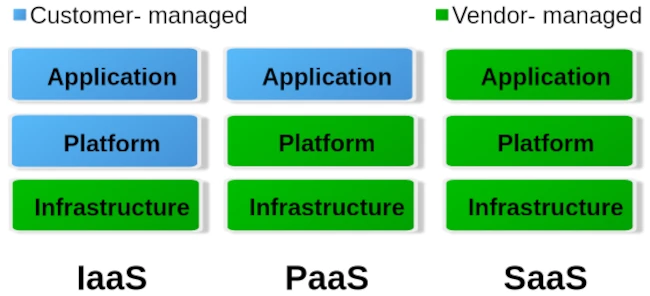
When it comes to cloud, we roughly distinguish between three different operating levels: Infrastructure as a Service (IaaS), Platform as a Service (PaaS) and Software as a Service. The image below gives an idea of ​​how these levels are divided.

To put it simply, you can say that with IaaS the provider only provides the hardware specification. So CPU, RAM, hard drive and internet connection. Via the administration software e.g. B. Kubernetes, you can now create your own virtual machines/containers and install the corresponding operating systems and services yourself. The entire responsibility for security and network routing lies with the customer. PaaS, on the other hand, already provides a rudimentary virtual machine including the selected operating system. What you ultimately install on this system above the operating system level is up to you. But here too, the issue of security is largely in the hands of the customer. For most hosting providers, typical PaaS products are so-called virtual servers. Users have the least freedom with SaaS. Here you usually only have permission to use software through a user account. Very typical SaaS products are email accounts, but also so-called managed servers. Managed servers are mostly used to provide your own websites. Here the version of the programming language and the database is specified by the server operator.

Managed servers in particular have a long tradition. They emerged at the turn of the millennium to provide an immediately usable environment for dynamic PHP websites with a MySQL database connection. The situation is similar with the serverless products that have recently become fashionable. Depending on your level of experience, you can now buy corresponding products from the major providers AWS, Google and Microsoft Azure.

The idea is to no longer operate your own servers for the services and thus outsource the entire hardware, operation and security effort to the cloud operators. In principle, this isn’t a bad idea, especially when it comes to small companies or startups that don’t have a lot of financial resources at their disposal or simply lack the administrative know-how for networks, Linux and server security.

Of course, serverless offerings that are completely managed externally quickly reach their limits. Especially if you want to provide your own developed individual serverless software in the cloud with as little effort as possible, you will come across many a stumbling block. A problem is often the flexible expandability when requirements change. You can certainly buy products from the various providers’ portfolios and combine them as you like like a building block set, but the costs incurred can quickly add up.

Basically, there is nothing wrong with a pay per use model (i.e. pay for what you use). At first glance, this is not a bad solution for people and organizations with small budgets. But here too, it’s the little details that can quickly grow into serious problems.

If you choose any cloud provider, you are well advised to avoid its proprietary management and automation products and instead use established general products if possible. If you commit yourself to one provider with all the consequences, it will only be possible to switch to another provider with great effort. Changes to the terms and conditions or continuously increasing costs are possible reasons for a forced change. Therefore, test whoever binds himself forever.

But also careless use of resources in cloud systems, e.g. B. due to incorrect configurations or unfavorable deployment strategies, can lead to an explosion in costs. Here you are well advised if there is the option to set limits and activate them. So that once you reach a certain amount, you will be informed that only a ‘certain’ quota is available. Especially with highly available services that suddenly receive an enormous number of new users, such limits can quickly lead to them being disconnected from the network. It is therefore always a good idea to use two cloud solutions, one for development and a separate one for the productive system, in order to minimize the offline risk.

Similar to stock market trading, you can also define limits for cloud services like AWS. Stop-loss orders on the stock market prevent you from selling a stock too cheaply or buying it too expensively. With the pay-per-use model, it’s not much different in the cloud. Here, you need to set appropriate limits with your provider to prevent bills from exceeding your available budget. These limits are also dynamic in the cloud. This means that the framework conditions are constantly changing, requiring the necessary limits to be regularly adjusted to meet current needs. To identify bottlenecks early, a robust monitoring system should be in place. The minimum requirement for an AWS node is determined by its requests. The upper limit of available resources is defined by the limit. Tools like IBM’s Kubecost can largely automate cost monitoring in Kubernetes clusters.

For cloud development environments, you should also keep a close eye on your own development and DevOps team. If an NPM Docker container of over 2 GB is created on the fly every time for a simple JavaScript Angular app, this strategy should definitely be questioned. Even if the cloud can allocate seemingly infinite resources dynamically, that doesn’t mean that this happens for free.

Of course, the issue of security is also an important factor. Of course, you can trust the cloud operator when he says that everything is encrypted and access to customer data and business secrets is not possible. One can certainly assume that the information that is to be accessed in most ventures rarely has any exciting or even exciting content that could be of interest to large cloud operators. If you still want to be on the safe side, you should write off the idea of ​​serverless completely and consider running your own cloud. Thanks to modern and free software, this is now easier than expected.

I have learned from personal experience that, given the complexity of modern web applications, efficient monitoring with Grafana and Prometheus or other solutions such as the ELK Stack or Slunk is essential. But some DevOps teams have difficulties with data collection and proper evaluation. IT decision-makers in particular are asked to get a technical overview so as not to fall for the well-sounding marketing traps of cloud and serverless.


Clean Desk – More Than Just Security

As a child, I liked to reply to my mother that only a genius could master chaos when she told me to tidy my room. A very welcome excuse to shirk my responsibilities. When I started an apprenticeship in a trade after finishing school, the first thing my master craftsman emphasized was: keeping things tidy. Tools had to be put back in their bags after use, opened boxes of the same materials had to be refilled, and of course, there was also the need to sweep up several times a day. I can say right away that I never perceived these things as harassment, even if they seemed annoying at first. Because we quickly learned the benefits of the motto “keep things clean.”

Tools that are always put back in their place give us a quick overview of whether anything is missing. So we can then go looking for it, and the likelihood of things being stolen is drastically reduced. With work materials, too, you maintain a good overview of what’s been used up and what needs to be replaced. Five empty boxes containing only one or two items not only take up space but also lead to miscalculations of available resources. Finally, it’s also true that one feels less comfortable in a dirty environment, and cleanliness demonstrates to the client that one works in a focused and planned manner.

Due to this early experience, when the concept of Clean Desk was introduced as a security measure in companies a few years ago, I didn’t immediately understand what was expected of me. After all, the Clean Desk principle had been second nature to me long before I completed my computer science degree. But let’s start at the beginning. First, let’s look at what Clean Desk actually is and how to implement it.

Anyone who delves deeply into the topic of security learns one of the first things they learn: most successful attacks aren’t carried out using complicated technical maneuvers. They’re much more mundane and usually originate from within, not from the outside. True to the adage, opportunity makes the thief. When you combine this fact with the insights of social engineering, a field primarily shaped by the hacker Kevin Mitnick, a new picture emerges. It’s not always necessary to immediately place your own employees under suspicion. In a building, there are external cleaning staff, security personnel, or tradespeople who usually have easy access to sensitive areas. Therefore, the motto should always be: trust is good, but control is better, which is why a Clean Desk Policy is implemented.

The first rule is: anyone leaving their workstation for an extended period must switch off their devices. This applies especially at the end of the workday. Otherwise, at least the desktop should be locked. The concept behind this is quite simple: Security vulnerabilities cannot be exploited from switched-off devices to hack into the company network from the outside. Furthermore, it reduces power consumption and prevents fires caused by short circuits. To prevent the devices from being physically stolen, they are secured to the desk with special locks. I’ve personally experienced devices being stolen during lunch breaks.

Since I myself have stayed in hotels a lot, my computer’s hard drive is encrypted as a matter of course. This also applies to all external storage devices such as USB sticks or external SSDs. If the device is stolen, at least no one can access the data stored on it.

It goes without saying that secure encryption is only possible with a strong password. Many companies have specific rules that employee passwords must meet. It’s also common practice to assign a new password every 30 to 90 days, and this new password must be different from the last three used.

It’s often pointed out that passwords shouldn’t be written on a sticky note stuck to the monitor. I’ve never personally experienced this. It’s much more typical for passwords to be written under the keyboard or mousepad.

Another aspect to consider is notes left on desks, wall calendars, and whiteboards. Even seemingly insignificant information can be quite valuable. Since it’s rather difficult to decide what truly needs protecting and what doesn’t, the general rule is: all notes should be stored securely at the end of the workday, inaccessible to outsiders. Of course, this only works if lockable storage space is available. In sensitive sectors like banking and insurance, the policy even goes so far as to prohibit colleagues from entering their vacation dates on wall calendars.

Of course, these considerations also include your own wastebasket. It’s essential to ensure that confidential documents are disposed of in specially secured containers. Otherwise, the entire effort to maintain confidentiality becomes pointless if you can simply pull them out of the trash after work.

But the virtual desktop is also part of the Clean Desk Policy. Especially in times of virtual video conferences and remote work, strangers can easily catch a glimpse of your workspace. This reminds me of my lecture days when a professor had several shortcuts to the trash on his desktop. We always joked that he was recycling. Separate trash folders for Word, Excel, etc. files.

The Clean Desk Policy has other effects as well. It’s much more than just a security concept. Employees who consistently implement this policy also bring more order to their thoughts and can thus work through tasks one by one with greater focus, leading to improved performance. Personal daily planning is usually structured so that all started tasks can be completed by the end of the workday. This is similar to the trades. Tradespeople also try to complete their jobs by the end of the workday to avoid having to return for a short time the next day. A considerable amount of time is spent on preparation.

Implementing a Clean Desk Policy follows the three Ps (Plan, Protect & Pick). At the beginning of the day, employees decide which tasks need to be completed (Plan), and select the corresponding documents and necessary materials for easy access. At the end of the day, everything is securely stored. During working hours, it must also be ensured that no unauthorized persons have access to information, for example, during breaks. This daily, easy-to-implement routine of preparation and follow-up quickly becomes a habit, and the time required can be reduced to just a few minutes, so that hardly any work time is wasted.

With a Clean Desk Policy, the overwhelming piles of paper disappear from your desk, and by considering which tasks need to be completed each day, you can focus better on them, which significantly improves productivity. At the end of the day, you can also mentally cross some items off your to-do list, leading to greater satisfaction.


Vibe coding – a new plague of the internet?

When I first read the term vibe coding, I first thought of headphones, chill music and transitioning into flow. The absolute state of creativity that programmers chase. A rush of productivity. But no, it became clear to me quite quickly that it was about something else.
Vibe coding is the name given to what you enter into an AI via the prompt in order to get a usable program. The output of the Large Language Model (LLM) is not yet the executable program, but rather just the corresponding source text in the programming language that the Vibe Coder specifies. Therefore, depending on which platform it is on, the Vibe Coder still needs the ability to make the whole thing work.

Since I’ve been active in IT, the salespeople’s dream has been there: You no longer need programmers to develop applications for customers. So far, all approaches of this kind have been less than successful, because no matter what you did, there was no solution that worked completely without programmers. A lot has changed since the general availability of AI systems and it is only a matter of time before LLM systems such as Copilot etc. also deliver executable applications.

The possibilities that Vibe Coding opens up are quite remarkable if you know what you are doing. Straight from Goethe’s sorcerer’s apprentice, who was no longer able to master the spirits he summoned. Are programmers now becoming obsolete? In the foreseeable future, I don’t think the programming profession will die out. But a lot will change and the requirements will be very high.

I can definitely say that I am open to AI assistance in programming. However, my experiences so far have taught me to be very careful about what the LLMs suggest as a solution. Maybe it’s because my questions were very specific and for specific cases. The answers were occasionally a pointer in a possible direction that turned out to be successful. But without your own specialist knowledge and experience, all of the AI’s answers would not have been usable. Justifications or explanations should also be treated with caution in this context.

There are now various offers that want to teach people how to use artificial intelligence. So in plain language, how to formulate a functioning prompt. I think such offers are dubious, because the LLMs were developed to understand natural (human) language. So what should you learn to formulate complete and understandable sentences?

Anyone who creates an entire application using Vibe Coding must test it extensively. So click through the functions and see if everything works as it should. This can turn into a very annoying activity that becomes more annoying with each run.

The use of programs created by Vibe Coding is also unproblematic as long as they run locally on your own computer and are not freely accessible as a commercial Internet service. Because this is exactly where the danger lurks. The programs created by Vibe Coding are not sufficiently protected against hacker attacks, which is why they should only be operated in closed environments. I can also well imagine that in the future the use of programs that are Vibe Coded will be prohibited in security-critical environments such as authorities or banks. As soon as the first cyber attacks on company networks through Vibe coding programs become known, the bans are in place.

Besides the question of security for Vibe Coding applications, modifications and extensions will be extremely difficult to implement. This phenomenon is well-known in software development and occurs regularly with so-called legacy applications. As soon as you hear that something has grown organically over time, you’re already in the thick of it. A lack of structure and so-called technical debt cause a project to erode over time to such an extent that the impact of changes on the remaining functionality becomes very difficult to assess. It is therefore likely that there will be many migration projects in the future to convert AI-generated codebases back into clean structures. For this reason, Vibe Coding is particularly suitable for creating prototypes to test concepts.

There are now also complaints in open source projects that every now and then there are contributions that convert almost half of the code base and add faulty functions. Of course, common sense and the many standards established in software development help here. It’s not like we haven’t had experience with bad code commits in open source before. This gave rise to the dictatorship workflow for tools like Git, which was renamed Pull Request by the code hosting platform GitHub.

So how can you quickly identify bad code? My current prescription is to check test coverage for added code. No testing, no code merge. Of course, test cases can also be Vibe Coded or lack necessary assertions, which can now also be easily recognized automatically. In my many years in software development projects, I’ve experienced enough that no Vibe Coder can even come close to bringing beads of sweat to my forehead.

My conclusion on the subject of Vibe Coding is: In the future, there will be a shortage of capable programmers who will be able to fix tons of bad production code. So it’s not a dying profession in the foreseeable future. On the other hand, a few clever people will definitely script together a few powerful isolated solutions for their own business with simple IT knowledge that will lead to competitive advantages. As we experience this transformation, the Internet will continue to become cluttered and the gems Weizenbaum once spoke of will become harder to find.


Featureitis

You don’t have to be a software developer to recognize a good application. But from my own experience, I’ve often seen programs that were promising and innovative at the start mutate into unwieldy behemoths once they reach a certain number of users. Since I’ve been making this observation regularly for several decades now, I’ve wondered what the reasons for this might be.

The phenomenon of software programs, or solutions in general, becoming overloaded with details was termed “featuritis” by Brooks in his classic book, “The Mythical Man-Month.” Considering that the first edition of the book was published in 1975, it’s fair to say that this is a long-standing problem. Perhaps the most famous example of featureitis is Microsoft’s Windows operating system. Of course, there are countless other examples of improvements that make things worse.

The phenomenon of software programs, or solutions in general, becoming overloaded with details is what Brooks called “featuritis.” Windows users who were already familiar with Windows XP and then confronted with its wonderful successor Vista, only to be appeased again by Windows 7, and then nearly had a heart attack with Windows 8 and 8.1, were calmed down again at the beginning of Windows 10. At least for a short time, until the forced updates quickly brought them back down to earth. And don’t even get me started on Windows 11. The old saying about Windows was that every other version is junk and should be skipped. Well, that hasn’t been true since Windows 7. For me, Windows 10 was the deciding factor in completely abandoning Microsoft, and like many others, I bought a new operating system. Some switched to Apple, and those who couldn’t afford or didn’t want the expensive hardware, like me, opted for a Linux system. This shows how a lack of insight can quickly lead to the loss of significant market share. Since Microsoft isn’t drawing any conclusions from these developments, this fact seems to be of little concern to the company. For other companies, such events can quickly push them to the brink of collapse, and beyond.

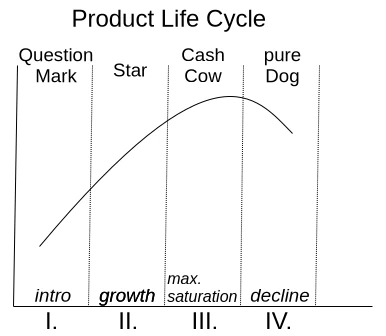
One motivation for adding more and more features to an existing application is the so-called product life cycle, which is represented by the BCG matrix in Figure 1.

With a product’s launch, it’s not yet certain whether it will be accepted by the market. If users embrace it, it quickly rises to stardom and reaches its maximum market position as a cash cow. Once market saturation is reached, it degrades to a slow seller. So far, so good. Unfortunately, the prevailing management view is that if no growth is generated compared to the previous quarter, market saturation has already been reached. This leads to the nonsensical assumption that users must be forced to accept an updated version of the product every year. Of course, the only way to motivate a purchase is to print a bulging list of new features on the packaging.

Since well-designed features can’t simply be churned out on an assembly line, a redesign of the graphical user interface is thrown in as a free bonus every time. Ultimately, this gives the impression of having something completely new, as it requires a period of adjustment to discover the new placement of familiar functions. It’s not as if the redesign actually streamlines the user experience or increases productivity. The arrangement of input fields and buttons always seems haphazardly thrown together.

But don’t worry, I’m not calling for an update boycott; I just want to talk about how things can be improved. Because one thing is certain: thanks to artificial intelligence, the market for software products will change dramatically in just a few years. I don’t expect complex and specialized applications to be produced by AI algorithms anytime soon. However, I do expect that these applications will have enough poorly generated AI-generated code sequences, which the developer doesn’t understand, injected into their codebases, leading to unstable applications. This is why I’m rethinking clean, handcrafted, efficient, and reliable software, because I’m sure there will always be a market for it.

I simply don’t want an internet browser that has mutated into a communication hub, offering chat, email, cryptocurrency payments, and who knows what else, in addition to simply displaying web pages. I want my browser to start quickly when I click something, then respond quickly and display website content correctly and promptly. If I ever want to do something else with my browser, it would be nice if I could actively enable this through a plugin.

Now, regarding the problem just described, the argument is often made that the many features are intended to reach a broad user base. Especially if an application has all possible options enabled from the start, it quickly engages inexperienced users who don’t have to first figure out how the program actually works. I can certainly understand this reasoning. It’s perfectly fine for a manufacturer to focus exclusively on inexperienced users. However, there is a middle ground that considers all user groups equally. This solution isn’t new and is very well-known: the so-called product lines.

In the past, manufacturers always defined target groups such as private individuals, businesses, and experts. These user groups were then often assigned product names like Home, Enterprise, and Ultimate. This led to everyone wanting the Ultimate version. This phenomenon is called Fear Of Missing Out (FOMO). Therefore, the names of the product groups and their assigned features are psychologically poorly chosen. So, how can this be done better?

An expert focuses their work on specific core functions that allow them to complete tasks quickly and without distractions. For me, this implies product lines like Essentials, Pure, or Core.

If the product is then intended for use by multiple people within the company, it often requires additional features such as external user management like LDAP or IAM. This specialized product line is associated with terms like Enterprise, Company, Business, and so on.

The cluttered end result, actually intended for NOOPS, has all sorts of things already activated during installation. If people don’t care about the application’s startup and response time, then go for it. Go all out. Throw in everything you can! Here, names like Ultimate, Full, and Maximized Extended are suitable for labeling the product line. The only important thing is that professionals recognize this as the cluttered version.

Those who cleverly manage these product lines and provide as many functions as possible via so-called modules, which can be installed later, enable high flexibility even in expert mode, where users might appreciate the occasional additional feature.

If you install tracking on the module system beforehand to determine how professional users upgrade their version, you’ll already have a good idea of ​​what could be added to the new version of Essentials. However, you shouldn’t rely solely on downloads as the decision criterion for this tracking. I often try things out myself and delete extensions faster than the installation process took if I think they’re useless.

I’d like to give a small example from the DevOps field to illustrate the problem I just described. There’s the well-known GitLab, which was originally a pure code repository hosting project. The name still reflects this today. An application that requires 8 GB of RAM on a server in its basic installation just to make a Git repository accessible to other developers is unusable for me, because this software has become a jack-of-all-trades over time. Slow, inflexible, and cluttered with all sorts of unnecessary features that are better implemented using specialized solutions.

In contrast to GitLab, there’s another, less well-known solution called SCM-Manager, which focuses exclusively on managing code repositories. I personally use and recommend SCM-Manager because its basic installation is extremely compact. Despite this, it offers a vast array of features that can be added via plugins.

I tend to be suspicious of solutions that claim to be an all-in-one solution. To me, that’s always the same: trying to do everything and nothing. There’s no such thing as a jack-of-all-trades, or as we say in Austria, a miracle worker!

When selecting programs for my workflow, I focus solely on their core functionality. Are the basic features promised by the marketing truly present and as intuitive as possible? Is there comprehensive documentation that goes beyond a simple “Hello World”? Does the developer focus on continuously optimizing core functions and consider new, innovative concepts? These are the questions that matter to me.

Especially in commercial environments, programs are often used that don’t deliver on their marketing promises. Instead of choosing what’s actually needed to complete tasks, companies opt for applications whose descriptions are crammed with buzzwords. That’s why I believe that companies that refocus on their core competencies and use highly specialized applications for them will be the winners of tomorrow.


Mismanagement and Alpha Geeks

When I recently picked up Camille Fournier’s book “The Manager’s Path,” I was immediately reminded of Tom DeMarco. He wrote the classic “Peopleware” and, in the early 2000s, published “Adrenaline Junkies and Form Junkies.” It’s a list of stereotypes you might encounter in software projects, with advice on how to deal with them. After several decades in the business, I can confirm every single word from my own experience. And it’s still relevant today, because people are the ones who make projects, and we all have our quirks.

For projects to be successful, it’s not just technical challenges that need to be overcome. Interpersonal relationships also play a crucial role. One important factor in this context, which often receives little attention, is project management. There are shelves full of excellent literature on how to become a good manager. The problem, unfortunately, is that few who hold this position actually fulfill it, and even fewer are interested in developing their skills further. The result of poor management is worn-down and stressed teams, extreme pressure in daily operations, and often also delayed delivery dates. It’s no wonder, then, that this impacts product quality.

One of the first sayings I learned in my professional life was: “Anyone who thinks a project manager actually manages projects also thinks a butterfly folds lemons.” So it seems to be a very old piece of wisdom. But what is the real problem with poor management? Anyone who has to fill a managerial position has a duty to thoroughly examine the candidate’s skills and suitability. It’s easy to be impressed by empty phrases and a list of big names in the industry on a CV, without questioning actual performance. In my experience, I’ve primarily encountered project managers who often lacked the necessary technical expertise to make important decisions. It wasn’t uncommon for managers in IT projects to dismiss me with the words, “I’m not a technician, sort this out amongst yourselves.” This is obviously disastrous when the person who’s supposed to make the decisions can’t make them because they lack the necessary knowledge. An IT project manager doesn’t need to know which algorithm will terminate the project faster. Evaluations can be used to inform decisions. However, a basic understanding of programming is essential. Anyone who doesn’t know what an API is and why version compatibility prevents modules that will later be combined into a software product from working together has no right to act as a decision-maker. A fundamental understanding of software development processes and the programming paradigms used is also indispensable for project managers who don’t work directly with the code.

I therefore advocate for vetting not only the developers you hire for their skills, but also the managers who are to be brought into a company. For me, external project management is an absolute no-go when selecting my projects. This almost always leads to chaos and frustration for everyone involved, which is why I reject such projects. Managers who are not integrated into the company and whose performance is evaluated based on project success, in my experience, do not deliver high-quality work. Furthermore, internal managers, just like developers, can develop and expand their skills through mentoring, training, and workshops. The result is a healthy, relaxed working environment and successful projects.

The title of this article points to toxic stereotypes in the project business. I’m sure everyone has encountered one or more of these stereotypes in their professional environment. There’s a lot of discussion about how to deal with these individuals. However, I would like to point out that hardly anyone is born a “monster.” People are the way they are, a result of their experiences. If a colleague learns that looking stressed and constantly rushed makes them appear more productive, they will perfect this behavior over time.

Camille Fournier aptly described this with the term “The Alpha Geek.” Someone who has made their role in the project indispensable and has an answer for everything. They usually look down on their colleagues with disdain, but can never truly complete a task without others having to redo it. Unrealistic estimates for extensive tasks are just as typical as downplaying complex issues. Naturally, this is the darling of all project managers who wish their entire team consisted of these “Alpha Geeks.” I’m quite certain that if this dream could come true, it would be the ultimate punishment for the project managers who create such individuals in the first place.

To avoid cultivating “alpha geeks” within your company, it’s essential to prevent personality cults and avoid elevating personal favorites above the rest of the team. Naturally, it’s also crucial to constantly review work results. Anyone who marks a task as completed but requires rework should be reassigned until the result is satisfactory.

Personally, I share Tom DeMarco’s view on the dynamics of a project. While productivity can certainly be measured by the number of tasks completed, other factors also play a crucial role. My experience has taught me that, as mentioned earlier, it’s essential to ensure employees complete all tasks thoroughly and thoroughly before taking on new ones. Colleagues who downplay a task or offer unrealistic, low-level assessments should be assigned that very task. Furthermore, there are colleagues who, while having relatively low output, contribute significantly to team harmony.

When I talk about people who build a healthy team, I don’t mean those who simply hand out sweets every day. I’m referring to those who possess valuable skills and mentor their colleagues. These individuals typically enjoy a high level of trust within the team, which is why they often achieve excellent results as mediators in conflicts. It’s not the people who try to be everyone’s darling with false promises, but rather those who listen and take the time to find a solution. They are often the go-to people for everything and frequently have a quiet, unassuming demeanor. Because they have solutions and often lend a helping hand, they themselves receive only average performance ratings in typical process metrics. A good manager quickly recognizes these individuals because they are generally reliable. They are balanced and appear less stressed because they proceed calmly and consistently.

Of course, much more could be said about the stereotypes in a software project, but I think the points already made provide a good basic understanding of what I want to express. An experienced project manager can address many of the problems described as they arise. This naturally requires solid technical knowledge and some interpersonal skills.

Of course, we must also be aware that experienced project managers don’t just appear out of thin air. They need to be developed and supported, just like any other team member. This definitely includes rotations through all technical departments, such as development, testing, and operations. Paradigms like pair programming are excellent for this. The goal isn’t to turn a manager into a programmer or tester, but rather to give them an understanding of the daily processes. This also strengthens confidence in the skills of the entire team, and mentalities like “you have to control and push lazy and incompetent programmers to get them to lift a finger” don’t even arise. In projects that consistently deliver high quality and meet their deadlines, there’s rarely a desire to introduce every conceivable process metric.


Blockchain – an introduction

The blockchain concept is a fundamental component of various crypto payment methods such as Bitcoin and Ethereum. But what exactly is blockchain technology, and what other applications does this concept have? Essentially, blockchain is structured like a backward-linked list. Each element in the list points to its predecessor. So, what makes blockchain so special?

Blockchain extends the list concept by adding various constraints. One of these constraints is ensuring that no element in the list can be altered or removed. This is relatively easy to achieve using a hash function. We encode the content of each element in the list into a hash using a hash algorithm. A wide range of hash functions are now available, with SHA-512 being a current standard. This hash algorithm is already implemented in the standard library of almost every programming language and can be used easily. Specifically, this means that the SHA-512 hash is generated from all the data in a block. This hash is always unique and never occurs again. Thus, the hash serves as an identifier (ID) to locate a block. An entry in the block is a reference to its predecessors. This reference is the hash value of the predecessor, i.e., its ID. When implementing a blockchain, it is essential that the hash value of the predecessor is included in the calculation of the hash value of the current block. This detail ensures that elements in the blockchain can only be modified with great difficulty. Essentially, to manipulate the element one wishes to alter, all subsequent elements must also be changed. In a large blockchain with a very large number of blocks, such an undertaking entails an enormous computational effort that is very difficult, if not impossible, to accomplish.

This chaining provides us with a complete transaction history. This also explains why crypto payment methods are not anonymous. Even though the effort required to uniquely identify a transaction participant can be enormous, if this participant also uses various obfuscation methods with different wallets that are not linked by other transactions, the effort increases exponentially.

Of course, the mechanism just described still has significant weaknesses. Transactions, i.e., the addition of new blocks, can only be considered verified and secure once enough successors have been added to the blockchain to ensure that changes are more difficult to implement. For Bitcoin and similar cryptocurrencies, a transaction is considered secure if there are five subsequent transactions.

To avoid having just one entity storing the transaction history—that is, all the blocks of the blockchain—a decentralized approach comes into play. This means there is no central server acting as an intermediary. Such a central server could be manipulated by its operator. With sufficient computing power, this would allow for the rebuilding of even very large blockchains. In the context of cryptocurrencies, this is referred to as chain reorganization. This is also the criticism leveled at many cryptocurrencies. Apart from Bitcoin, no other decentralized and independent cryptocurrency exists. If the blockchain, with all its contained elements, is made public and each user has their own instance of this blockchain locally on their computer, where they can add elements that are then synchronized with all other instances of the blockchain, then we have a decentralized approach.

The technology for decentralized communication without an intermediary is called peer-to-peer (P2P). P2P networks are particularly vulnerable in their early stages, when there are only a few participants. With a great deal of computing power, one could easily create a large number of so-called “Zomi peers” that influence the network’s behavior. Especially in times when cloud computing, with providers like AWS and Google Cloud Platform, can provide virtually unlimited resources for relatively little money, this is a significant problem. This point should not be overlooked, particularly when there is a high financial incentive for fraudsters.

There are also various competing concepts within P2P. To implement a stable and secure blockchain, it is necessary to use only solutions that do not require supporting backbone servers. The goal is to prevent the establishment of a master chain. Therefore, questions must be answered regarding how individual peers can find each other and which protocol they use to synchronize their data. By protocol, we mean a set of rules, a fixed framework for how interaction between peers is regulated. Since this point is already quite extensive, I refer you to my 2022 presentation for an introduction to the topic.

Another feature of blockchain blocks is that their validity can be easily and quickly verified. This simply requires generating the SHA-512 hash of the entire contents of a block. If this hash matches the block’s ID, the block is valid. Time-sensitive or time-critical transactions, such as those relevant to payment systems, can also be created with minimal effort. No complex time servers are needed as intermediaries. Each block is appended with a timestamp. This timestamp must, however, take into account the location where it is created, i.e., specify the time zone. To obscure the location of the transaction participants, all times in the different time zones can be converted to the current UTC 0.

To ensure that the time is correctly set on the system, a time server can be queried for the current time when the software starts, and a correction message can be displayed if there are any discrepancies.

Of course, time-critical transactions are subject to a number of challenges. It must be ensured that a transaction was carried out within a defined time window. This is a problem that so-called real-time systems have to deal with. The double-spending problem also needs to be prevented—that is, the same amount being sent twice to different recipients. In a decentralized network, this requires confirmation of the transaction by multiple participants. Classic race conditions can also pose a problem. Race conditions can be managed by applying the Immutable design pattern to the block elements.

To prevent the blockchain from being disrupted by spam attacks, we need a solution that makes creating a single block expensive. We achieve this by incorporating computing power. The participant creating a block must solve a puzzle that requires a certain amount of computing time. If a spammer wants to flood the network with many blocks, their computing power increases exorbitantly, making it impossible for them to generate an unlimited number of blocks in a short time. This cryptographic puzzle is called a nonce, which stands for “number used only once.” The nonce mechanism in the blockchain is also often referred to as Proof of Work (POW) and is used in Bitcoin to verify the blocks by the miners.

The nonce is a (pseudo)random number for which a hash must be generated. This hash must then meet certain criteria. These could be, for example, two or three leading zeros in the hash. To prevent arbitrary hashes from being inserted into the block, the random number that solves the puzzle is stored directly. A nonce that has already been used cannot be used again, as this would circumvent the puzzle. When generating the hash from the nonce, it must meet the requirements, such as leading zeros, to be accepted.

Since finding a valid nonce becomes increasingly difficult as the number of blocks in a blockchain grows, it is necessary to change the rules for such a nonce cyclically, for example, every 2048 blocks. This also means that the rules for a valid nonce must be assigned to the corresponding blocks. Such a set of rules for the nonce can easily be formulated using a regular expression (regex).

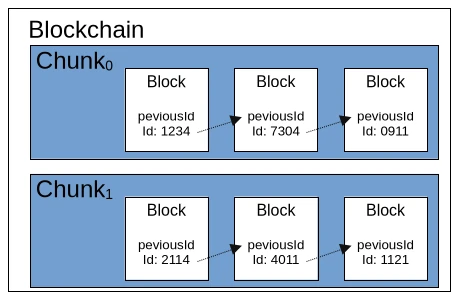
We’ve now learned a considerable amount about the ruleset for a blockchain. So it’s time to consider performance. If we were to simply store all the individual blocks of the blockchain in a list, we would quickly run out of memory. While it’s possible to store the blocks in a local database, this would negatively impact the blockchain’s speed, even with an embedded solution like SQLite. A simple solution would be to divide the blockchain into equal parts, called chunks. A chunk would have a fixed length of 2048 valid blocks, and the first block of a new chunk would point to the last block of the previous chunk. Each chunk could also contain a central rule for the nonce and store metadata such as minimum and maximum timestamps.

To briefly recap our current understanding of the blockchain ruleset, we’re looking at three different levels. The largest level is the blockchain itself, which contains fundamental metadata and configurations. Such configurations include the hash algorithm used. The second level consists of so-called chunks, which contain a defined set of block elements. As mentioned earlier, chunks also contain metadata and configurations. The smallest element of the blockchain is the block itself, which comprises an ID, the described additional information such as a timestamp and nonce, and the payload. The payload is a general term for any data object that is to be made verifiable by the blockchain. For Bitcoin and other cryptocurrencies, the payload is the information about the amount being transferred from Wallet A (source) to Wallet B (destination).

Blockchain technology is also suitable for many other application scenarios. For example, the hash values ​​of open-source software artifacts could be stored in a blockchain. This would allow users to download binary files from untrusted sources and verify them against the corresponding blockchain. The same principle could be applied to the signatures of antivirus programs. Applications and other documents could also be transmitted securely in governmental settings. The blockchain would function as a kind of “postal stamp.” Accounting, including all receipts for goods and services purchased and sold, is another conceivable application.

Depending on the use case, an extension of the blockchain would be the unique signing of a block by its creator. This would utilize the classic PKI (Public Key Infrastructure) method with public and private keys. The signer stores their public key in the block and creates a signature using their private key via the payload, which is then also stored in the block.

Currently, there are two freely available blockchain implementations: BitcoinJ and Web3j for Ethereum. Of course, it’s possible to create your own universally applicable blockchain implementation using the principles just described. The pitfalls, naturally, lie in the details, some of which I’ve already touched upon in this article. Fundamentally, however, blockchain isn’t rocket science and is quite manageable for experienced developers. Anyone considering trying their hand at their own implementation now has sufficient basic knowledge to delve deeper into the necessary details of the various technologies involved.


Privacy

I constantly encounter statements like, “I use Apple because of the data privacy,” or “There are no viruses under Linux,” and so on and so forth. In real life, I just chuckle to myself and refrain from replying. These people are usually devotees of a particular brand, which they worship and would even defend with their lives. Therefore, I save my energy for more worthwhile things, like writing this article.

My aim is to use as few technical details and jargon as possible so that people without a technical background can also access this topic. Certainly, some skeptics might demand proof to support my claims. To them, I say that there are plenty of keywords for each statement that you can use to search for yourself and find plenty of primary sources that exist outside of AI and Wikipedia.

When one ponders what freedom truly means, one often encounters statements like: “Freedom is doing what you want without infringing on the freedom of others.” This definition also includes the fact that confidential information should remain confidential. However, efforts to maintain this confidentiality existed long before the availability of electronic communication devices. It is no coincidence that there is an age-old art called cryptography, which renders messages transmitted via insecure channels incomprehensible to the uninitiated. The fact that the desire to know other people’s thoughts is very old is also reflected in the saying that the two oldest professions of humankind are prostitution and espionage. Therefore, one might ask: Why should this be any different in the age of communication?

Particularly thoughtless individuals approach the topic with the attitude that they have nothing to hide anyway, so why should they bother with their own privacy? I personally belong to the group of people who consider this attitude very dangerous, as it opens the floodgates to abuse by power-hungry groups. Everyone has areas of their life that they don’t want dragged into the public eye. These might include specific sexual preferences, infidelity to a partner, or a penchant for gambling—things that can quickly shatter a seemingly perfect facade of moral integrity.

In East Germany, many people believed they were too insignificant for the notorious domestic intelligence service, the Stasi, to be interested in them. The opening of the Stasi files after German reunification demonstrated just how wrong they were. In this context, I would like to point out the existing legal framework in the EU, which boasts achievements such as hate speech laws, chat monitoring, and data retention. The private sector also has ample reason to learn more about every individual. This allows them to manipulate people effectively and encourage them to purchase services and products. One goal of companies is to determine the optimal price for their products and services, thus maximizing profit. This is achieved through methods of psychology. Or do you really believe that products like a phone that can take photos are truly worth the price they’re charged? So we see: there are plenty of reasons why personal data can indeed be highly valuable. Let’s therefore take a look at the many technological half-truths circulating in the public sphere. I’ve heard many of these half-truths from technology professionals themselves, who haven’t questioned many things.

Before I delve into the details, I’d like to make one essential point. There is no such thing as secure and private communication when electronic devices are involved. Anyone wanting to have a truly confidential conversation would have to go to an open field in strong winds, with a visibility of at least 100 meters, and cover their mouth while speaking. Of course, I realize that microphones could be hidden there as well. This statement is meant to be illustrative and demonstrates how difficult it is to create a truly confidential environment.

Let’s start with the popular brand Apple. Many Apple users believe their devices are particularly secure. This is only true to the extent that strangers attempting to gain unauthorized access to the devices face significant obstacles. The operating systems incorporate numerous mechanisms that allow users to block applications and content, for example, on their phones.

Microsoft is no different and goes several steps further. Ever since the internet became widely available, there has been much speculation about what telemetry data users send to the parent company via Windows. Windows 11 takes things to a whole new level, recording every keystroke and taking a screenshot every few seconds. Supposedly, this data is only stored locally on the computer. Of course, you can believe that if you like, but even if it were true, it’s a massive security vulnerability. Any hacker who compromises a Windows 11 computer can then read this data and gain access to online banking and all sorts of other accounts.

Furthermore, Windows 11 refuses to run on supposedly outdated processors. The fact that Windows has always been very resource-intensive is nothing new. However, the reason for the restriction to older CPUs is different. Newer generation CPUs have a so-called security feature that allows the computer to be uniquely identified and deactivated via the internet. The key term here is Pluton Security Processor with the Trusted Platform Module (TPM 2.0).

The extent of Microsoft’s desire to collect all possible information about its users is also demonstrated by the changes to its terms and conditions around 2022. These included a new section granting Microsoft permission to use all data obtained through its products to train artificial intelligence. Furthermore, Microsoft reserves the right to exclude users from all Microsoft products if hate speech is detected.

But don’t worry, Microsoft isn’t the only company with such disclaimers in its terms and conditions. Social media platforms like Meta, better known for its Facebook and WhatsApp products, and the communication platform Zoom also operate similarly. The list of such applications is, of course, much longer. Everyone is invited to imagine the possibilities that the things already described offer.

I’ve already mentioned Apple as problematic in the area of ​​security and privacy. But Android, Google’s operating system for smart TVs and phones, also gives enormous scope for criticism. It’s not entirely without reason that you can no longer remove the batteries from these phones. Android behaves just like Windows and sends all sorts of telemetry data to its parent company. Add to that the scandal involving manufacturer Samsung, which came to light in 2025. They had a hidden Israeli program called AppCloud on their devices, the purpose of which can only be guessed at. Perhaps it’s also worth remembering when, in 2023, pagers exploded for many Palestinians and other people declared enemies by Israel. It’s no secret in the security community that Israel is at the forefront of cybersecurity and cyberattacks.

Another issue with phones is the use of so-called messengers. Besides well-known ones like WhatsApp and Telegram, there are also a few niche solutions like Signal and Session. All these applications claim end-to-end encryption for secure communication. It’s true that hackers have difficulty accessing information when they only intercept network traffic. However, what happens to the message after successful transmission and decryption on the target device is a different matter entirely. How else can the meta terms and conditions, with their already included clauses, be explained?

Considering all the aforementioned facts, it’s no wonder that many devices, such as Apple, Windows, and Android, have implemented forced updates. Of course, not everything is about total control. The issue of resilience, which allows devices to age prematurely in order to replace them with newer models, is another reason.

Of course, there are also plenty of options that promise their users exceptional security. First and foremost is the free and open-source operating system Linux. There are many different Linux distributions, and not all of them prioritize security and privacy equally. The Ubuntu distribution, published by Canonical, regularly receives criticism. For example, around 2013, the Unity desktop was riddled with ads, which drew considerable backlash. The notion that there are no viruses under Linux is also a myth. They certainly exist, and the antivirus scanner for Linux is called ClamAV; however, its use is less widespread due to the lower number of home installations compared to Windows. Furthermore, Linux users are still often perceived as somewhat nerdy and less likely to click on suspicious links. But those who have installed all the great applications like Skype, Dropbox, AI agents, and so on under Linux don’t actually have any improved security compared to the Big Tech industry.

The situation is similar with so-called “debugged” smartphones. Here, too, the available hardware, which is heavily regulated, is a problem. But everyday usability also often reveals limitations. These limitations are already evident within families and among friends, who are often reliant on WhatsApp and similar apps. Even online banking can present significant challenges, as banks, for security reasons, only offer their apps through the verified Google Play Store.

As you can see, this topic is quite extensive, and I haven’t even listed all the points, nor have I delved into them in great depth. I hope, however, that I’ve been able to raise awareness, at least to the point that smartphones shouldn’t be taken everywhere, and that more time should be spent in real life with other people, free from all these technological devices.