Beyond the Hype: AI-Powered Programming

The prophecy that programmers will become obsolete because computers will essentially program themselves is now several decades old. So far, however, the profession of programmer hasn’t died out. Nevertheless, some fundamental changes have occurred in recent years. The capabilities of current AI systems evoke a wide range of emotions. Some hate it, others love it. However, as is so often the case in life, things aren’t black and white. Therefore, I would like to share my experiences with AI-supported programming and offer an assessment of the overall situation.

The development is exponential. Roughly speaking, performance doubles with each leap in half the time compared to the previous leap.

We are currently in the third iteration. The next iteration, with double the performance, will no longer take 18 months, but a maximum of 9 months. My key takeaway for software development is this: AI can massively support skilled programmers and administrators in their work and significantly boost their performance. However, like everything in life, this also has its downsides. In this article, I’ll take the time to shed some light on the background of this topic.

Some time ago, I kept seeing posts on my timeline on the relevant social media platforms from junior developers raving about vibe coding. At first, I thought it was about creating the optimal atmosphere for working—things like the right music and essential oils to get into the perfect workflow. But no. That wasn’t what it was about. People who knew nothing about programming could suddenly generate code that seemingly did exactly what the authors intended. Sounds great at first, but the reality is quite different.

We’ve been familiar with the “copy-paste” approach for quite some time. We didn’t need AI for that; it wasn’t so long ago that people would Google code snippets and find them on websites like Stack Overflow. Fragments of supposed recommendations were quickly copied into their own codebases, and if it worked, everything was left unchecked, exactly as it had been copied. These self-proclaimed experts weren’t even able to understand the copied code snippets, let alone adapt them correctly to their own projects. Hence the expression “copy-pastes-along.” The fact that these code snippets could cause massive problems in production environments was conveniently ignored by these supposed experts. The spectrum of issues ranged from poor performance to critical security vulnerabilities. This situation hasn’t changed with the widespread availability of AI. Therefore, I predict that in the coming years, a flood of low-quality software will compete for users’ attention.

Here I can only quote Grady Booch again: “A fool with a tool is still a fool.” My observations of using LLM for programming in my own projects have been rather lukewarm. In my experience, it’s mostly project managers and people who can’t program who massively overestimate the capabilities of AI models on social media.

I’m generally a skeptical person and, of course, I’ve tried using the usual suspects—AI models—for my daily work. I specifically looked at the community-created versions, without paying for them. Because with these versions, the world will be flooded with bad software in the future. Here, too, I can cut to the chase. All of Grok’s results in the areas of programming/scripting and configuration were below average. It felt a bit like being in an old forum. Instead of asking those annoying “why” and “how come” questions, Grok failed to get to the point, let alone present a working solution. The model, however, shone with meaningless motivational slogans like “Team leader on steroids.” It reminds me a bit of Joseph Weizenbaum’s statements about virtual conversations and his Eliza chatbot.

Things went somewhat better with Deep Seek. At least it produced usable results. These were also immediately usable and seemingly did what they were intended to do. However, upon closer inspection of the code, it was cluttered with all sorts of unnecessary elements. In these cases, I didn’t conduct any further analysis to determine whether any security-critical issues had arisen. Statistically, one can assume that the more code there is, the higher the probability of errors. Opus, on the other hand, constantly annoyed me by requiring a subscription even for minimal queries. I actually achieved the best results with ChatGPT, although the answers were sometimes contradictory or redundant.

Anyone considering setting up a local instance of one of the free AI models, for example with LM Studio, and buying an exorbitantly expensive graphics card for it, should know: you can save your money. The freely available models are nowhere near as powerful as their commercial counterparts. It also wouldn’t exactly be good for business to create your own competition. The question then arises: when does it actually make sense to work with AI programming models to truly accelerate your output? In my experience, it’s less about what or with what, but more about how. For this, we need to make a few important distinctions.

An AI agent that is directly integrated into the IDE and has complete freedom is not a good idea. You often hear that this AI does things it shouldn’t, and instructions to stop these activities have little effect. Anyone who still insists on trying it is well advised to establish a clean branching model with appropriate access restrictions for the agent. Although I generally reject pull requests in commercial development teams, this strategy is essential when using AI agents. Access to the build logic, such as the Maven POM or Gradle project file, is also forbidden for the agents. The proven security approach applies here as well: as little as possible, as much as necessary. Locking down the build logic prevents the AI ​​agent from arbitrarily defining its own version of dependencies.

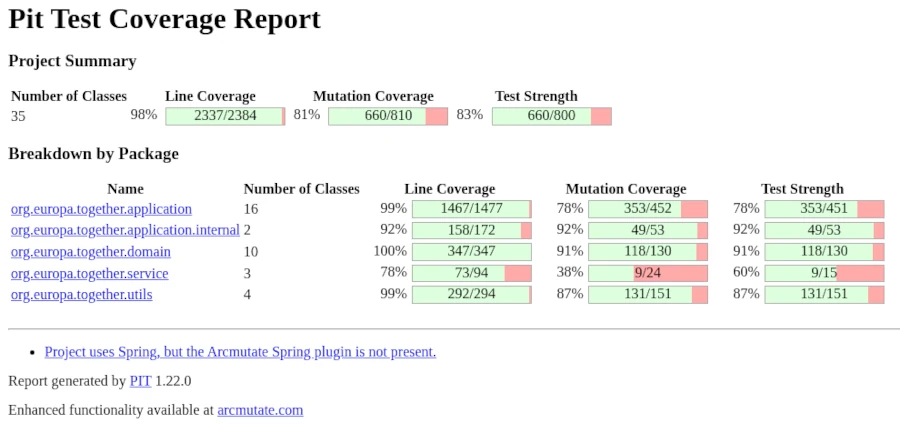
It’s also important to ensure that code changes remain manageable and are implemented iteratively. Although it might seem a bit clunky, I use AI to generate functions or classes. I then copy the suggested code snippets into my IDE and review them line by line. Based on my quality criteria, I modify the code and use custom test cases to verify that everything works as intended. Generating extensive test data for late tests is an ideal example of tasks that can and should be delegated to AI. Of course, it’s essential to continuously monitor test quality, for which test coverage is a key indicator. Even though the approach described above takes a bit more time, it offers more advantages over quick fixes. I’m able to understand the code changes and assign them to the relevant requirements. Another significant factor is that this method helps me further develop my programming skills. Quickly skimming and unreflectively accepting the proposed solution will likely cause my skills to atrophy over time, leading to a continuous decline in my performance. This will not secure my job in the long run.

This brings me to another point regarding working with LLM: How can you formulate efficient prompts, i.e., instructions for the model? Since communication with the model occurs via natural language, it’s essential to structure your thoughts effectively in order to articulate them clearly. Therefore, taking a course in prompt engineering is not helpful. If you can’t clearly communicate your ideas and concepts to others, you’ll achieve little success with AI. So, what really matters? The answer is almost so simple it’s easy to miss: clear communication with concise, short, and understandable sentences. No complicated, convoluted sentences to satisfy your ego. Of course, you also need a concrete—fully thought-out—idea of ​​what you expect. Vague formulations can leave (too much) room for interpretation. Anyone who can explain their intentions to a preschooler in a few minutes will also achieve good results with AI. I’d like to leave it at that and discuss another aspect.

I’m often asked how I assess the quality of the source code generated by LLM. The answer isn’t straightforward, as there are various criteria to consider. UI is a whole other story. UI/UX is subject to trends and changes more frequently than business logic. In my Java test automation training courses, I strongly advise against creating UI tests altogether. The reason is that the cost-benefit ratio simply isn’t balanced enough in this area. For generated UI code, this means I only look at functionality and appearance and leave it at that. The situation is completely different with business logic for backend systems. Here, I’ve found that the code produced by LLM is sometimes better in terms of security than that of many programmers. The usual checks, such as SQL parameters, input validation, and filtering, are considered and implemented. However, there’s still room for improvement in performance and readability/understandability. I expect significant improvements in these areas in about two more iterations. This is also a key reason why LLM optimizations of an existing codebase are never truly complete and should be repeated with each new generation of LLM.

My strongest criticism of companies, as well as developers and administrators, who excessively use LLM in their daily projects is that they could quickly lose control of their products/services. The entire issue cannot be categorized as black and white, because the range of nuances is too vast. Therefore, it is up to us to follow the motto of the literary Enlightenment, as exemplified by Immanuel Kant: “Have the courage to use your own understanding.”

Finally, I’d like to discuss the cost factor for high-performance AI models. This is where unpleasant surprises can quickly arise. Let’s assume we have someone with a great startup idea who also has the ability to formulate correct and meaningful requirements clearly. Ideally, they even possess rudimentary programming skills to read, understand, and easily modify source code. This person decides to implement the idea independently, without a programmer. Even if the project is broken down into smaller parts and these tasks are assigned to freelancers, several thousand euros can quickly accumulate, depending on the scope of the work packages. If these tasks are then distributed to AI agents, the usual rates of 20 to 50 euros per month no longer apply. Token-based billing becomes necessary. Depending on the scope of the prompt, a request to the AI ​​then consumes one or more tokens. One token often has a value of one euro/US dollar. If no limit is set, several thousand euros can be consumed in just a few hours. Furthermore, it’s impossible to predict the quality of the generated source code beforehand. Every improvement requires tokens, which must be paid for – a cost factor that doesn’t arise with human developers. Even though AI agents might not seem to incur social security or similar expenses at first glance, this doesn’t mean projects can be implemented more cheaply. What’s more important is having someone on board who knows how to structure source code so that it can be easily extended later.

Firewalls – Reality vs. Myth

The firewall, or firewall, was always a spectacular event in the days of the circus and traveling performers. People or animals would leap through it and be cheered by the crowd. However dramatic such a performance may have seemed to the spectators, the spectacle was quite calculated for the acrobat. After all, we know that fire is one of the most powerful primal elements that humankind has tamed.

In cybersecurity, the firewall is one of the most fundamental protective mechanisms for networked computer systems. This applies to both home computers and mainframes in data centers. However, the idea of ​​igniting one or more rings of fire around a computer is more comparable to a circus spectacle, often melodramatically depicted in movies. Statements like “The first firewall has fallen and the second is already 70% breached” are perfect for the screen but have nothing to do with reality.

Before we delve into the details, let’s briefly consider how computer systems are connected to form a network. The crucial detail we need is the IP address. In simpler terms, the IP address is the telephone number of the computer or device on the network. To connect to another computer, you need to know its IP address, just like a telephone and its phone number. Once the connection is established, information, or data, can be exchanged between the two devices. This information is broken down into small, manageable packets by the various internet protocols. A protocol is a defined set of rules that all participants must follow. This can easily be compared to sending a letter or package through the mail.

  1. Write the letter.
  2. Put the letter in an envelope and seal it.
  3. Write the recipient’s address on the front of the envelope.
  4. Write the sender’s address on the back of the envelope.
  5. Attach a sufficient stamp to the envelope and drop it in the mailbox.
  6. Write the letter.

Write a … Without knowing the internal workings of the postal service, we can assume that the letter will reach its recipient if we follow the protocol correctly. The same applies to the internet. Depending on the type of data, the computer selects a suitable program that implements the protocol for us. Based on the Internet Protocol (IP), which governs the connection between computers, there are other protocols that handle the data. Well-known protocols include HTTP(s) for websites and FTP for sending files.

Now let’s get to the main topic. What exactly is a firewall and what is it used for? Imagine a very long hallway with countless doors—65,536 doors to be precise. These doors can be opened inwards or outwards. We can therefore move from the hallway to the outside (outgoing traffic) or from the outside into the hallway (incoming traffic).

A Browser Game, (c) mediasinres.tv

These doors are called ports in technical jargon, and they have a fixed number. If you install special programs on your computer that can communicate with other computers, these programs are usually bound to such a port. Here’s a small example: Long before WhatsApp and similar apps, there was Internet Relay Chat, or IRC for short. If you installed IRC on your computer, it was hidden behind port 194. An important characteristic of ports is that if a program is already bound to a port, no other program can use that port.

A firewall allows you to selectively block these gateways to and from the internet. Basically, there are four different options for each gateway:

  1. Completely blocked,
  2. Inbound blocked,
  3. Outbound blocked, and
  4. Completely open.

Let’s return to our IRC example. If the gateway is completely blocked, we cannot send or receive messages, even though the program can be started on our computer. It cannot establish a connection to the network. If the inbound gateway is blocked, we cannot receive messages, but we can send them. If the outbound gateway is blocked, we can receive messages, but we cannot send any ourselves.

The biggest problem with using firewalls is that they are often not configured correctly. We distinguish between two options here. The most common option is called a blacklist and only regulates the ports specified in the list. Considering that there are 65,536 ports, this can become a very long and unwieldy list. The risk of forgetting something is very high. The advantage of this option is that it is very robust for inexperienced users. The other option is the so-called whitelist. This works in exactly the opposite way to the blacklist. By default, all ports are closed, and the user must explicitly specify which ports are allowed to be opened. As you can easily imagine, operating in whitelist mode requires a certain amount of user experience. You have to know which port belongs to which program and how to enter these rules into the firewall.

As we can see, the image of drawing a ring of fire around the computer is not a suitable way to visualize how a firewall works. Once the door—that is, on the computer—is blocked, installing another firewall on the computer makes little sense. In this case, the saying “two is better than one” doesn’t apply.

Attacks on firewalls typically involve searching for open ports and then exploiting them. This is done using so-called port scanners. Anyone wanting to try out such a port scanner shouldn’t do so without authorization. Searching for open ports on other people’s computers is already a criminal offense in Germany and many other parts of the world.

Another, very advanced attack scenario involves attacking the firewall program itself. Here, the aim is to find and exploit any existing programming errors in the firewall.

Firewalls are available for every operating system in a wide variety of forms. Professional network devices such as routers and switches may also have integrated firewalls. In this case, the router acts as a network computer and protects all devices connected to it. Before deciding on a specific program, you should find out that it is as easy to use as possible and comes from a reputable manufacturer.

List (incomplete) of the most well-known standard ports:

Portnummer     Servicename Beschreibung
21FTPFile Transfer Protocol
22SSH-SCPSecure Shell
23TelnetTelnet protocol
25SMTPSimple Mail Transfer Protocol
53DNSDomain Name System
80HTTPHypertext Transfer Protocol (HTTP)
110POP3Post Office Protocol v. 3
143IMAP4Internet Message Access Protocol v. 4
443HTTP over SSLHypertext Transfer Protocol Secure (HTTPS)
465SMTP over TLS/SSL, SSMAuthenticated SMTP over TLS/SSL (SMTPS)
587SMTPEmail message submission
993IMAP4 over SSLInternet Message Access Protocol
995POP3 over SSLPost Office Protocol 3
1194OpenVPNOpenVPN
1725SteamValve Steam Client uses port 1725 
2967Symantec AVSymantec System Center
3074XBOX LiveXbox LIVE and Games for Windows
3306MySQLMySQL database system
3724World of WarcraftSome Blizzard games

Sandboxing on Linux desktops with FireJail

Anyone wanting to use a desktop program under Linux without modifying their existing system needs a special environment known in technical circles as a sandbox. Of course, you can also create a virtual machine with VMware or Oracle’s free VirtualBox, which simulates an entire computer including its operating system, and install programs within it for testing purposes to see how they behave. However, this option consumes a considerable amount of resources and is also somewhat resource-intensive.

But there is also a more lightweight virtualization technology available under Linux that employs various security features not available under Windows. These include, among other things, permissions at the file and directory level. But don’t worry, we won’t delve too deeply into the many details of the individual solutions; instead, we’ll focus primarily on the how and why.

On the server side, there are already proven virtualization programs for isolated and secure environments, such as LXC (Linux Containers) and the widely used Docker. On the desktop, programs like FireJail or BubbleWarp are commonly used to run applications with a graphical user interface in a restricted environment. Before we delve into the details of how this works, let’s consider a few scenarios that explain why all this effort can be worthwhile.

One of the oldest reasons for sandboxing is to create an environment where different versions of software need to be installed simultaneously for testing or development purposes, and the installation routine doesn’t allow this. Typical behavior in such cases is to first uninstall the old version of the software to install the new one, or simply to update the existing version. Setting up a sandbox, a kind of testing environment, helps in these situations.

Another reason for using sandboxes is to isolate programs for security reasons. Here, the primary concern is protecting privacy. The goal is to prevent a program from accessing other data on the computer. Therefore, in this context, we often refer to it as creating a “jail.” The classic example we’re talking about here is the web browser. In my opinion, I see the smartphone as far more problematic in this scenario, where this data theft is quite easy for any user to observe. Without being sarcastic, I regularly see people who fortify their computers like fortresses and carelessly distribute all their data from their smartphones to the world.

It’s an open secret in expert circles that websites, especially those of large tech companies, employ all sorts of tricks to know their users better than the users know themselves. For outsiders, these expert opinions often seem incomprehensible, which frequently manifests as resignation or indifference. To avoid delving too deeply into the subject, I’d like to illustrate just how sophisticated these methods are with a simple example. Anyone who believes that a VPN connection offers maximum privacy protection is fatally mistaken. Just because you mask your IP address doesn’t mean you can’t deduce your actual location. And you don’t even have to try very hard to do so. For example, someone who claims to be logging into the internet from Germany, but whose web browser is set to Russian as the language and Moscow as the time zone, is probably not actually in Germany. Of course, tech companies like LinkedIn or Facebook collect far more information about their users. Each individual measure might seem rather trivial in isolation, but when you combine the various possibilities, the situation changes fundamentally. That’s why it’s absolutely essential to consider security as a holistic concept.

We see that building an effective jail requires significantly more specialized knowledge and experience than simply installing software. AppAmor on Linux is a prime example. Furthermore, it’s crucial to understand that sandboxing your browser also presents challenges. These include access to hardware like microphones and cameras during video conferences, as well as file downloads and uploads. Since the browser is isolated from the rest of the system, you can’t just quickly post photos to Facebook. Anyone considering this should take the time to fully consider these implications.

Having discussed the “why” in detail, let’s move on to the “how.” I’ve already mentioned the two most popular tools, FireJail and BubbleWarp. Because this article is aimed at power users, not IT professionals with specialized knowledge, my focus is on an easy-to-use solution. That’s why I chose FireJail [1], which, although it requires downloading and manual installation, has an active community and, unlike BubbleWarp, comes with documentation.

After downloading [2] FireJail and FireTools for the corresponding distribution, both programs can be easily installed. In my case, I’m using a current Debian Linux distribution, so I downloaded the .deb files from the website and installed them easily with a simple double-click via the package manager. Of course, this also works with the standard Debian package manager, APT. However, to stay up-to-date, I prefer the first installation method.

sudo apt-get install firejail firetool
ed:~$ firejail --help
firejail version 0.9.80

Firejail is a SUID sandbox program that reduces the risk of security breaches by restricting the running environment of untrusted applications using Linux namespaces.

Usage: firejail [options] [program and arguments]

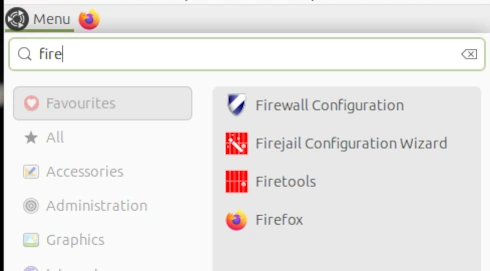
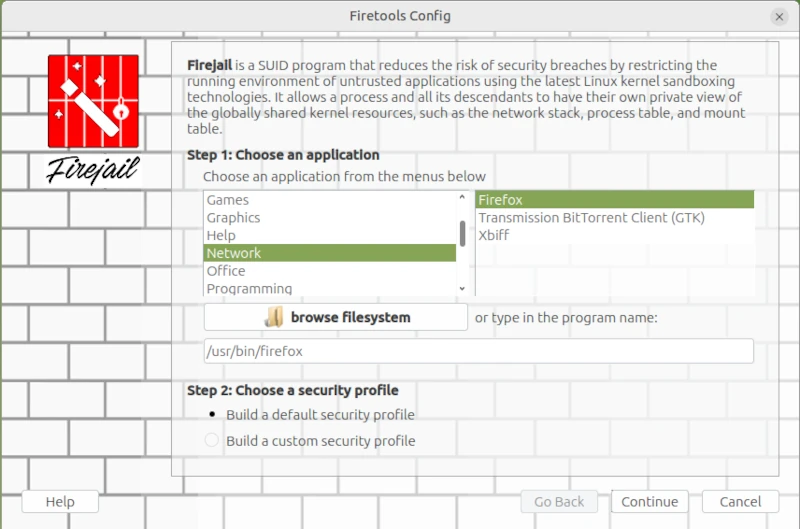
I started the Firejail Configuration Wizard via the application menu.

This opens a wizard for configuring applications as sandboxes. This differs from the console command in that the command line places all FireJail-supported programs into a sandbox. However, this could restrict functionality so much that it becomes unusable for everyday tasks.

sudo firecfg

This allows you to launch applications in the sandbox via the icons in the window manager menu or file links in the file manager. This automated method currently supports the desktop environments Mate, KDE, LXDE, Cinnamon, and LXDE. Support for Gnome 3 and Unity is limited. Simply double-click the desktop icon in Firetools or use the command firetools firefox in the Bash shell. Alternatively, you can launch FireTools directly. FireTools is a graphical launcher for applications running in the sandbox via FireJail.

In my example, I configured the Firefox web browser using FireJail’s default configuration. It’s possible to use custom configurations for each installed application. The corresponding configuration files are located in the logged-in user’s home directory: ~/.config/firejail/<app>.profile and /etc/firejail/<app>.profile.

# Firejail profile for firefox
# Description: Safe and easy web browser from Mozilla
# This file is overwritten after every install/update
# Persistent local customizations
include firefox.local
# Persistent global definitions
include globals.local

# Note: Sandboxing web browsers is as important as it is complex. Users might
# be interested in creating custom profiles depending on the use case (e.g. one
# for general browsing, another for banking, ...). Consult our FAQ/issue
# tracker for more information. Here are a few links to get you going:
# https://github.com/netblue30/firejail/wiki/Frequently-Asked-Questions#firefox-doesnt-open-in-a-new-sandbox-instead-it-opens-a-new-tab-in-an-existing-firefox-instance
# https://github.com/netblue30/firejail/wiki/Frequently-Asked-Questions#how-do-i-run-two-instances-of-firefox
# https://github.com/netblue30/firejail/issues/4206#issuecomment-824806968

# (Ignore entry from disable-common.inc)
ignore read-only ${HOME}/.config/mozilla/firefox/profiles.ini
ignore read-only ${HOME}/.mozilla/firefox/profiles.ini

noblacklist ${HOME}/.cache/mozilla
noblacklist ${HOME}/.config/mozilla
noblacklist ${HOME}/.mozilla
noblacklist ${RUNUSER}/*firefox*
noblacklist ${RUNUSER}/psd/*firefox*

# uses libgdk-pixbuf and/or glycin - see #6906
#blacklist /usr/libexec

mkdir ${HOME}/.cache/mozilla/firefox
mkdir ${HOME}/.config/mozilla
mkdir ${HOME}/.mozilla
whitelist ${HOME}/.cache/mozilla/firefox
whitelist ${HOME}/.config/mozilla
whitelist ${HOME}/.mozilla

whitelist /usr/share/firefox
whitelist /usr/share/gnome-shell/search-providers/firefox-search-provider.ini
whitelist ${RUNUSER}/*firefox*
whitelist ${RUNUSER}/psd/*firefox*

# Note: Firefox requires a shell to launch on Arch and Fedora.
# Add the next lines to firefox.local to enable private-bin.
#private-bin bash,dbus-launch,dbus-send,env,firefox,sh,which
#private-bin basename,bash,cat,dirname,expr,false,firefox,firefox-wayland,getenforce,ln,mkdir,pidof,restorecon,rm,rmdir,sed,sh,tclsh,true,uname
private-etc firefox

dbus-user filter
dbus-user.own org.mozilla.*
dbus-user.own org.mpris.MediaPlayer2.firefox.*
ignore dbus-user none

# Redirect
include firefox-common.profile

Since configuring each individual application can quickly become very complex, and one must always consider what one wants to achieve with sandboxing, I refer you to the homepage [1] for further information.

On the command line, you can list all applications currently started via Firejail. This allows you to check whether the sandbox is working for the respective application. Two commands are available for this purpose: firejail --list and firejail --top. The top parameter displays the process load in the Bash shell.

However, I did notice one limitation during my test: Browsers in virtual machines, in particular, refuse to start under Firejail. This is, of course, somewhat pointless, as virtual machines already provide excellent isolation between the application and the operating system.

Fazit

In my opinion, the idea of ​​sandboxing is quite appealing. My criticism lies more in its implementation. I would view virtualization in a more traditional way, as implemented, for example, with Docker or PlayOnLinux. A sandbox would essentially create a virtual environment on my desktop into which I could install programs in isolation, without altering the operating system. If the sandbox is deleted, all files of the installed program, including its configuration, are completely removed. However, FireJail works differently. FireJail identifies all installed programs that can be jailed, in order to run them in a so-called cage. Launching AppImages in FireJail also generally doesn’t work. Based on my experience in security and penetration testing, I consider the cost-benefit ratio, especially for FireJail, to be insufficient, and I also believe that the way FireJail works gives users a false sense of security. Updates are also a problem, as they often silently reset security-related settings to unwanted defaults.

Resources


The internet never forgets.

The internet has its own unique memory that forgets almost nothing. Part of this memory is archive.org, a project initiated by Brewster Kahle in 1996, which has made it its mission to archive the internet. A central component of archive.org is the Wayback Machine.

According to its own figures, the Wayback Machine has access to a database of approximately 1 trillion web pages. Similar to Google, the Wayback Machine is operated via a simple search field. In this search field, you can search for either a specific internet domain or a specific keyword. If something related to the search term is stored in archive.org’s database, the calendar view shows the date on which a so-called snapshot was created. All content from a domain that was freely accessible on that day was included in the snapshot. This makes it easy to recover content that has already been deleted.

However, when working with the Wayback Machine, you need to be aware of certain conditions. While archive.org is a non-profit organization that is financed by donations, there are still some limitations. Furthermore, archive.org is headquartered in the United States. Considering the enormous costs incurred simply for collecting and storing the data, it’s more than just a suspicion that this project has close ties to government agencies. Official bodies also have considerable reasons for wanting such a service without having to adhere to the strict regulations of official government organizations.

One problem that arises from working with the Wayback Machine is the frequency of changes to the archived homepages. Especially with small websites, several changes are made between snapshots. But even seemingly large websites, like spiegelonline.de, don’t have a daily snapshot, as one might expect. The reasons for this are quite varied. In addition, there are various mechanisms that prevent crawlers from indexing the website. The purpose of such efforts can be, among other things, to limit traffic on the server itself, so that resources are available to readers and not blocked by bots.

Another issue arising from this massive amount of data is, of course, the potential use of artificial intelligence to train large LLMs (Learning Management Systems). Large platforms fear losing their users, an aspect I addressed back in 2023. In February 2026, there was also a public discussion on this topic between Wayback Machine board member Mark Graham and Nieman Lab, which can also be found as a blog post at archive.org. Most website operators face this problem, as creating and publishing content costs both time and money. In the case of elmar-dott.com, this includes expenses for the server, domain, books, and various subscriptions. Since we explicitly oppose automated content creation, all articles on elmar-dott.com are based on concrete experience and in-depth research into the respective topics. This also means that many of the solutions described are actually used by the authors themselves. To prevent AI from harvesting the content and thus limiting our visitors to web crawlers, high-quality information is only accessible via subscription. This applies particularly to references, source code, and selected articles.

Another aspect, of course, is the trustworthiness of the stored content. Even though archive.org’s motto is non-profit and its efforts to ensure a freely accessible internet, this doesn’t mean that archive.org doesn’t potentially pursue other, unofficial interests. Electronically stored content is known to be easily manipulated. Therefore, the content collected via archiving services should be considered more of an indicator. Of course, there are ways to protect the collected content from alteration. Blockchain technology would be one such way to detect manipulation.

In the premium article “Harvest Time,” I describe how to gather information using various free and paid APIs. The Wayback Machine can also be used for sensitive research tasks. Because, as is so often the case, mistakes happen in business. Small mishaps are simply human, and sometimes companies can ‘accidentally’ publish sensitive internal information. This could be error messages on the website that reveal which DBMS or server is in use. As soon as you become aware that potentially misusable information appears in any database, the first step is to contact the database owner and request its removal. Often, an explanation and a friendly word are all it takes.

Of course, archive.org isn’t solely focused on websites. Its goal is to create a comprehensive library, which naturally includes digitizing copyright-free books, similar to Project Gutenberg. But films, audio, and software can also be found in the archive. Interestingly, archive.org can also be found on the Onion Tor network under its own Onion domain.

Of course, archive.org isn’t the only organization trying to preserve the internet. The website archive.today also has this goal. However, archive.today’s database isn’t as comprehensive. On the other hand, you can quickly submit your own URL via an input field, and your website will be added to their archive.

As we can see, there are certainly some gems on the internet. You don’t have to be a journalist to delve deeply into research techniques. The field of reconnaissance in cybersecurity also requires a certain amount of intuition. There’s a reason they say: knowledge is power.


It doesn’t always have to be Kali Linux!

Kali Linux [1] and Parrot Linux [2] are considered the first choice among Linux distributions when it comes to security and penetration testing. Many relevant programs are already preinstalled on these distributions and can be used out of the box, so to speak.

However, it must also be said that Kali and Parrot are not necessarily the most suitable Linux distributions for everyday use due to their specialization. For daily use, Ubuntu for beginners and Debian for advanced users are more common. For this reason, Kali and Parrot are usually set up and used as virtual machines with VirtualBox or VMWare Player. A very practical approach, especially when it comes to looking at the distribution first before installing it natively on the computer.

In my opinion, the so-called distribution hopping that some people do under Linux is more of a hindrance to getting used to a system in order to be able to work with it efficiently. Which Linux you choose depends primarily on your own taste and the requirements of what you want to do with it. Developers and system administrators will likely have an inclination toward Debian, a version from which many other distributions were derived. Windows switchers often enjoy Linux Mint, and the list goes on.

If you want to feel like a hacker, you can opt for a Kali installation. Things like privacy and anonymous surfing on the Internet are often the actual motives. I had already introduced Kodachi Linux, which specializes in anonymous surfing on the Internet. Of course, it must be made very clear that there is no real anonymous communication on the Internet. However, you can massively reduce the number of possible eavesdroppers with a few easy-to-implement measures. I have addressed the topic of privacy in several articles on this blog. Even if it is an unpopular opinion for many. But a Linux VM that is used for anonymous surfing via an Apple or Windows operating system completely misses its usefulness.

he first point in the “privacy” section is the internet browser. No matter which one you use and how much the different manufacturers emphasize privacy protection, the reality is like the fairy tale “The Emperor’s New Clothes”. Most users know the Tor / Onion network by name. Behind it is the Tor browser, which you can easily download from the Tor Project website [3]. After downloading and unzipping the directory, the Tor Browser can be opened using the start script on the console.

./Browser/start-tor-browser

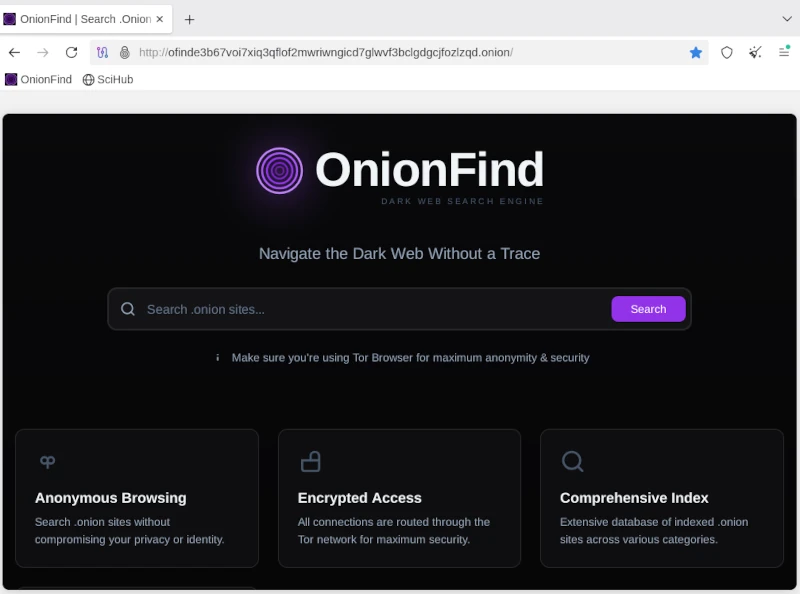
Anyone using the Tor network can visit URLs ending in .onion. A large number of these sites are known as the so-called dark web and should be surfed with great caution. You can come across very disturbing and illegal content here, but you can also fall victim to phishing attacks and the like. Without going into too much detail about exactly how the Tor network works, you should be aware that you are not completely anonymous here either. Even if the big tech companies are largely ignored, authorities certainly have resources and options, especially when it comes to illegal actions. There are enough examples of this in the relevant press.

If you now think about how the Internet works in broad terms, you will find the next important point: proxy servers. Proxy servers are so-called representatives that, similar to the Tor network, do not send requests to the Internet directly to the homepage, but rather via a third-party server that forwards this request and then returns the answer. For example, if you access the Google website via a proxy, Google will only see the IP address of the proxy server. Even your own provider only sees that you have sent a request to a specific server. The provider does not see in its own log files that this server then makes a request to Google. Only the proxy server appears on both sides, at the provider and on the target website. As a rule, proxy server operators ensure that they do not store any logs with the original IP of their clients. Unfortunately, there is no guarantee for these statements. In order to further reduce the probability of being detected, you can connect several proxy connections in series. With the console program proxychain, this project can be easily implemented. ProxyChain is quickly installed on Debian distributions using the APT package manager.

sudo apt-get install proxychains4

Using it is just as easy. The behavior for proxychain is specified via the configuration file /etc/proxychain.conf. If you change the working mode from stricht_chain to random_chain, a different variation of each proxy server will be randomly assembled for each connection. At the end of the configuration file you can enter the individual proxy servers. Some examples are included in the file. To use proxychain, you simply call it via the console, followed by the application (the browser), which establishes the connection to the Internet via the proxies.

Proxychanin firefox
## RFC6890 Loopback address range
## if you enable this, you have to make sure remote_dns_subnet is not 127
## you'll need to enable it if you want to use an application that 
## connects to localhost.
# localnet 127.0.0.0/255.0.0.0
# localnet ::1/128

The real challenge is finding suitable proxy servers. To get started, you can find a large selection of free proxies worldwide at [4].

Using proxies alone for connections to the Internet only offers limited anonymity. In order for two computers to communicate, an IP address is required that can be linked via the Internet access provider to the correct geographical address where the computer is located. However, additional information is sent to the network via the network card. The so-called MAC address, with which you can directly identify a computer. Since you don’t have to install a new network card every time you restart your computer to get a different MAC address, you can use a small, simple tool called macchanger. Like proxychain, this can also be easily installed via APT. After installation you can set the autostart and you have to decide whether you want to always use the same MAC address or a randomly generated MAC address each time.

Of course, the measures presented so far are only of any use if the connection to the Internet is encrypted. This happens via the so-called Secure Socket Layer (SSL). If you do not connect to the Internet via a VPN and the websites you access only use http instead of https, you can use any packet sniffer (e.g. the Wireshark program) to record the communication and read the content of the communication in plain text. In this way, passwords or confidential messages are spied on on public networks (WiFi). We can safely assume that Internet providers run all of their customers’ communications through so-called packet filters in order to detect suspicious actions. With https connections, these filters cannot look into the packets.

Now you could come up with the idea of ​​illegally connecting to a foreign network using all the measures described so far. After all, no one knows that you are there and all activities on the Internet are assigned to the connection owner. For this reason, I would like to expressly point out that in pretty much all countries such actions are punishable by law and if you are caught doing so, you can quickly end up in prison. If you would like to find out more about the topic of WiFi security in order to protect your own network from illegal access, you will find a detailed workshop on Aircrack-ng in the members’ area (subscription).

The next item on the privacy list is email. For most people, running their own email server is simply not possible. The effort is enormous and not entirely cost-effective. That’s why offers from Google, Microsoft and Co. to provide an email service are gladly accepted. Anyone who does not use this service via a local client and does not cryptographically encrypt the emails sent can be sure that the email provider will scan and read the emails. Without exception! Since configuring a mail client with functioning encryption is more of a geek topic, just like running your own mail server, the options here are very limited. The only solution is the Swiss provider Proton [5], which also provides free email accounts. Proton promotes the protection of its customers’ privacy and implements this through strict encryption. Everyone has to decide for themselves whether they should still send confidential messages via email. Of course, this also applies to the available messengers, which are now used a lot for telephony.

Many people have googled themselves to find out what digital traces they have left behind on the Internet. Of course, this is only scratching the surface, as HR people at larger companies and corporations use more effective ways. Matego is a very professional tool, but there is also a powerful tool in the open source area that can reveal a lot of things. There is also a corresponding workshop for subscribers on this subject. Because if you find your traces, you can also start to cover them up.

As you can see, the topic of privacy and anonymity is very extensive and is only covered superficially in this short article. Nevertheless, the depth of information is sufficient to get a first impression of the matter. It’s not nearly enough to set up a system like Kali if you don’t know the basics to use the tools correctly. Because if you don’t put the different pieces of the puzzle together accurately, the hoped-for effect of providing more privacy on the Internet through anonymity will remain. This article also explains my personal point of view on a technical level as to why there is no such thing as secure, anonymous electronic communication. Anyone who wants to familiarize themselves with the topic will achieve success more quickly with a sensible strategy and their own system, which is gradually expanded, than with a ready-made all-round tool like Kali Linux.

Resources

Abonnement / Subscription

[English] This content is only available to subscribers.

[Deutsch] Diese Inhalte sind nur für Abonnenten verfügbar.

Age verification via systemd in Linux distributions

Since 2025, several countries have already introduced age verification for using social media and the internet in general. Australia and the United Kingdom are leading the way in this trend. Several US states have also followed suit. Age verification is slated to be rolled out across the EU by 2027. Italy and France have already passed corresponding laws. The new government that has been in power in Germany since the beginning of 2025 also favors this form of paternalism. This was demonstrated by a clause in the coalition agreement that stipulates the nationwide introduction of eID in Germany. In this article, I will outline the social and technical aspects that will inevitably affect us citizens.

Under the guise of protecting minors, children and young people under 16 are to be denied access to harmful content such as pornography. Social media platforms like Facebook, X, and others will also be affected by these measures. Already, various types of content on YouTube are only accessible to registered users.

If the well-being of children were truly the priority, the focus would be on fostering their development into stable and healthy personalities. This begins with balanced, healthy school meals, which should be available to every student at an affordable price. Teaching media literacy in schools would also be a step in the right direction. These are just a few examples demonstrating that the justification for introducing age verification is a smokescreen and that fundamentally different goals are being pursued.

It’s about paternalism and control over every single citizen. It’s a violation of the right to self-determination. Because one thing must be clear to everyone: to ensure that a person is indeed of legal age for accessing restricted content, everyone who wants to view it must provide proof of age. This proof will only be possible with an eID. Once a critical mass is reached using their eID, this will become the standard for payments and all sorts of other things. It sounds somewhat prophetic, especially if you’re familiar with the Book of Revelation in the New Testament.

The second beast caused everyone—great and small, rich and poor, master and slave—to receive a mark on their right hand or forehead. Without this mark, no one could buy or sell anything. Revelation 13:16

It is therefore foreseeable that an individual’s refusal to accept the eID will completely exclude them from the digital world. Simultaneously, opportunities that provide alternatives in real life, the so-called analog realm, will disappear. However, I don’t want to be too prophetic here. Everyone can imagine for themselves what consequences the introduction of the digital ID will have on their own lives. I will now delve into some technical details and offer some food for thought regarding civic self-defense. Because I am quite certain that there is broad acceptance of the eID. Even if the specific reasons vary, they can be reduced to personal comfort and convenience. Anyone who continues reading from here on is fully responsible for implementing things independently and acquiring the necessary knowledge. There will be no quick, easy, off-the-shelf solution. But you don’t have to be a techie either. The willingness to think independently is perfectly sufficient to quickly understand the technical connections. It’s not rocket science, as they say.

Because I am quite certain that there is widespread acceptance of the eID. Even if the specific reasons vary, they can be reduced to personal comfort and convenience. People who rely on Apple or Microsoft products have no choice but to switch to open-source operating systems. Smartphones simply don’t offer a practical alternative to banking apps and messaging services. There’s a reason why you need a working phone number to register for Telegram and Signal Messenger: chats are synchronized from the phone to the desktop application. So, you’re left with your computer, which ideally shouldn’t be newer than 2020. I’ve already published an article on this topic.

All Linux distributions run smoothly on older and even low-performance hardware. Switching to Linux is now easy, and you’ll be used to the new system in just a few weeks. So far, so good.

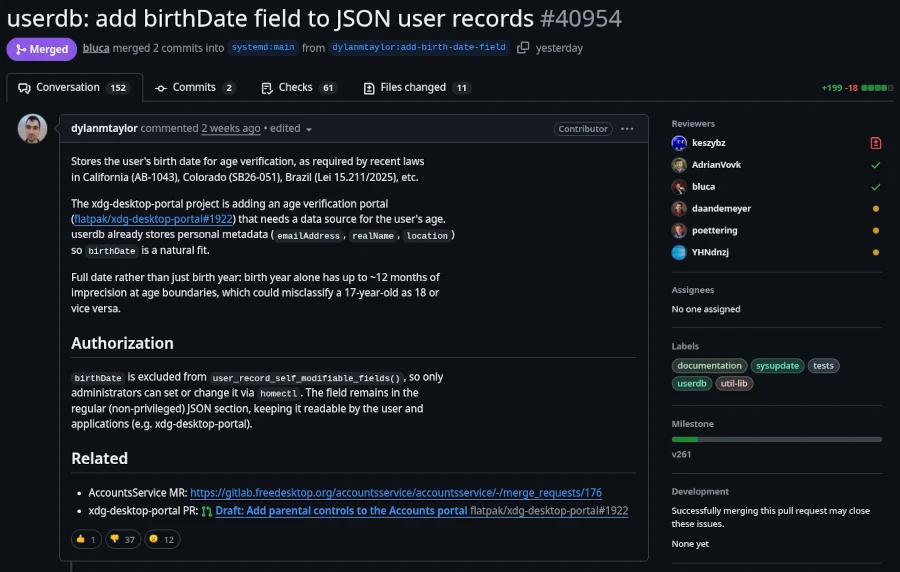
However, since calendar week 13 of 2026, the Linux community has been up in arms across all social media. The program systemd made a commit to the public source code repository adding a birthday field for age verification. Anyone thinking, “Oh well, just one program, I’ll ignore it,” should know that systemd stands for System Daemon. Besides the kernel, it’s one of the most important programs in a Linux distribution. Among other things, it’s responsible for starting necessary services and programs when the computer is turned on.

This is the same record that already holds basic user metadata like realNameemailAddress, and location. The field stores a full date in YYYY-MM-DD format and can only be set by administrators, not by users themselves.

Lennart Poettering, the creator of systemd, has clarified that this change is:

An optional field in the userdb JSON object. It’s not a policy engine, not an API for apps. We just define the field, so that it’s standardized iff people want to store the date there, but it’s entirely optional.

Source: It’s FOSS

All these events also shed new light on the meeting between Linus Torvalds and Bill Gates on June 22, 2025, their first personal encounter in 30 years. It’s absolutely unacceptable in the Linux community to patronize computer users and infringe on their privacy. And there are strong voices opposing the systemd project. However, it’s impossible to predict how strong this resistance will remain if government pressure is exerted on these staunch dissenters.

The first approach to solving this problem is to use a Linux distribution that doesn’t use systemd. Well-known distributions that manage without systemd include Gentoo, Slackware, and Alpine Linux. Those who, like myself and many others, use a pure Debian system might want to take a look at Devuan (version 6.1 Excalibur for March 2026), which is a fork of current Debian versions that doesn’t use systemd.

It’s also worth mentioning that systemd has always been viewed critically by hardcore Linux users. It’s simply considered too bloated. Those who have been running their distribution for a while often hesitate to switch. Linux is like a fine wine. It matures with time, and fresh installations are considered unnecessary by power users, as everything can easily be repaired. Migrations to newer major versions are also generally trouble-free. Therefore, replacing systemd with the more lightweight SysVinit is no problem. The only requirement is that you’re not afraid of the Linux Bash shell. However, there are limits here as well. Those using the GNOME 3 desktop should first switch to a desktop environment that isn’t based on systemd. Devuan Linux shows us the alternatives: KDE Plasma, MATE (a GNOME 2 fork), Cinnamon (for Windows switchers), or the rudimentary Xfce. Before starting, you should at least back up your data for security reasons and, if possible, clone your hard drive to restore the original state in case of problems.

Since I haven’t yet found the time to try out the tutorial myself due to the topic’s current relevance, I refer you to the English-language website linuxconfig.org, which provides instructions on replacing systemd with sysVinit in Debian.

It’s probably like so many things: things are never as bad as they seem. I don’t think the mandatory digital ID will arrive overnight. It will likely be a gradual process that makes life difficult for those who resist total control by authoritarian authorities. There will always be a way for determined individuals to find a solution. But to do so, one must take action and not passively wait for the great savior. He was here before, a very long time ago.

High-performance hardware under Linux for local AI applications

Anyone wanting to experiment a bit with local LLM will quickly discover its limitations. Not everyone has a massively upgraded desktop PC with 2 TB of RAM and a CPU that could fry an egg under full load. A laptop with 32 GB of RAM, or in my case, a Lenovo P14s with 64 GB of RAM, is more typical. Despite this generous configuration, it often fails to load a more demanding AI model, as 128 GB of RAM is fairly standard for many of these models. And you can’t upgrade the RAM in current laptops because the chips are soldered directly onto the motherboard. We have the same problem with the graphics card, of course. That’s why I’ve made it a habit when buying a laptop to configure it with almost all the available options, hoping to be set for 5-8 years. The quality of the Lenovo ThinkPad series, in particular, hasn’t disappointed me in this regard. My current system is about two years old and is still running reliably.

I’ve been using Linux as my operating system for years, and I’m currently running Debian 13. Compared to Windows, Linux and Unix distributions are significantly more resource-efficient and don’t use their resources for graphical animations and complex gradients, but rather provide a powerful environment for the applications they’re used in. Therefore, my urgent advice to anyone wanting to try local LLMs is to get a powerful computer and run Linux on it. But let’s take it one step at a time. First, let’s look at the individual hardware components in more detail.

Let’s start with the CPU. LLMs, CAD applications, and even computer games all perform calculations that can be processed very effectively in parallel. For parallel calculations, the number of available CPU cores is a crucial factor. The more cores, the more parallel calculations can be performed.

Of course, the processors need to be able to quickly request the data for the calculations. This is where RAM comes into play. The more RAM is available, the more efficiently the data can be provided for the calculations. Affordable laptops with 32 GB of RAM are already available. Of course, the purchase price increases exponentially with more RAM. While there are certainly some high-end gaming devices in the consumer market, I wouldn’t recommend them due to their typically short lifespan and comparatively high price.

The next logical step in the hardware chain is the hard drive. Simple SSDs significantly accelerate data transfer to RAM, but there are still improvements. NVMe cards with 2 GB of storage capacity or more can reach speeds of up to 7000 MB/s in the 4th generation.

We have some issues with graphics cards in laptops. Due to their size and the required performance, the graphics cards built into laptops are more of a compromise than a true highlight. A good graphics card would be ideal for parallel calculations, such as those performed in LLMs (Large Linear Machines). As a solution, we can connect the laptop to an external graphics card. Thanks to Bitcoin miners in the crypto community, considerable experience has already been gained in this area. However, to connect an external graphics card to the laptop, you need a port that can handle that amount of data. USB 3 is far too slow for our purposes and would severely limit the advantages of the external graphics card due to its low data rate.

The solution to our problem is Thunderbolt. Thunderbolt ports look like USB-C, but are significantly faster. You can identify Thunderbolt by the small lightning bolt symbol (see Figure 1) on the cables or connectors. These are not the power supply connections. To check if your computer has Thunderbolt, you can use a simple Linux shell command.

ed@local: $ lspci | grep -i thunderbolt
00:07.0 PCI bridge: Intel Corporation Raptor Lake-P Thunderbolt 4 PCI Express Root Port #0
00:07.2 PCI bridge: Intel Corporation Raptor Lake-P Thunderbolt 4 PCI Express Root Port #2
00:0d.0 USB controller: Intel Corporation Raptor Lake-P Thunderbolt 4 USB Controller
00:0d.2 USB controller: Intel Corporation Raptor Lake-P Thunderbolt 4 NHI #0
00:0d.3 USB controller: Intel Corporation Raptor Lake-P Thunderbolt 4 NHI #1

In my case, my computer’s output shows that two Thunderbolt 4 ports are available.

To connect an external graphics card, we need a mounting system onto which a PCI card can be inserted. ANQUORA offers a good solution here with the ANQ-L33 eGPU Enclosure. The board can accommodate a graphics card with up to three slots. It costs between €130 and €200. A standard ATX power supply is also required. The required power supply wattage depends on the graphics card’s power consumption. It’s advisable not to buy the cheapest power supply, as the noise level might bother some users. The open design of the board provides ample flexibility in choosing a graphics card.

Selecting a graphics card is a whole other topic. Since I use Linux as my operating system, I need a graphics card that is supported by Linux. For accelerating LLMs, a graphics card with as many GPU cores as possible and a correspondingly large amount of internal memory is necessary. To make the purchase worthwhile and actually notice a performance boost, the card should be equipped with at least 8 GB of RAM. More is always better, of course, but the price of the card will then increase exorbitantly. It’s definitely worth checking the used market.

If you add up all the costs, the investment for an external GPU amounts to at least 500 euros. Naturally, this only includes an inexpensive graphics card. High-end graphics cards can easily exceed the 500-euro price point on their own. Anyone who would like to contribute their expertise in the field of graphics cards is welcome to contribute an article.

To avoid starting your shopping spree blindly and then being disappointed with the result, it’s highly advisable to consider beforehand what you want to do with the local LLM. Supporting programming requires less processing power than generating graphics and audio. Those who use LLMs professionally can save considerably by purchasing a high-end graphics card with self-hosted models compared to the costs of, for example, cloud code. The specification of LLMs depends on the available parameters. The more parameters, the more accurate the response and the more computing power is required. Accuracy is further differentiated by:

  • FP32 (Single-Precision Floating Point): Standard precision, requires the most memory. (e.g., 32 bits per parameter)
  • FP16 (Half-Precision Floating Point): Half the precision, halves the memory requirement compared to FP32, but can slightly reduce precision. (e.g., 16 bits per parameter / 4 bytes)
  • BF16 (Brain Floating Point): Another option for half-precision calculations, often preferred in deep learning due to its better performance in certain operations. (e.g., 16 bits per parameter / 2 bytes)
  • INT8/INT4 (Integer Quantization): Even lower precision, drastically reduces memory requirements and speeds up inference, but can lead to a greater loss of precision. (e.g., 8 bits per parameter / 1 byte)

Other factors influencing the hardware requirements for LLM include:

  • Batch Size: The number of input requests processed simultaneously.
  • Context Length: The maximum length of text that the model can consider in a query. Longer context lengths require more memory because the entire context must be held in memory.
  • Model Architecture: Different architectures have different memory requirements.

To estimate the memory consumption of a model, you can use the following calculation: Parameters * Accuracy = Memory consumption for the model.

7,000,000,000 parameters * 2 bytes/parameter (BF16) = 14,000,000,000 bytes = 14 GB

When considering hardware recommendations, you should refer to the model’s documentation. This usually only specifies the minimum or average requirements. However, there are general guidelines you can use.

  • Small models (up to 7 billion parameters): A GPU with at least 8 GB of VRAM should be sufficient, especially if you are using quantization.
  • Medium-sized models (7-30 billion parameters): A GPU with 16 GB to 24 GB of VRAM is recommended.
  • Large models (over 30 billion parameters): Multiple GPUs, each with at least 24 GB of VRAM, or a single GPU with a very large amount of VRAM (e.g., 48 GB, 80 GB) are required.
  • CPU-only: For small models and simple experiments, the CPU may suffice, but inference will be significantly slower than on a GPU. Here, a large amount of RAM is crucial (several GB / 32+).

We can see that using locally running LLMs can be quite realistic if you have the necessary hardware available. It doesn’t always have to be a supercomputer; however, most solutions from typical electronics retailers are off-the-shelf and not really suitable. Therefore, with this article, I have laid the groundwork for your own experiments.


Risk Cloud & Serverless

The cloud is one of the most innovative developments since the turn of the millennium and enables us to make widespread use of neural networks, which we popularly refer to as Large Language Models (LLM). This technological leap can only be surpassed by quantum computing. But enough of the buzzwords for SEO optimization, instead let’s take a look behind the scenes. Let’s start with what the cloud actually is and put all the marketing terms aside.

The best way to imagine the cloud is as a gigantic supercomputer made up of many small computers like building blocks. This theoretically allows you to combine any amount of CPU power, RAM and hard drive space. On this supercomputer, which runs in a data center, virtual machines can now be provided that simulate a real computer with freely definable hardware. In this way, the physical hardware resources can be optimally distributed among the provided virtual machines.

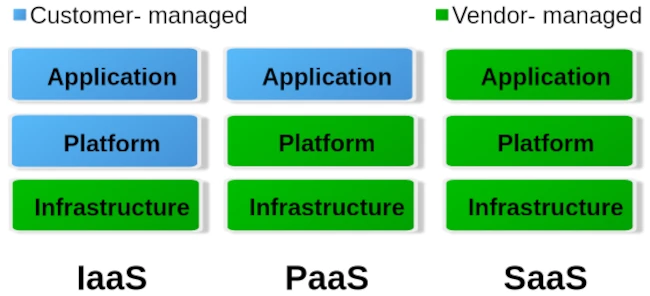
When it comes to cloud, we roughly distinguish between three different operating levels: Infrastructure as a Service (IaaS), Platform as a Service (PaaS) and Software as a Service. The image below gives an idea of ​​how these levels are divided.

To put it simply, you can say that with IaaS the provider only provides the hardware specification. So CPU, RAM, hard drive and internet connection. Via the administration software e.g. B. Kubernetes, you can now create your own virtual machines/containers and install the corresponding operating systems and services yourself. The entire responsibility for security and network routing lies with the customer. PaaS, on the other hand, already provides a rudimentary virtual machine including the selected operating system. What you ultimately install on this system above the operating system level is up to you. But here too, the issue of security is largely in the hands of the customer. For most hosting providers, typical PaaS products are so-called virtual servers. Users have the least freedom with SaaS. Here you usually only have permission to use software through a user account. Very typical SaaS products are email accounts, but also so-called managed servers. Managed servers are mostly used to provide your own websites. Here the version of the programming language and the database is specified by the server operator.

Managed servers in particular have a long tradition. They emerged at the turn of the millennium to provide an immediately usable environment for dynamic PHP websites with a MySQL database connection. The situation is similar with the serverless products that have recently become fashionable. Depending on your level of experience, you can now buy corresponding products from the major providers AWS, Google and Microsoft Azure.

The idea is to no longer operate your own servers for the services and thus outsource the entire hardware, operation and security effort to the cloud operators. In principle, this isn’t a bad idea, especially when it comes to small companies or startups that don’t have a lot of financial resources at their disposal or simply lack the administrative know-how for networks, Linux and server security.

Of course, serverless offerings that are completely managed externally quickly reach their limits. Especially if you want to provide your own developed individual serverless software in the cloud with as little effort as possible, you will come across many a stumbling block. A problem is often the flexible expandability when requirements change. You can certainly buy products from the various providers’ portfolios and combine them as you like like a building block set, but the costs incurred can quickly add up.

Basically, there is nothing wrong with a pay per use model (i.e. pay for what you use). At first glance, this is not a bad solution for people and organizations with small budgets. But here too, it’s the little details that can quickly grow into serious problems.

If you choose any cloud provider, you are well advised to avoid its proprietary management and automation products and instead use established general products if possible. If you commit yourself to one provider with all the consequences, it will only be possible to switch to another provider with great effort. Changes to the terms and conditions or continuously increasing costs are possible reasons for a forced change. Therefore, test whoever binds himself forever.

But also careless use of resources in cloud systems, e.g. B. due to incorrect configurations or unfavorable deployment strategies, can lead to an explosion in costs. Here you are well advised if there is the option to set limits and activate them. So that once you reach a certain amount, you will be informed that only a ‘certain’ quota is available. Especially with highly available services that suddenly receive an enormous number of new users, such limits can quickly lead to them being disconnected from the network. It is therefore always a good idea to use two cloud solutions, one for development and a separate one for the productive system, in order to minimize the offline risk.

Similar to stock market trading, you can also define limits for cloud services like AWS. Stop-loss orders on the stock market prevent you from selling a stock too cheaply or buying it too expensively. With the pay-per-use model, it’s not much different in the cloud. Here, you need to set appropriate limits with your provider to prevent bills from exceeding your available budget. These limits are also dynamic in the cloud. This means that the framework conditions are constantly changing, requiring the necessary limits to be regularly adjusted to meet current needs. To identify bottlenecks early, a robust monitoring system should be in place. The minimum requirement for an AWS node is determined by its requests. The upper limit of available resources is defined by the limit. Tools like IBM’s Kubecost can largely automate cost monitoring in Kubernetes clusters.

For cloud development environments, you should also keep a close eye on your own development and DevOps team. If an NPM Docker container of over 2 GB is created on the fly every time for a simple JavaScript Angular app, this strategy should definitely be questioned. Even if the cloud can allocate seemingly infinite resources dynamically, that doesn’t mean that this happens for free.

Of course, the issue of security is also an important factor. Of course, you can trust the cloud operator when he says that everything is encrypted and access to customer data and business secrets is not possible. One can certainly assume that the information that is to be accessed in most ventures rarely has any exciting or even exciting content that could be of interest to large cloud operators. If you still want to be on the safe side, you should write off the idea of ​​serverless completely and consider running your own cloud. Thanks to modern and free software, this is now easier than expected.

I have learned from personal experience that, given the complexity of modern web applications, efficient monitoring with Grafana and Prometheus or other solutions such as the ELK Stack or Slunk is essential. But some DevOps teams have difficulties with data collection and proper evaluation. IT decision-makers in particular are asked to get a technical overview so as not to fall for the well-sounding marketing traps of cloud and serverless.


Clean Desk – More Than Just Security

As a child, I liked to reply to my mother that only a genius could master chaos when she told me to tidy my room. A very welcome excuse to shirk my responsibilities. When I started an apprenticeship in a trade after finishing school, the first thing my master craftsman emphasized was: keeping things tidy. Tools had to be put back in their bags after use, opened boxes of the same materials had to be refilled, and of course, there was also the need to sweep up several times a day. I can say right away that I never perceived these things as harassment, even if they seemed annoying at first. Because we quickly learned the benefits of the motto “keep things clean.”

Tools that are always put back in their place give us a quick overview of whether anything is missing. So we can then go looking for it, and the likelihood of things being stolen is drastically reduced. With work materials, too, you maintain a good overview of what’s been used up and what needs to be replaced. Five empty boxes containing only one or two items not only take up space but also lead to miscalculations of available resources. Finally, it’s also true that one feels less comfortable in a dirty environment, and cleanliness demonstrates to the client that one works in a focused and planned manner.

Due to this early experience, when the concept of Clean Desk was introduced as a security measure in companies a few years ago, I didn’t immediately understand what was expected of me. After all, the Clean Desk principle had been second nature to me long before I completed my computer science degree. But let’s start at the beginning. First, let’s look at what Clean Desk actually is and how to implement it.

Anyone who delves deeply into the topic of security learns one of the first things they learn: most successful attacks aren’t carried out using complicated technical maneuvers. They’re much more mundane and usually originate from within, not from the outside. True to the adage, opportunity makes the thief. When you combine this fact with the insights of social engineering, a field primarily shaped by the hacker Kevin Mitnick, a new picture emerges. It’s not always necessary to immediately place your own employees under suspicion. In a building, there are external cleaning staff, security personnel, or tradespeople who usually have easy access to sensitive areas. Therefore, the motto should always be: trust is good, but control is better, which is why a Clean Desk Policy is implemented.

The first rule is: anyone leaving their workstation for an extended period must switch off their devices. This applies especially at the end of the workday. Otherwise, at least the desktop should be locked. The concept behind this is quite simple: Security vulnerabilities cannot be exploited from switched-off devices to hack into the company network from the outside. Furthermore, it reduces power consumption and prevents fires caused by short circuits. To prevent the devices from being physically stolen, they are secured to the desk with special locks. I’ve personally experienced devices being stolen during lunch breaks.

Since I myself have stayed in hotels a lot, my computer’s hard drive is encrypted as a matter of course. This also applies to all external storage devices such as USB sticks or external SSDs. If the device is stolen, at least no one can access the data stored on it.

It goes without saying that secure encryption is only possible with a strong password. Many companies have specific rules that employee passwords must meet. It’s also common practice to assign a new password every 30 to 90 days, and this new password must be different from the last three used.

It’s often pointed out that passwords shouldn’t be written on a sticky note stuck to the monitor. I’ve never personally experienced this. It’s much more typical for passwords to be written under the keyboard or mousepad.

Another aspect to consider is notes left on desks, wall calendars, and whiteboards. Even seemingly insignificant information can be quite valuable. Since it’s rather difficult to decide what truly needs protecting and what doesn’t, the general rule is: all notes should be stored securely at the end of the workday, inaccessible to outsiders. Of course, this only works if lockable storage space is available. In sensitive sectors like banking and insurance, the policy even goes so far as to prohibit colleagues from entering their vacation dates on wall calendars.

Of course, these considerations also include your own wastebasket. It’s essential to ensure that confidential documents are disposed of in specially secured containers. Otherwise, the entire effort to maintain confidentiality becomes pointless if you can simply pull them out of the trash after work.

But the virtual desktop is also part of the Clean Desk Policy. Especially in times of virtual video conferences and remote work, strangers can easily catch a glimpse of your workspace. This reminds me of my lecture days when a professor had several shortcuts to the trash on his desktop. We always joked that he was recycling. Separate trash folders for Word, Excel, etc. files.

The Clean Desk Policy has other effects as well. It’s much more than just a security concept. Employees who consistently implement this policy also bring more order to their thoughts and can thus work through tasks one by one with greater focus, leading to improved performance. Personal daily planning is usually structured so that all started tasks can be completed by the end of the workday. This is similar to the trades. Tradespeople also try to complete their jobs by the end of the workday to avoid having to return for a short time the next day. A considerable amount of time is spent on preparation.

Implementing a Clean Desk Policy follows the three Ps (Plan, Protect & Pick). At the beginning of the day, employees decide which tasks need to be completed (Plan), and select the corresponding documents and necessary materials for easy access. At the end of the day, everything is securely stored. During working hours, it must also be ensured that no unauthorized persons have access to information, for example, during breaks. This daily, easy-to-implement routine of preparation and follow-up quickly becomes a habit, and the time required can be reduced to just a few minutes, so that hardly any work time is wasted.

With a Clean Desk Policy, the overwhelming piles of paper disappear from your desk, and by considering which tasks need to be completed each day, you can focus better on them, which significantly improves productivity. At the end of the day, you can also mentally cross some items off your to-do list, leading to greater satisfaction.


Vibe coding – a new plague of the internet?

When I first read the term vibe coding, I first thought of headphones, chill music and transitioning into flow. The absolute state of creativity that programmers chase. A rush of productivity. But no, it became clear to me quite quickly that it was about something else.
Vibe coding is the name given to what you enter into an AI via the prompt in order to get a usable program. The output of the Large Language Model (LLM) is not yet the executable program, but rather just the corresponding source text in the programming language that the Vibe Coder specifies. Therefore, depending on which platform it is on, the Vibe Coder still needs the ability to make the whole thing work.

Since I’ve been active in IT, the salespeople’s dream has been there: You no longer need programmers to develop applications for customers. So far, all approaches of this kind have been less than successful, because no matter what you did, there was no solution that worked completely without programmers. A lot has changed since the general availability of AI systems and it is only a matter of time before LLM systems such as Copilot etc. also deliver executable applications.

The possibilities that Vibe Coding opens up are quite remarkable if you know what you are doing. Straight from Goethe’s sorcerer’s apprentice, who was no longer able to master the spirits he summoned. Are programmers now becoming obsolete? In the foreseeable future, I don’t think the programming profession will die out. But a lot will change and the requirements will be very high.

I can definitely say that I am open to AI assistance in programming. However, my experiences so far have taught me to be very careful about what the LLMs suggest as a solution. Maybe it’s because my questions were very specific and for specific cases. The answers were occasionally a pointer in a possible direction that turned out to be successful. But without your own specialist knowledge and experience, all of the AI’s answers would not have been usable. Justifications or explanations should also be treated with caution in this context.

There are now various offers that want to teach people how to use artificial intelligence. So in plain language, how to formulate a functioning prompt. I think such offers are dubious, because the LLMs were developed to understand natural (human) language. So what should you learn to formulate complete and understandable sentences?

Anyone who creates an entire application using Vibe Coding must test it extensively. So click through the functions and see if everything works as it should. This can turn into a very annoying activity that becomes more annoying with each run.

The use of programs created by Vibe Coding is also unproblematic as long as they run locally on your own computer and are not freely accessible as a commercial Internet service. Because this is exactly where the danger lurks. The programs created by Vibe Coding are not sufficiently protected against hacker attacks, which is why they should only be operated in closed environments. I can also well imagine that in the future the use of programs that are Vibe Coded will be prohibited in security-critical environments such as authorities or banks. As soon as the first cyber attacks on company networks through Vibe coding programs become known, the bans are in place.

Besides the question of security for Vibe Coding applications, modifications and extensions will be extremely difficult to implement. This phenomenon is well-known in software development and occurs regularly with so-called legacy applications. As soon as you hear that something has grown organically over time, you’re already in the thick of it. A lack of structure and so-called technical debt cause a project to erode over time to such an extent that the impact of changes on the remaining functionality becomes very difficult to assess. It is therefore likely that there will be many migration projects in the future to convert AI-generated codebases back into clean structures. For this reason, Vibe Coding is particularly suitable for creating prototypes to test concepts.

There are now also complaints in open source projects that every now and then there are contributions that convert almost half of the code base and add faulty functions. Of course, common sense and the many standards established in software development help here. It’s not like we haven’t had experience with bad code commits in open source before. This gave rise to the dictatorship workflow for tools like Git, which was renamed Pull Request by the code hosting platform GitHub.

So how can you quickly identify bad code? My current prescription is to check test coverage for added code. No testing, no code merge. Of course, test cases can also be Vibe Coded or lack necessary assertions, which can now also be easily recognized automatically. In my many years in software development projects, I’ve experienced enough that no Vibe Coder can even come close to bringing beads of sweat to my forehead.

My conclusion on the subject of Vibe Coding is: In the future, there will be a shortage of capable programmers who will be able to fix tons of bad production code. So it’s not a dying profession in the foreseeable future. On the other hand, a few clever people will definitely script together a few powerful isolated solutions for their own business with simple IT knowledge that will lead to competitive advantages. As we experience this transformation, the Internet will continue to become cluttered and the gems Weizenbaum once spoke of will become harder to find.