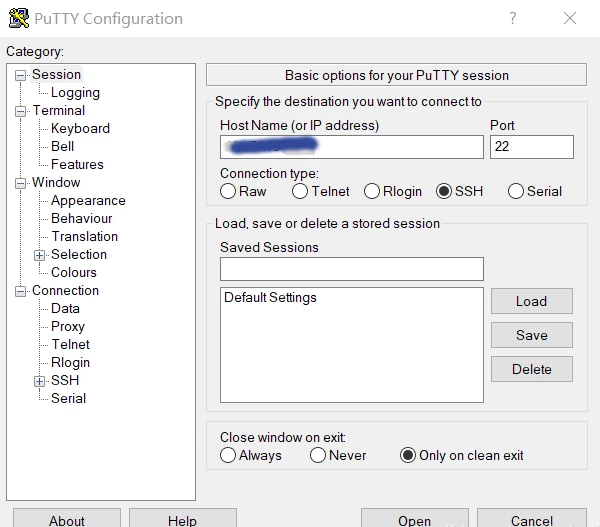
Managing Linux servers or Docker containers needs a basic understanding of the terminal, also known as the command line. Windows users, for example, can use the program PuTTY to obtain remote access via Secure Shell (SSH). The SSH is a secure remote connection that establishes an encrypted terminal connection to a Linux machine. SSH provides two basic types of access to a remote system. The not recommended way is via user /password or the better secure variant with a provided RSA encryption key pair.
Per definition, “terminal” and “shell” are not the same but are often used as synonyms. In general, is the terminal just the command line interface (CLI) that receives keystrokes from user interaction. The shell is an interpreter who runs inside the terminal to execute programs. For most Linux distributions, BASH (Bourne Again Shell) is the default system shell. Besides the BASH, there exist other shell variants like KornShell (ksh) or C Shell (csh).
When gaining access to a machine, whether through a reverse shell or SSH, the terminal may behave unusually. Common issues include the inability to clear text, use CTRL+C or CTRL+L, and improper text display. Here’s how to improve terminal navigation.
Steps for a Better Terminal Experience
1. Start a Temporary Script
script /dev/null -c bash
This starts a script that automatically deletes itself, as it points to /dev/null.
2. Send Reverse Shell to Background
Press CTRL+Z. This puts the reverse shell process in the background.
3. Resume the Process and Configure stty
stty raw -echo; fg
This returns you to the process and adjusts the terminal for rawer input and no echo.
4. Reset the Terminal
reset xterm
Use this command even if the text doesn’t display correctly or there are strange indents.
Replace [real console row number] and [real console column number] with the corresponding values found by running stty size in a normal console.
Security hint: Linux server machines that are reachable on the internet should not provide the login via superuser (root), neither as account password access. The problem we face is a distributed brute force attack from botnets to gain an administrative shell and hijack the system. Modern harden Linux servers disable the root account and just provide the sudo command for administrative users.
Administrators who need to deal with multiple open shells to maintain different machines like to use a very handy tool called TMUX [1]. Currently available in Version 3 and easily installed via shell.
apt-get install tmux
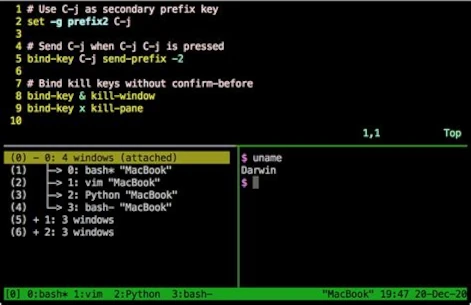
TMUX is a program that allows multiple terminal sessions in one terminal. For the correct usage, you should consult the official manual page [2]. The program is a bit complex to use and needs a little time to learn. A short workshop is too large for this post and would fit into its own article, may get published in the future. Just to give an idea of the possibilities they can do with TMUX check the following screenshot.
One of the most important insights into software testing comes from the much-cited article “The Humble Programmer,” published by Dijkstra in 1972. In essence, it states that testing can only detect errors, but it is impossible to prove that the program is error-free. Conversely, this means that high-quality testing uncovers as many errors as possible, thus reducing the likelihood of further errors existing in the program.
The first question that arises is what constitutes “good” test quality. A crucial factor is performance. If test execution takes longer than 5 minutes, it disrupts the developer’s workflow. If test execution takes longer than 10 minutes, developers lose acceptance of running tests automatically during the build process. This leads to test execution being disabled locally, thus violating the principle of failing as quickly as possible in case of an error. The principle of rapid failure is one of the cornerstones of automated software testing, as it allows for timely addressing and fixing of the problem. This rapid response is what supports the developer’s workflow and thus avoids so-called context switching. The less time one has to adapt to a new situation, the more productive one can be, which can result in a significant reduction in development costs. We can say that it’s not the number of tests that matters, but rather writing the right, i.e., relevant, tests.
The work of McCabe, who formulated a measure of complexity in 1976, provides an idea of how many test cases are needed. The complexity score of a function or method serves as a benchmark for the number of required test cases. However, a high number of test cases does not automatically mean that they are relevant to the correctness of the method or function. The usefulness, or in other words, the expressiveness of the existing test cases, results from how well they cover the existing code. Only complete coverage ensures that all areas of a function have been executed and are thus covered by a test case. When considering test coverage, we distinguish between two metrics: the coverage of all lines of code and the coverage of all branches. Achieving high test coverage is particularly difficult in so-called legacy projects. To keep the effort required for meaningful tests manageable, it’s necessary to achieve 100% line and branch coverage only for newly added features. If 100% coverage cannot be reached, this indicates the need for refactoring to ensure the testability of the added functionality.
Let’s assume the optimal case and consider a so-called greenfield project, whose number of test cases corresponds to McCabe’s complexity measure and for which we can already demonstrate 100% test coverage for lines and branches. We still face the problem Dijkstra formulated. We must be aware that while we can prove we’ve entered all code sections with a test case, we cannot verify whether our assumptions about the source code’s behavior are correct. In the context of xUnit tests, this involves the various assert functions that test a function against an expected value. Here’s a classic example for Java Collections, which can also be applied to other programming languages:
Lists, or more precisely, the ArrayList implemented in Java, doesn’t store the list elements as values within the list itself, but uses call-by-reference, which only references the memory address of the list element. Therefore, when performing operations on existing lists, we are always manipulating the original list. When comparing the original list with the manipulated list in a test case, they are always identical because they are the same list. Only when a true copy of the original is created, for example, using a copy constructor, which is then manipulated to perform comparison tests, are the assumptions made correct. To put it bluntly, 100% test coverage can be achieved without a real safety net for error detection.
To discover such logical errors as just described in tests, we can use so-called mutation testing. The concept of mutation testing also has its origins in the 1970s. In his 1971 article “Fault Diagnostics of Computer Programs,” Richard Lipton described the idea of mutation testing, which led to numerous further research projects.
The idea behind mutation testing is very simple, like so many groundbreaking achievements. Let’s assume that the source code contains an expression if(var > 0) and a corresponding test has been formulated for this expression. If we now change the condition in the if statement, the associated test should fail. There are several ways to modify the if statement. One option is to reverse the operator from > to <. Using other operators like = or ! is also possible. Another option is to change the comparison value of 0. This can be achieved by incrementing or decrementing it by 1. All these variations represent so-called mutations of the original expression, which is why they can also be referred to as mutants. The goal is to ensure that as many mutants as possible cause the existing test case to fail. Each mutant that causes the test case to fail is called a “kill.”
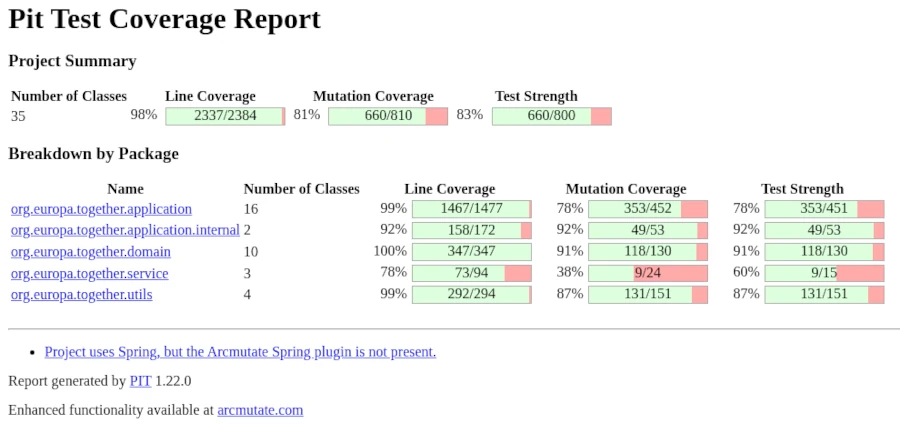
If none of the generated mutants cause the test case to fail, the correctness of the test case is questionable and must be verified. Ideally, all mutants should cause the test case to fail, although this is rather the exception. Meaningful test cases should achieve a mutation score of at least 70%. The calculation of the mutation score, or kill rate, is as follows: To calculate the mutation score, divide the number of killed mutants (mutants that caused the test to fail) by the total number of mutants generated and multiply the result by 100 to obtain a percentage. For example, if 7 out of 10 mutants are killed, the mutation score is 70%.
Some mutants behave functionally identically to the original code. These equivalent mutants cannot be eliminated by any test, as they do not represent actual errors. This provides us with a decision criterion that can be helpful when the mutation score is low and when assessing the situation.
Even though the concept described here is very easy to understand, as is so often the case, the devil is in the details. Firstly, appropriate mutation operators must be selected, and secondly, the number of generated mutants should be limited to minimize test execution time. Since determining the mutation score can be very time-consuming depending on the size of the codebase, mutation tests should not be run via the standard build process but rather as a separate test procedure. Generally speaking, however, developers with a good understanding of test-driven software development will quickly grasp the topic of mutation testing. Mutant testing, combined with high test coverage, is also a very powerful tool for project management evaluation, allowing them to assess the system without reading the source code. Finally, it is crucial to note that the procedure described here cannot address security concerns. To ensure that the application is protected against hacker attacks such as SQL injections, specialized security audits are essential.
The permanent storage of data is called persistence in technical terms. To be able to access this data again, software is needed that structures and searches it. Such software is called a Database Management System (DBMS). To access a database from a programming language like Java, Ruby, Python, or PHP, a corresponding driver is required. This driver is often referred to as a client, because the DBMS is the server that allows access for multiple clients. In this article, we won’t focus on how to connect to the respective databases with which programming language, but rather on the different database technologies and their applications.
[Relational DB (rows, columns) | GIS DB | embedded DB]
[NoSQL | Key Value Store | Document DB (JSON, XML) | Graph DB | Time Series Server]
There are now numerous solutions to choose from for classic database systems, the so-called relational databases. Both commercial and professional free open-source options are vying for users’ attention. Most web hosting providers offer their users the choice between the free DBMS MySQL (Oracle) and MariaDB (a fork of MySQL after its acquisition by Oracle) for data storage. However, those who can manage their own servers can, of course, opt for the more professional PostgreSQL.
PostgreSQL is rather unsuitable for most standard PHP applications, although WordPress and Joomla do support this database system. Problems usually arise with the developers of extensions. Instead of using the application’s interfaces, database access is often achieved by ignorantly using MySQL’s native commands.
In commercial application development, Oracle or Microsoft SQL Server are typically used, depending on familiarity with the Microsoft Windows environment. The reason for using commercial database servers lies in the costly support available when vulnerabilities and bugs are discovered. Business-critical applications must ensure the continued existence of both the vendor and their customers. The speed of delivery of security patches is a particularly significant reason for using commercial software.
The functionality of relational databases is defined by tables. The columns of a table define the properties, and a row of the table represents the data record. To access an explicit data record, a column (primary key) must contain unique entries that do not appear again in that column. This property of the primary key is called uniqueness. Primary keys allow for the establishment of relationships, or relations, between tables. To keep this article from becoming excessively long, I will limit my in-depth discussion of the functionality of relational databases to this point and move on to the next category.
Of course, there are also relational databases that operate in a column-oriented rather than row-oriented manner. This enables more efficient queries and analyses, especially with large datasets. Here are some of the main features and benefits of column-oriented databases:
Data organization: Stores data in columns, which speeds up the processing of specific columns in queries.
Compression: Often offers better compression rates for columnar data because similar data types are stored together.
Analytical queries: Optimized for analysis and aggregate queries that need to quickly process large amounts of data.
Reduced I/O: Reduces the amount of data that needs to be read from disk, as only the required columns are retrieved.
Column-oriented databases include Apache Cassandra, SAP Hanna, DB2, and Amazon BigQuery, with classic use cases for:
Business Intelligence: Ideal for databases that need to process large amounts of data for analytical purposes.
Data Warehousing: Efficient storage and analysis of historical data.
Real-time analytics: Suitable for applications that require rapid decisions based on current data.
To provide data for geographic information systems (GIS) like Google Maps, so-called geospatial databases are used. Geospatial databases are extensions of relational databases that provide tables and relations optimized and standardized for geometric objects. The GIS extension for PostgreSQL is called PostGIS. The datasets for the freely available OpenStreetMap are in a specialized XML format but can also be transformed into geospatial data structures.
Key-value stores are often used in configuration files. However, if you want to build a fast caching system, you need a bit more complexity. This is because the key/value relationship can range from simple strings to complex objects. Basically, a store consists of a unique key to which values can be assigned depending on the data type. Data types can be strings, numbers (integers, floats), Boolean values, and lists. Key-value databases belong to the NoSQL database family because, unlike relational databases, queries are not performed using SQL but are database- and vendor-specific.
Typical key-value databases include Redis, MemCached, Amazon DynamoDB, and the somewhat outdated BarkleyDB, which was acquired by Oracle. A characteristic of key-value databases is that data is stored in memory and backed up to disk at regular intervals. Keeping data in RAM naturally requires a machine with sufficient RAM. Especially with large applications, an enormous amount of data can accumulate for caching.
Another category of databases is embedded databases. “Embedded” refers to the database server itself. Specifically, this means that the database system is not a standalone installation but rather a library integrated into the application. The advantage of this solution is a simpler application installation process. However, this often comes at the expense of security, as many embedded databases lack a dedicated user management layer. This is particularly true for SQLite and the Java-implemented H2. Even the previously mentioned NoSQL BarkelyDB, available as a Java or C library, lacks user management. This means that anyone with access to the application can use a client to read data from the database. Therefore, these systems are not suitable for applications requiring a high level of security.
Regarding the Java version of BarkelyDB, the last available implementation dates back to 2017 and is available as source code in Java/Apache Ant, but this code must be compiled manually. An official binary from Oracle is no longer available, but unofficial versions can be found in the Maven Central Repository.
Anyone wanting to integrate a fully functional relational database into their application can use the embedded version of PostgreSQL – pgx – which provides all the functions of the PostgreSQL server locally.
The next class of databases belongs to the NoSQL category: document-based databases. The two DBMSs, MongoDB and CouchDB, are quite similar in their feature set, but there are significant differences.
MongoDB is often chosen for applications requiring complex queries and real-time analytics due to its comprehensive query language and high performance.
CouchDB is particularly well-suited for applications that require reliability, a distributed architecture, and easy replication, especially in scenarios where offline access is essential.
The fundamental way document databases work is that the schema is derived from the underlying data structure. These data structures are usually in JSON format and are accessed accordingly. Documents of the same data structure are assigned to a collection. Therefore, these databases don’t store classic office documents, but rather formats like JSON and XML. Document databases that specialize in XML include Oracle XML DB and Apache Xindice.
Many web developers specializing in front-end (UX/UI) development frequently use document databases. This allows them to store data in JSON format to simulate RESTful access and thus populate the dynamic content of the user interface.
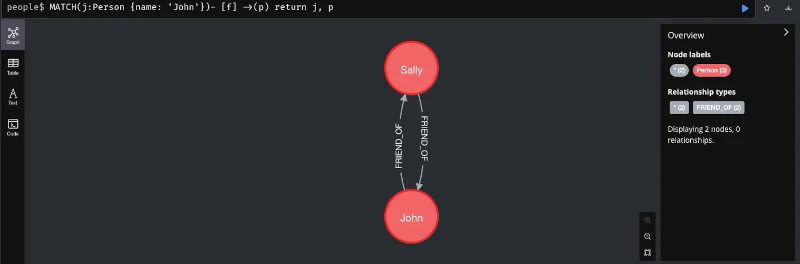
A very exotic variant of NoSQL databases are graph databases, which represent data as graphs. This storage format allows for the efficient storage of information according to relationships. Such relationships can be links between websites or a person’s representation on social media. Even the complex relationships used in recommendation systems can be represented as graphs. The following figure shows a simple example of a graph database implemented in Java using Neo4j, to illustrate its use case.
Other graph databases include Amazon Neptune and ArangoDB.
Finally, I’d like to introduce time series. Since monitoring has become essential, especially in the context of application operation, data presented as time series has gained in importance. Typical databases that specialize in processing time series are Prometheus and InfluxDB. However, there are also corresponding extensions for classic relational databases. The PostgreSQL database, which has already been mentioned several times, also has a corresponding extension for this use case called TimescaleDB.
Of course, much more could be said about this topic. After all, countless books on databases fill several meters of library shelves. However, this should suffice for an introduction and an overview of the various database systems and NoSQL solutions. With the information from this article, you now have an idea of which database is suitable for your specific use case. We have also seen that relational databases, especially the free and open-source database PostgreSQL with its available extensions, are very versatile. Further topics related to databases include data modeling and security against hacker attacks.
The cloud is one of the most innovative developments since the turn of the millennium and enables us to make widespread use of neural networks, which we popularly refer to as Large Language Models (LLM). This technological leap can only be surpassed by quantum computing. But enough of the buzzwords for SEO optimization, instead let’s take a look behind the scenes. Let’s start with what the cloud actually is and put all the marketing terms aside.
The best way to imagine the cloud is as a gigantic supercomputer made up of many small computers like building blocks. This theoretically allows you to combine any amount of CPU power, RAM and hard drive space. On this supercomputer, which runs in a data center, virtual machines can now be provided that simulate a real computer with freely definable hardware. In this way, the physical hardware resources can be optimally distributed among the provided virtual machines.
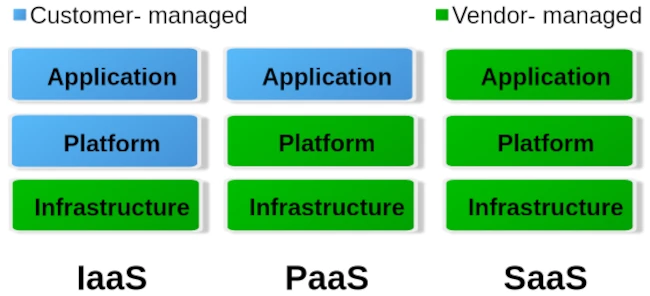
When it comes to cloud, we roughly distinguish between three different operating levels: Infrastructure as a Service (IaaS), Platform as a Service (PaaS) and Software as a Service. The image below gives an idea of how these levels are divided.
To put it simply, you can say that with IaaS the provider only provides the hardware specification. So CPU, RAM, hard drive and internet connection. Via the administration software e.g. B. Kubernetes, you can now create your own virtual machines/containers and install the corresponding operating systems and services yourself. The entire responsibility for security and network routing lies with the customer. PaaS, on the other hand, already provides a rudimentary virtual machine including the selected operating system. What you ultimately install on this system above the operating system level is up to you. But here too, the issue of security is largely in the hands of the customer. For most hosting providers, typical PaaS products are so-called virtual servers. Users have the least freedom with SaaS. Here you usually only have permission to use software through a user account. Very typical SaaS products are email accounts, but also so-called managed servers. Managed servers are mostly used to provide your own websites. Here the version of the programming language and the database is specified by the server operator.
Managed servers in particular have a long tradition. They emerged at the turn of the millennium to provide an immediately usable environment for dynamic PHP websites with a MySQL database connection. The situation is similar with the serverless products that have recently become fashionable. Depending on your level of experience, you can now buy corresponding products from the major providers AWS, Google and Microsoft Azure.
The idea is to no longer operate your own servers for the services and thus outsource the entire hardware, operation and security effort to the cloud operators. In principle, this isn’t a bad idea, especially when it comes to small companies or startups that don’t have a lot of financial resources at their disposal or simply lack the administrative know-how for networks, Linux and server security.
Of course, serverless offerings that are completely managed externally quickly reach their limits. Especially if you want to provide your own developed individual serverless software in the cloud with as little effort as possible, you will come across many a stumbling block. A problem is often the flexible expandability when requirements change. You can certainly buy products from the various providers’ portfolios and combine them as you like like a building block set, but the costs incurred can quickly add up.
Basically, there is nothing wrong with a pay per use model (i.e. pay for what you use). At first glance, this is not a bad solution for people and organizations with small budgets. But here too, it’s the little details that can quickly grow into serious problems.
If you choose any cloud provider, you are well advised to avoid its proprietary management and automation products and instead use established general products if possible. If you commit yourself to one provider with all the consequences, it will only be possible to switch to another provider with great effort. Changes to the terms and conditions or continuously increasing costs are possible reasons for a forced change. Therefore, test whoever binds himself forever.
But also careless use of resources in cloud systems, e.g. B. due to incorrect configurations or unfavorable deployment strategies, can lead to an explosion in costs. Here you are well advised if there is the option to set limits and activate them. So that once you reach a certain amount, you will be informed that only a ‘certain’ quota is available. Especially with highly available services that suddenly receive an enormous number of new users, such limits can quickly lead to them being disconnected from the network. It is therefore always a good idea to use two cloud solutions, one for development and a separate one for the productive system, in order to minimize the offline risk.
Similar to stock market trading, you can also define limits for cloud services like AWS. Stop-loss orders on the stock market prevent you from selling a stock too cheaply or buying it too expensively. With the pay-per-use model, it’s not much different in the cloud. Here, you need to set appropriate limits with your provider to prevent bills from exceeding your available budget. These limits are also dynamic in the cloud. This means that the framework conditions are constantly changing, requiring the necessary limits to be regularly adjusted to meet current needs. To identify bottlenecks early, a robust monitoring system should be in place. The minimum requirement for an AWS node is determined by its requests. The upper limit of available resources is defined by the limit. Tools like IBM’s Kubecost can largely automate cost monitoring in Kubernetes clusters.
For cloud development environments, you should also keep a close eye on your own development and DevOps team. If an NPM Docker container of over 2 GB is created on the fly every time for a simple JavaScript Angular app, this strategy should definitely be questioned. Even if the cloud can allocate seemingly infinite resources dynamically, that doesn’t mean that this happens for free.
Of course, the issue of security is also an important factor. Of course, you can trust the cloud operator when he says that everything is encrypted and access to customer data and business secrets is not possible. One can certainly assume that the information that is to be accessed in most ventures rarely has any exciting or even exciting content that could be of interest to large cloud operators. If you still want to be on the safe side, you should write off the idea of serverless completely and consider running your own cloud. Thanks to modern and free software, this is now easier than expected.
I have learned from personal experience that, given the complexity of modern web applications, efficient monitoring with Grafana and Prometheus or other solutions such as the ELK Stack or Slunk is essential. But some DevOps teams have difficulties with data collection and proper evaluation. IT decision-makers in particular are asked to get a technical overview so as not to fall for the well-sounding marketing traps of cloud and serverless.
It’s not just high-level languages, which need to convert source code into machine code to make it executable, that require build tools. These tools are now also available for modern scripting languages like Python, Ruby, and PHP, as their scope of responsibility continues to expand. Looking back at the beginnings of this tool category, one inevitably encounters make, the first official representative of what we now call a build tool. Make’s main task was to generate machine code and package the files into a library or executable. Therefore, build tools can be considered automation tools. It’s logical that they also take over many other recurring tasks that arise in a developer’s daily work. For example, one of the most important innovations responsible for Maven’s success was the management of dependencies on other program libraries.
Another class of automation tools that has almost disappeared is the installer. Products like Inno Setup and Wise Installer were used to automate the installation process for desktop applications. These installation routines are a special form of deployment. The deployment process, in turn, depends on various factors. First and foremost, the operating system used is, of course, a crucial criterion. But the type of application also has a significant influence. Is it, for example, a web application that requires a defined runtime environment (server)? We can already see here that many of the questions being asked now fall under the umbrella of DevOps.
As a developer, it’s no longer enough to simply know how to write program code and implement functions. Anyone wanting to build a web application must first get the corresponding server running on which the application will execute. Fortunately, there are now many solutions that significantly simplify the provisioning of a working runtime. But especially for beginners, it’s not always easy to grasp the whole topic. I still remember questions in relevant forums about downloading Java Enterprise, but only finding that the application server was included.
Where automation solutions were lacking in the early 2000s, the challenge today is choosing the right tool. There’s an analogy here from the Java universe. When the Gradle build tool appeared on the market, many projects migrated from Maven to Gradle. The argument was that it offered greater flexibility. Often, the ability to define orchestrated builds was needed—that is, the sequence in which subprojects are created. Instead of acknowledging that this requirement represented an architectural shortcoming and addressing it, complex and difficult-to-manage build logic was built in Gradle. This, in turn, made customizations difficult to implement, and many projects were migrated back to Maven.
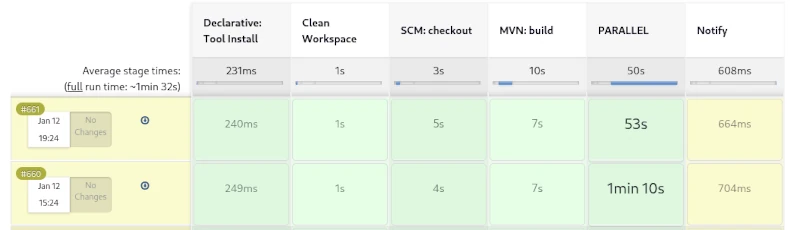
From DevOps automations, so-called pipelines have become established. Pipelines can also be understood as processes, and these processes can, in turn, be standardized. The best example of a standardized process is the build lifecycle defined in Maven, also known as the default lifecycle. This process defines 23 sequential steps, which, broadly speaking, perform the following tasks:
Resolving and deploying dependencies
Compiling the source code
Compiling and running unit tests
Packaging the files into a library or application
Deploying the artifact locally for use in other local development projects
Running integration tests
Deploying the artifacts to a remote repository server.
This process has proven highly effective in countless Java projects over the years. However, if you run this process as a pipeline on a CI server like Jenkins, you won’t see much. The individual steps of the build lifecycle are interdependent and cannot be triggered individually. It’s only possible to exit the lifecycle prematurely. For example, after packaging, you can skip the subsequent steps of local deployment and running the integration tests.
A weakness of the build process described here becomes apparent when creating web applications. Web frontends usually contain CSS and JavaScript code, which is also automatically optimized. To convert variables defined in SCSS into correct CSS, a SASS preprocessor must be used. Furthermore, it is very useful to compress CSS and JavaScript files as much as possible. This obfuscation process optimizes the loading times of web applications. However, there are already countless libraries for CSS and JavaScript that can be managed with the NPM tool. NPM, in turn, provides so-called development libraries like Grunt, which enable CSS processing and optimization.
We can see how complex the build process of modern applications can become. Compilation is only a small part of it. An important feature of modern build tools is the optimization of the build process. An established solution for this is creating incremental builds. This is a form of caching where only changed files are compiled or processed.
Jenkins Pipelines
But what needs to be done during a release? This process is only needed once an implementation phase is complete, to prepare the artifact for distribution. While it’s possible to include all the steps involved in a release in the build process, this would lead to longer build times. Longer local build times disrupt the developer’s workflow, making it more efficient to define a separate process for this.
An important condition for a release is that all used libraries must also be in their final release versions. If this isn’t the case, it cannot be guaranteed that subsequent releases of this version are identical. Furthermore, all test cases must run correctly, and a failure will abort the process. Additionally, a corresponding revision tag should be set in the source control repository. The finished artifacts must be signed, and API documentation must be created. Of course, the rules described here are just a small selection, and some of the tasks can even be parallelized. By using sophisticated caching, creating a release can be accomplished quickly, even for large monoliths.
Furthermore, by utilizing sophisticated caching, creating a release can be accomplished quickly, even for large monoliths. For Maven, for example, no complete release process, similar to the build process, has been defined. Instead, the community has developed a special plugin that allows for the semi-automation of simple tasks that arise during a release.
If we take a closer look at the topic of documentation and reporting, we find ample opportunities to describe a complete process. Creating API documentation would be just one minor aspect. Far more compelling about standardized reporting are the various code inspections, some of which can even be performed in parallel.
Of course, deployment is also essential. Due to the diversity of potential target environments, a different strategy is appropriate here. One possible approach would be broad support for configuration tools like Ansible, Chef, and Puppet. Virtualization technologies such as Docker and LXC containers are also standard in the age of cloud computing. The main task of deployment would then be provisioning the target environment and deploying the artifacts from a repository server. A wealth of different deployment templates would significantly simplify this process.
If we consistently extrapolate from these assumptions, we conclude that there can be different types of projects. These would be classic development projects, from which artifacts for libraries and applications are created; test projects, which in turn contain the created artifacts as dependencies; and, of course, deployment projects for providing the infrastructure. The area of automated deployment is also reflected in the concepts of Infrastructure as Code and GitOps, which can be taken up and further developed here.
Anyone interested in this somewhat specialized article doesn’t need an explanation of what Docker is and what this virtualization tool is used for. Therefore, this article is primarily aimed at system administrators, DevOps engineers, and cloud developers. For those who aren’t yet completely familiar with the technology, I recommend our Docker course: From Zero to Hero.
In a scenario where we regularly create new Docker images and instantiate various containers, our hard drive is put under considerable strain. Depending on their complexity, images can easily reach several hundred megabytes to gigabytes in size. To prevent creating new images from feeling like downloading a three-minute MP3 with a 56k modem, Docker uses a build cache. However, if there’s an error in the Dockerfile, this build cache can become quite bothersome. Therefore, it’s a good idea to clear the build cache regularly. Old container instances that are no longer in use can also lead to strange errors. So, how do you keep your Docker environment clean?
While docker rm <container-nane> and docker rmi <image-id> will certainly get you quite far, in build environments like Jenkins or server clusters, this strategy can become a time-consuming and tedious task. But first, let’s get an overview of the overall situation. The command docker system df will help us with this.
Before I delve into the details, one important note: The commands presented are very efficient and will irrevocably delete the corresponding areas. Therefore, only use these commands in a test environment before using them on production systems. Furthermore, I’ve found it helpful to also version control the commands for instantiating containers in your text file.
The most obvious step in a Docker system cleanup is deleting unused containers. Specifically, this means that the delete command permanently removes all instances of Docker containers that are not running (i.e., not active). If you want to perform a clean slate on a Jenkins build node before deployment, you can first terminate all containers running on the machine with a single command.
The -f parameter suppresses the confirmation prompt, making it ideal for automated scripts. Deleting containers frees up relatively little disk space. The main resource drain comes from downloaded images, which can also be removed with a single command. However, before images can be deleted, it must first be ensured that they are not in use by any containers (even inactive ones). Removing unused containers offers another practical advantage: it releases ports blocked by containers. A port in a host environment can only be bound to a container once, which can quickly lead to error messages. Therefore, we extend our script to include the option to delete all Docker images not currently used by containers.
Another consequence of our efforts concerns Docker layers. For performance reasons, especially in CI environments, you should avoid using them. Docker volumes, on the other hand, are less problematic. When you remove the volumes, only the references in Docker are deleted. The folders and files linked to the containers remain unaffected. The -a parameter deletes all Docker volumes.
docker volume prune -a -f
Another area affected by our cleanup efforts is the build cache. Especially if you’re experimenting with creating new Dockerfiles, it can be very useful to manually clear the cache from time to time. This prevents incorrectly created layers from persisting in the builds and causing unusual errors later in the instantiated container. The corresponding command is:
docker buildx prune -f
The most radical option is to release all unused resources. There is also an explicit shell command for this.
docker volume prune -a -f
We can, of course, also use the commands just presented for CI build environments like Jenkins or GitLab CI. However, this might not necessarily lead to the desired result. A proven approach for Continuous Integration/Continuous Deployment is to set up your own Docker registry where you can deploy your self-built images. This approach provides a good backup and caching system for the Docker images used. Once correctly created, images can be conveniently deployed to different server instances via the local network without having to constantly rebuild them locally. This leads to a proven approach of using a build node specifically optimized for Docker images/containers to optimally test the created images before use. Even on cloud instances like Azure and AWS, you should prioritize good performance and resource efficiency. Costs can quickly escalate and seriously disrupt a stable project.
In this article, we have seen that in-depth knowledge of the tools used offers several opportunities for cost savings. The motto “We do it because we can” is particularly unhelpful in a commercial environment and can quickly degenerate into an expensive waste of resources.
Apache Maven (Maven for short) was first released on March 30, 2002, as an Apache Top-Level Project under the free Apache 2.0 License. This license also allows free use by companies in a commercial environment without paying license fees.
The word Maven comes from Yiddish and means something like “collector of knowledge.”
Maven is a pure command-line program developed in the Java programming language. It belongs to the category of build tools and is primarily used in Java software development projects. In the official documentation, Maven describes itself as a project management tool, as its functions extend far beyond creating (compiling) binary executable artifacts from source code. Maven can be used to generate quality analyses of program code and API documentation, to name just a few of its diverse applications.
This online course is suitable for both beginners with no prior knowledge and experienced experts. Each lesson is self-contained and can be individually selected. Extensive supplementary material explains concepts and is supported by numerous references. This allows you to use the Apache Maven Master Class course as a reference. New content is continually being added to the course. If you choose to become an Apache Maven Master Class member, you will also have full access to exclusive content.
Developer
Maven Basics
Maven on the Command Line
IDE Integration
Archetypes: Creating Project Structures
Test Integration (TDD & BDD) with Maven
Test Containers with Maven
Multi-Module Projects for Microservices
Build Manager / DevOps
Release Management with Maven
Deploy to Maven Central
Sonatype Nexus Repository Manager
Maven Docker Container
Creating Docker Images with Maven
Encrypted Passwords
Process & Build Optimization
Quality Manager
Maven Site – The Reporting Engine
Determine and evaluate test coverage
Static code analysis
Review coding style specifications
In-Person Live Training – Build Management with Apache Maven
[EN] We use cookies to improve your experience on our site. By using our site, you consent to cookies.
[DE] Wir verwenden Cookies, um Ihre Erfahrungen auf unserer Website zu verbessern. Durch die Nutzung unserer Website stimmen Sie Cookies zu.
This website uses cookies
Websites store cookies to enhance functionality and personalise your experience. You can manage your preferences, but blocking some cookies may impact site performance and services.
Essential cookies enable basic functions and are necessary for the proper function of the website.
Name
Description
Duration
Cookie Preferences
This cookie is used to store the user's cookie consent preferences.
30 days
These cookies are needed for adding comments on this website.
Name
Description
Duration
comment_author
Used to track the user across multiple sessions.
Session
comment_author_email
Used to track the user across multiple sessions.
Session
comment_author_url
Used to track the user across multiple sessions.
Session
These cookies are used for managing login functionality on this website.
Name
Description
Duration
wordpress_logged_in
Used to store logged-in users.
Persistent
wordpress_sec
Used to track the user across multiple sessions.
15 days
wordpress_test_cookie
Used to determine if cookies are enabled.
Session
Statistics cookies collect information anonymously. This information helps us understand how visitors use our website.
Matomo is an open-source web analytics platform that provides detailed insights into website traffic and user behavior.