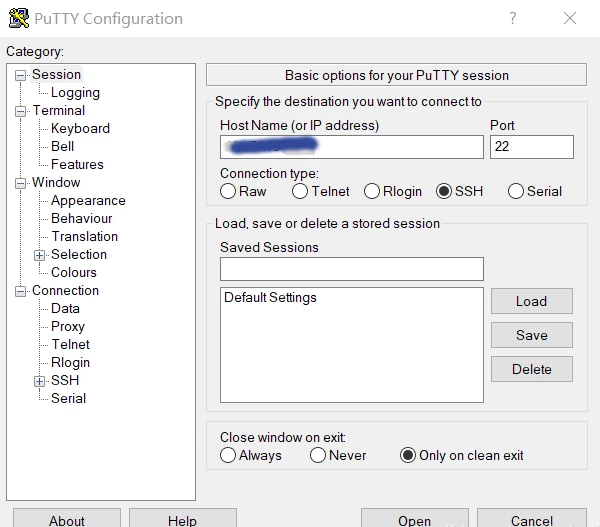
Managing Linux servers or Docker containers needs a basic understanding of the terminal, also known as the command line. Windows users, for example, can use the program PuTTY to obtain remote access via Secure Shell (SSH). The SSH is a secure remote connection that establishes an encrypted terminal connection to a Linux machine. SSH provides two basic types of access to a remote system. The not recommended way is via user /password or the better secure variant with a provided RSA encryption key pair.
Per definition, “terminal” and “shell” are not the same but are often used as synonyms. In general, is the terminal just the command line interface (CLI) that receives keystrokes from user interaction. The shell is an interpreter who runs inside the terminal to execute programs. For most Linux distributions, BASH (Bourne Again Shell) is the default system shell. Besides the BASH, there exist other shell variants like KornShell (ksh) or C Shell (csh).
When gaining access to a machine, whether through a reverse shell or SSH, the terminal may behave unusually. Common issues include the inability to clear text, use CTRL+C or CTRL+L, and improper text display. Here’s how to improve terminal navigation.
Steps for a Better Terminal Experience
1. Start a Temporary Script
script /dev/null -c bash
This starts a script that automatically deletes itself, as it points to /dev/null.
2. Send Reverse Shell to Background
Press CTRL+Z. This puts the reverse shell process in the background.
3. Resume the Process and Configure stty
stty raw -echo; fg
This returns you to the process and adjusts the terminal for rawer input and no echo.
4. Reset the Terminal
reset xterm
Use this command even if the text doesn’t display correctly or there are strange indents.
Replace [real console row number] and [real console column number] with the corresponding values found by running stty size in a normal console.
Security hint: Linux server machines that are reachable on the internet should not provide the login via superuser (root), neither as account password access. The problem we face is a distributed brute force attack from botnets to gain an administrative shell and hijack the system. Modern harden Linux servers disable the root account and just provide the sudo command for administrative users.
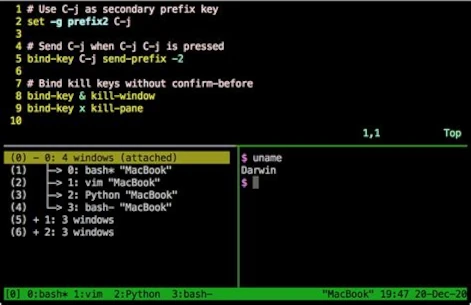
Administrators who need to deal with multiple open shells to maintain different machines like to use a very handy tool called TMUX [1]. Currently available in Version 3 and easily installed via shell.
apt-get install tmux
TMUX is a program that allows multiple terminal sessions in one terminal. For the correct usage, you should consult the official manual page [2]. The program is a bit complex to use and needs a little time to learn. A short workshop is too large for this post and would fit into its own article, may get published in the future. Just to give an idea of the possibilities they can do with TMUX check the following screenshot.
Developers with some networking experience know that a user’s IP address can reveal some interesting details. These details include information about the country and city of origin, as well as the internet service provider (ISP). This makes it possible to effectively identify and block the increasingly popular proxy servers. Of course, geolocation is just one piece of the puzzle in uniquely identifying users.
The current version of GeoIP is 2, which has completely replaced the outdated version 1. GeoIP2 is a service provided by MaxMind [1], which also offers a free community version. For example, if you run a self-hosted analytics tool like Matomo, you should ensure your web server is correctly configured for GeoIP2 to guarantee full functionality.
There are two ways to integrate GeoIP2 into your own server. Option 1 is the simpler option using a PHP module. Option 2 is more powerful but requires more server administration knowledge. In this solution, we use GeoIP2 as an Apache2 module.
Anyone who already has Fail2Ban [2] running correctly on their own server might be considering whether it makes sense to link Fail2Ban with GeoIP2. This is certainly possible, but it has more advantages than disadvantages, because Fail2Ban operates directly on the Apache log files. This is why Fail2Ban can only become active on the second request from an IP address. To activate GeoIP2 in Fail2Ban, a corresponding filter must be set, which can quickly have a negative impact on performance on servers with high user load. Therefore, it is better to monitor the requests to the server and block specific countries directly via the request in case of suspected attacks. However, this requires GeoIP2 to be installed and configured as an Apache module.
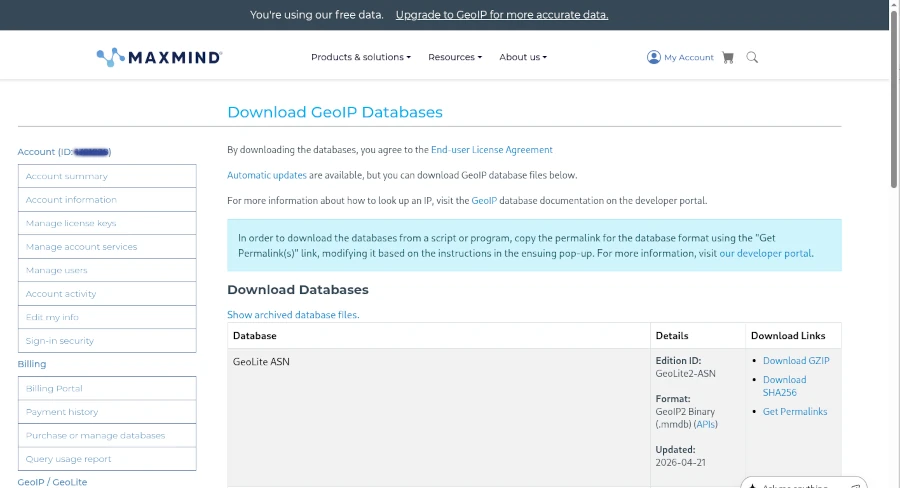
Before we can begin, however, we need to create a free account with MaxMind and download the free GeoIP2 (Lite version) databases for our example.
Once the first hurdle is cleared, we can get started. To use GeoIP2 in PHP applications, a suitable library is required. Using Composer as a dependency manager, the geoip2/geoip2 library can be included in its latest version.
As you can see, the directory for the MaxMind GeoLite database must also be specified during initialization. This option is particularly suitable for those using a managed server or web space who have no control over the installed environment. However, you should avoid using PECL (PHP Extension Community Library), as it has been marked as deprecated and will be replaced by PIE (PHP Installer for Extensions) [4].
Integrating GeoIP2 globally for all PHP applications requires a bit more effort. The basic requirement is a functioning Apache 2/PHP installation on a Linux operating system. If this is the case, only a few steps are necessary:
Install the maxminddb library
Download the PIE PHAR library
Install maxminddb for PIE and activate the extension in the php.ini file
Deploy the GeoLite databases on the server Before following this path, however, you should consider whether it would be better to deploy MaxMindDB as an Apache module. The most significant advantage of this approach is its high speed, which prevents the server from crashing even under heavy user load. The Apache module provides environment variables that can be used for filtering directly in the Apache configuration. The biggest challenge is compiling the Apache 2 module.
To keep this short workshop concise, I’ll demonstrate all the necessary steps in the php-apache:8.4 Docker container. Of course, it should be easy to adapt the corresponding commands slightly for a natively installed Apache HTTP Server.
In line 13, we copy the mod_maxminddb version 1.3.0, previously downloaded from GitHub [5], into the container to compile it in the next step. The important addition in line 16, which suppresses the error message that automake version 1.6 is required, is crucial. Afterward, the module can be activated, and the databases downloaded from MaxMind should also be copied into the Docker container. Finally, the module configuration for Apache in the geoip.conf file must be configured and activated. The content of the configuration file is as follows:
Anyone wanting to use a desktop program under Linux without modifying their existing system needs a special environment known in technical circles as a sandbox. Of course, you can also create a virtual machine with VMware or Oracle’s free VirtualBox, which simulates an entire computer including its operating system, and install programs within it for testing purposes to see how they behave. However, this option consumes a considerable amount of resources and is also somewhat resource-intensive.
But there is also a more lightweight virtualization technology available under Linux that employs various security features not available under Windows. These include, among other things, permissions at the file and directory level. But don’t worry, we won’t delve too deeply into the many details of the individual solutions; instead, we’ll focus primarily on the how and why.
On the server side, there are already proven virtualization programs for isolated and secure environments, such as LXC (Linux Containers) and the widely used Docker. On the desktop, programs like FireJail or BubbleWarp are commonly used to run applications with a graphical user interface in a restricted environment. Before we delve into the details of how this works, let’s consider a few scenarios that explain why all this effort can be worthwhile.
One of the oldest reasons for sandboxing is to create an environment where different versions of software need to be installed simultaneously for testing or development purposes, and the installation routine doesn’t allow this. Typical behavior in such cases is to first uninstall the old version of the software to install the new one, or simply to update the existing version. Setting up a sandbox, a kind of testing environment, helps in these situations.
Another reason for using sandboxes is to isolate programs for security reasons. Here, the primary concern is protecting privacy. The goal is to prevent a program from accessing other data on the computer. Therefore, in this context, we often refer to it as creating a “jail.” The classic example we’re talking about here is the web browser. In my opinion, I see the smartphone as far more problematic in this scenario, where this data theft is quite easy for any user to observe. Without being sarcastic, I regularly see people who fortify their computers like fortresses and carelessly distribute all their data from their smartphones to the world.
It’s an open secret in expert circles that websites, especially those of large tech companies, employ all sorts of tricks to know their users better than the users know themselves. For outsiders, these expert opinions often seem incomprehensible, which frequently manifests as resignation or indifference. To avoid delving too deeply into the subject, I’d like to illustrate just how sophisticated these methods are with a simple example. Anyone who believes that a VPN connection offers maximum privacy protection is fatally mistaken. Just because you mask your IP address doesn’t mean you can’t deduce your actual location. And you don’t even have to try very hard to do so. For example, someone who claims to be logging into the internet from Germany, but whose web browser is set to Russian as the language and Moscow as the time zone, is probably not actually in Germany. Of course, tech companies like LinkedIn or Facebook collect far more information about their users. Each individual measure might seem rather trivial in isolation, but when you combine the various possibilities, the situation changes fundamentally. That’s why it’s absolutely essential to consider security as a holistic concept.
We see that building an effective jail requires significantly more specialized knowledge and experience than simply installing software. AppAmor on Linux is a prime example. Furthermore, it’s crucial to understand that sandboxing your browser also presents challenges. These include access to hardware like microphones and cameras during video conferences, as well as file downloads and uploads. Since the browser is isolated from the rest of the system, you can’t just quickly post photos to Facebook. Anyone considering this should take the time to fully consider these implications.
Having discussed the “why” in detail, let’s move on to the “how.” I’ve already mentioned the two most popular tools, FireJail and BubbleWarp. Because this article is aimed at power users, not IT professionals with specialized knowledge, my focus is on an easy-to-use solution. That’s why I chose FireJail [1], which, although it requires downloading and manual installation, has an active community and, unlike BubbleWarp, comes with documentation.
After downloading [2] FireJail and FireTools for the corresponding distribution, both programs can be easily installed. In my case, I’m using a current Debian Linux distribution, so I downloaded the .deb files from the website and installed them easily with a simple double-click via the package manager. Of course, this also works with the standard Debian package manager, APT. However, to stay up-to-date, I prefer the first installation method.
sudo apt-get install firejail firetool
ed:~$firejail--helpfirejailversion0.9.80FirejailisaSUIDsandboxprogramthatreducestheriskofsecuritybreachesbyrestrictingtherunningenvironmentofuntrustedapplicationsusingLinuxnamespaces.Usage:firejail [options] [program and arguments]
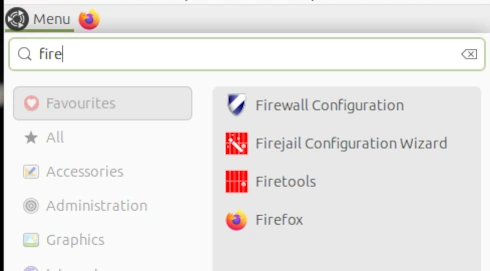
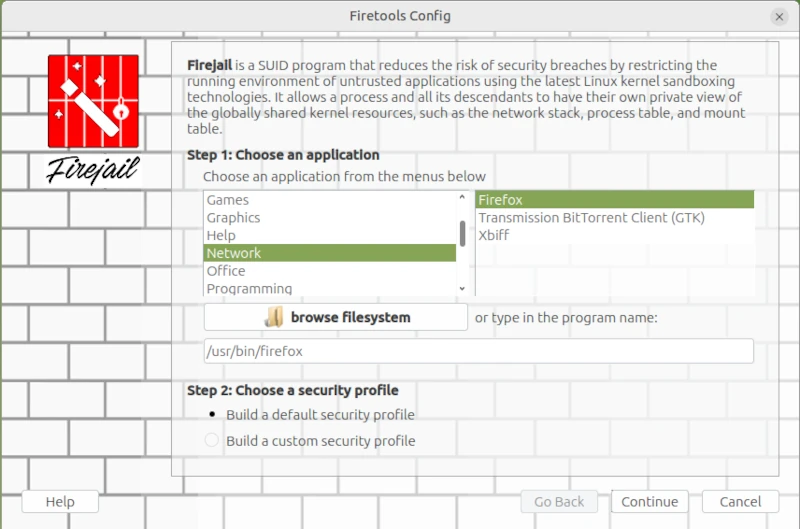
I started the Firejail Configuration Wizard via the application menu.
This opens a wizard for configuring applications as sandboxes. This differs from the console command in that the command line places all FireJail-supported programs into a sandbox. However, this could restrict functionality so much that it becomes unusable for everyday tasks.
sudo firecfg
This allows you to launch applications in the sandbox via the icons in the window manager menu or file links in the file manager. This automated method currently supports the desktop environments Mate, KDE, LXDE, Cinnamon, and LXDE. Support for Gnome 3 and Unity is limited. Simply double-click the desktop icon in Firetools or use the command firetools firefox in the Bash shell. Alternatively, you can launch FireTools directly. FireTools is a graphical launcher for applications running in the sandbox via FireJail.
In my example, I configured the Firefox web browser using FireJail’s default configuration. It’s possible to use custom configurations for each installed application. The corresponding configuration files are located in the logged-in user’s home directory: ~/.config/firejail/<app>.profile and /etc/firejail/<app>.profile.
# Firejail profile for firefox # Description: Safe and easy web browser from Mozilla # This file is overwritten after every install/update # Persistent local customizations include firefox.local # Persistent global definitions include globals.local
# Note: Sandboxing web browsers is as important as it is complex. Users might # be interested in creating custom profiles depending on the use case (e.g. one # for general browsing, another for banking, ...). Consult our FAQ/issue # tracker for more information. Here are a few links to get you going: # https://github.com/netblue30/firejail/wiki/Frequently-Asked-Questions#firefox-doesnt-open-in-a-new-sandbox-instead-it-opens-a-new-tab-in-an-existing-firefox-instance # https://github.com/netblue30/firejail/wiki/Frequently-Asked-Questions#how-do-i-run-two-instances-of-firefox # https://github.com/netblue30/firejail/issues/4206#issuecomment-824806968
# Note: Firefox requires a shell to launch on Arch and Fedora. # Add the next lines to firefox.local to enable private-bin. #private-bin bash,dbus-launch,dbus-send,env,firefox,sh,which #private-bin basename,bash,cat,dirname,expr,false,firefox,firefox-wayland,getenforce,ln,mkdir,pidof,restorecon,rm,rmdir,sed,sh,tclsh,true,uname private-etc firefox
Since configuring each individual application can quickly become very complex, and one must always consider what one wants to achieve with sandboxing, I refer you to the homepage [1] for further information.
On the command line, you can list all applications currently started via Firejail. This allows you to check whether the sandbox is working for the respective application. Two commands are available for this purpose: firejail --list and firejail --top. The top parameter displays the process load in the Bash shell.
However, I did notice one limitation during my test: Browsers in virtual machines, in particular, refuse to start under Firejail. This is, of course, somewhat pointless, as virtual machines already provide excellent isolation between the application and the operating system.
Fazit
In my opinion, the idea of sandboxing is quite appealing. My criticism lies more in its implementation. I would view virtualization in a more traditional way, as implemented, for example, with Docker or PlayOnLinux. A sandbox would essentially create a virtual environment on my desktop into which I could install programs in isolation, without altering the operating system. If the sandbox is deleted, all files of the installed program, including its configuration, are completely removed. However, FireJail works differently. FireJail identifies all installed programs that can be jailed, in order to run them in a so-called cage. Launching AppImages in FireJail also generally doesn’t work. Based on my experience in security and penetration testing, I consider the cost-benefit ratio, especially for FireJail, to be insufficient, and I also believe that the way FireJail works gives users a false sense of security. Updates are also a problem, as they often silently reset security-related settings to unwanted defaults.
Kali Linux [1] and Parrot Linux [2] are considered the first choice among Linux distributions when it comes to security and penetration testing. Many relevant programs are already preinstalled on these distributions and can be used out of the box, so to speak.
However, it must also be said that Kali and Parrot are not necessarily the most suitable Linux distributions for everyday use due to their specialization. For daily use, Ubuntu for beginners and Debian for advanced users are more common. For this reason, Kali and Parrot are usually set up and used as virtual machines with VirtualBox or VMWare Player. A very practical approach, especially when it comes to looking at the distribution first before installing it natively on the computer.
In my opinion, the so-called distribution hopping that some people do under Linux is more of a hindrance to getting used to a system in order to be able to work with it efficiently. Which Linux you choose depends primarily on your own taste and the requirements of what you want to do with it. Developers and system administrators will likely have an inclination toward Debian, a version from which many other distributions were derived. Windows switchers often enjoy Linux Mint, and the list goes on.
If you want to feel like a hacker, you can opt for a Kali installation. Things like privacy and anonymous surfing on the Internet are often the actual motives. I had already introduced Kodachi Linux, which specializes in anonymous surfing on the Internet. Of course, it must be made very clear that there is no real anonymous communication on the Internet. However, you can massively reduce the number of possible eavesdroppers with a few easy-to-implement measures. I have addressed the topic of privacy in several articles on this blog. Even if it is an unpopular opinion for many. But a Linux VM that is used for anonymous surfing via an Apple or Windows operating system completely misses its usefulness.
he first point in the “privacy” section is the internet browser. No matter which one you use and how much the different manufacturers emphasize privacy protection, the reality is like the fairy tale “The Emperor’s New Clothes”. Most users know the Tor / Onion network by name. Behind it is the Tor browser, which you can easily download from the Tor Project website [3]. After downloading and unzipping the directory, the Tor Browser can be opened using the start script on the console.
./Browser/start-tor-browser
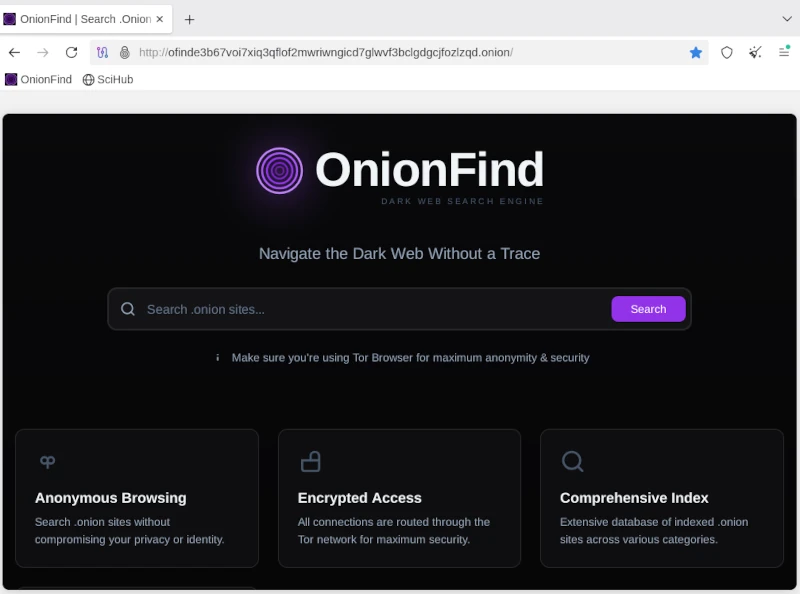
Anyone using the Tor network can visit URLs ending in .onion. A large number of these sites are known as the so-called dark web and should be surfed with great caution. You can come across very disturbing and illegal content here, but you can also fall victim to phishing attacks and the like. Without going into too much detail about exactly how the Tor network works, you should be aware that you are not completely anonymous here either. Even if the big tech companies are largely ignored, authorities certainly have resources and options, especially when it comes to illegal actions. There are enough examples of this in the relevant press.
If you now think about how the Internet works in broad terms, you will find the next important point: proxy servers. Proxy servers are so-called representatives that, similar to the Tor network, do not send requests to the Internet directly to the homepage, but rather via a third-party server that forwards this request and then returns the answer. For example, if you access the Google website via a proxy, Google will only see the IP address of the proxy server. Even your own provider only sees that you have sent a request to a specific server. The provider does not see in its own log files that this server then makes a request to Google. Only the proxy server appears on both sides, at the provider and on the target website. As a rule, proxy server operators ensure that they do not store any logs with the original IP of their clients. Unfortunately, there is no guarantee for these statements. In order to further reduce the probability of being detected, you can connect several proxy connections in series. With the console program proxychain, this project can be easily implemented. ProxyChain is quickly installed on Debian distributions using the APT package manager.
sudo apt-get install proxychains4
Using it is just as easy. The behavior for proxychain is specified via the configuration file /etc/proxychain.conf. If you change the working mode from stricht_chain to random_chain, a different variation of each proxy server will be randomly assembled for each connection. At the end of the configuration file you can enter the individual proxy servers. Some examples are included in the file. To use proxychain, you simply call it via the console, followed by the application (the browser), which establishes the connection to the Internet via the proxies.
Proxychaninfirefox## RFC6890 Loopback address range## if you enable this, you have to make sure remote_dns_subnet is not 127## you'll need to enable it if you want to use an application that ## connects to localhost.# localnet 127.0.0.0/255.0.0.0# localnet ::1/128
The real challenge is finding suitable proxy servers. To get started, you can find a large selection of free proxies worldwide at [4].
Using proxies alone for connections to the Internet only offers limited anonymity. In order for two computers to communicate, an IP address is required that can be linked via the Internet access provider to the correct geographical address where the computer is located. However, additional information is sent to the network via the network card. The so-called MAC address, with which you can directly identify a computer. Since you don’t have to install a new network card every time you restart your computer to get a different MAC address, you can use a small, simple tool called macchanger. Like proxychain, this can also be easily installed via APT. After installation you can set the autostart and you have to decide whether you want to always use the same MAC address or a randomly generated MAC address each time.
Of course, the measures presented so far are only of any use if the connection to the Internet is encrypted. This happens via the so-called Secure Socket Layer (SSL). If you do not connect to the Internet via a VPN and the websites you access only use http instead of https, you can use any packet sniffer (e.g. the Wireshark program) to record the communication and read the content of the communication in plain text. In this way, passwords or confidential messages are spied on on public networks (WiFi). We can safely assume that Internet providers run all of their customers’ communications through so-called packet filters in order to detect suspicious actions. With https connections, these filters cannot look into the packets.
Now you could come up with the idea of illegally connecting to a foreign network using all the measures described so far. After all, no one knows that you are there and all activities on the Internet are assigned to the connection owner. For this reason, I would like to expressly point out that in pretty much all countries such actions are punishable by law and if you are caught doing so, you can quickly end up in prison. If you would like to find out more about the topic of WiFi security in order to protect your own network from illegal access, you will find a detailed workshop on Aircrack-ng in the members’ area (subscription).
The next item on the privacy list is email. For most people, running their own email server is simply not possible. The effort is enormous and not entirely cost-effective. That’s why offers from Google, Microsoft and Co. to provide an email service are gladly accepted. Anyone who does not use this service via a local client and does not cryptographically encrypt the emails sent can be sure that the email provider will scan and read the emails. Without exception! Since configuring a mail client with functioning encryption is more of a geek topic, just like running your own mail server, the options here are very limited. The only solution is the Swiss provider Proton [5], which also provides free email accounts. Proton promotes the protection of its customers’ privacy and implements this through strict encryption. Everyone has to decide for themselves whether they should still send confidential messages via email. Of course, this also applies to the available messengers, which are now used a lot for telephony.
Many people have googled themselves to find out what digital traces they have left behind on the Internet. Of course, this is only scratching the surface, as HR people at larger companies and corporations use more effective ways. Matego is a very professional tool, but there is also a powerful tool in the open source area that can reveal a lot of things. There is also a corresponding workshop for subscribers on this subject. Because if you find your traces, you can also start to cover them up.
As you can see, the topic of privacy and anonymity is very extensive and is only covered superficially in this short article. Nevertheless, the depth of information is sufficient to get a first impression of the matter. It’s not nearly enough to set up a system like Kali if you don’t know the basics to use the tools correctly. Because if you don’t put the different pieces of the puzzle together accurately, the hoped-for effect of providing more privacy on the Internet through anonymity will remain. This article also explains my personal point of view on a technical level as to why there is no such thing as secure, anonymous electronic communication. Anyone who wants to familiarize themselves with the topic will achieve success more quickly with a sensible strategy and their own system, which is gradually expanded, than with a ready-made all-round tool like Kali Linux.
Since 2025, several countries have already introduced age verification for using social media and the internet in general. Australia and the United Kingdom are leading the way in this trend. Several US states have also followed suit. Age verification is slated to be rolled out across the EU by 2027. Italy and France have already passed corresponding laws. The new government that has been in power in Germany since the beginning of 2025 also favors this form of paternalism. This was demonstrated by a clause in the coalition agreement that stipulates the nationwide introduction of eID in Germany. In this article, I will outline the social and technical aspects that will inevitably affect us citizens.
Under the guise of protecting minors, children and young people under 16 are to be denied access to harmful content such as pornography. Social media platforms like Facebook, X, and others will also be affected by these measures. Already, various types of content on YouTube are only accessible to registered users.
If the well-being of children were truly the priority, the focus would be on fostering their development into stable and healthy personalities. This begins with balanced, healthy school meals, which should be available to every student at an affordable price. Teaching media literacy in schools would also be a step in the right direction. These are just a few examples demonstrating that the justification for introducing age verification is a smokescreen and that fundamentally different goals are being pursued.
It’s about paternalism and control over every single citizen. It’s a violation of the right to self-determination. Because one thing must be clear to everyone: to ensure that a person is indeed of legal age for accessing restricted content, everyone who wants to view it must provide proof of age. This proof will only be possible with an eID. Once a critical mass is reached using their eID, this will become the standard for payments and all sorts of other things. It sounds somewhat prophetic, especially if you’re familiar with the Book of Revelation in the New Testament.
The second beast caused everyone—great and small, rich and poor, master and slave—to receive a mark on their right hand or forehead. Without this mark, no one could buy or sell anything. Revelation 13:16
It is therefore foreseeable that an individual’s refusal to accept the eID will completely exclude them from the digital world. Simultaneously, opportunities that provide alternatives in real life, the so-called analog realm, will disappear. However, I don’t want to be too prophetic here. Everyone can imagine for themselves what consequences the introduction of the digital ID will have on their own lives. I will now delve into some technical details and offer some food for thought regarding civic self-defense. Because I am quite certain that there is broad acceptance of the eID. Even if the specific reasons vary, they can be reduced to personal comfort and convenience. Anyone who continues reading from here on is fully responsible for implementing things independently and acquiring the necessary knowledge. There will be no quick, easy, off-the-shelf solution. But you don’t have to be a techie either. The willingness to think independently is perfectly sufficient to quickly understand the technical connections. It’s not rocket science, as they say.
Because I am quite certain that there is widespread acceptance of the eID. Even if the specific reasons vary, they can be reduced to personal comfort and convenience. People who rely on Apple or Microsoft products have no choice but to switch to open-source operating systems. Smartphones simply don’t offer a practical alternative to banking apps and messaging services. There’s a reason why you need a working phone number to register for Telegram and Signal Messenger: chats are synchronized from the phone to the desktop application. So, you’re left with your computer, which ideally shouldn’t be newer than 2020. I’ve already published an article on this topic.
All Linux distributions run smoothly on older and even low-performance hardware. Switching to Linux is now easy, and you’ll be used to the new system in just a few weeks. So far, so good.
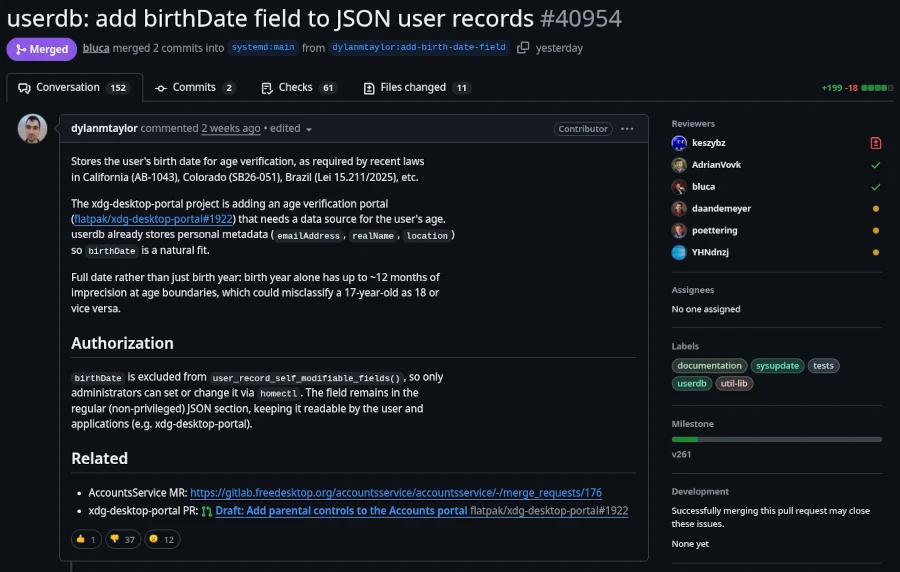
However, since calendar week 13 of 2026, the Linux community has been up in arms across all social media. The program systemd made a commit to the public source code repository adding a birthday field for age verification. Anyone thinking, “Oh well, just one program, I’ll ignore it,” should know that systemd stands for System Daemon. Besides the kernel, it’s one of the most important programs in a Linux distribution. Among other things, it’s responsible for starting necessary services and programs when the computer is turned on.
This is the same record that already holds basic user metadata like realName, emailAddress, and location. The field stores a full date in YYYY-MM-DD format and can only be set by administrators, not by users themselves.
Lennart Poettering, the creator of systemd, has clarified that this change is:
An optional field in the userdb JSON object. It’s not a policy engine, not an API for apps. We just define the field, so that it’s standardized iff people want to store the date there, but it’s entirely optional.
All these events also shed new light on the meeting between Linus Torvalds and Bill Gates on June 22, 2025, their first personal encounter in 30 years. It’s absolutely unacceptable in the Linux community to patronize computer users and infringe on their privacy. And there are strong voices opposing the systemd project. However, it’s impossible to predict how strong this resistance will remain if government pressure is exerted on these staunch dissenters.
The first approach to solving this problem is to use a Linux distribution that doesn’t use systemd. Well-known distributions that manage without systemd include Gentoo, Slackware, and Alpine Linux. Those who, like myself and many others, use a pure Debian system might want to take a look at Devuan (version 6.1 Excalibur for March 2026), which is a fork of current Debian versions that doesn’t use systemd.
It’s also worth mentioning that systemd has always been viewed critically by hardcore Linux users. It’s simply considered too bloated. Those who have been running their distribution for a while often hesitate to switch. Linux is like a fine wine. It matures with time, and fresh installations are considered unnecessary by power users, as everything can easily be repaired. Migrations to newer major versions are also generally trouble-free. Therefore, replacing systemd with the more lightweight SysVinit is no problem. The only requirement is that you’re not afraid of the Linux Bash shell. However, there are limits here as well. Those using the GNOME 3 desktop should first switch to a desktop environment that isn’t based on systemd. Devuan Linux shows us the alternatives: KDE Plasma, MATE (a GNOME 2 fork), Cinnamon (for Windows switchers), or the rudimentary Xfce. Before starting, you should at least back up your data for security reasons and, if possible, clone your hard drive to restore the original state in case of problems.
Since I haven’t yet found the time to try out the tutorial myself due to the topic’s current relevance, I refer you to the English-language website linuxconfig.org, which provides instructions on replacing systemd with sysVinit in Debian.
It’s probably like so many things: things are never as bad as they seem. I don’t think the mandatory digital ID will arrive overnight. It will likely be a gradual process that makes life difficult for those who resist total control by authoritarian authorities. There will always be a way for determined individuals to find a solution. But to do so, one must take action and not passively wait for the great savior. He was here before, a very long time ago.
Anyone wanting to experiment a bit with local LLM will quickly discover its limitations. Not everyone has a massively upgraded desktop PC with 2 TB of RAM and a CPU that could fry an egg under full load. A laptop with 32 GB of RAM, or in my case, a Lenovo P14s with 64 GB of RAM, is more typical. Despite this generous configuration, it often fails to load a more demanding AI model, as 128 GB of RAM is fairly standard for many of these models. And you can’t upgrade the RAM in current laptops because the chips are soldered directly onto the motherboard. We have the same problem with the graphics card, of course. That’s why I’ve made it a habit when buying a laptop to configure it with almost all the available options, hoping to be set for 5-8 years. The quality of the Lenovo ThinkPad series, in particular, hasn’t disappointed me in this regard. My current system is about two years old and is still running reliably.
I’ve been using Linux as my operating system for years, and I’m currently running Debian 13. Compared to Windows, Linux and Unix distributions are significantly more resource-efficient and don’t use their resources for graphical animations and complex gradients, but rather provide a powerful environment for the applications they’re used in. Therefore, my urgent advice to anyone wanting to try local LLMs is to get a powerful computer and run Linux on it. But let’s take it one step at a time. First, let’s look at the individual hardware components in more detail.
Let’s start with the CPU. LLMs, CAD applications, and even computer games all perform calculations that can be processed very effectively in parallel. For parallel calculations, the number of available CPU cores is a crucial factor. The more cores, the more parallel calculations can be performed.
Of course, the processors need to be able to quickly request the data for the calculations. This is where RAM comes into play. The more RAM is available, the more efficiently the data can be provided for the calculations. Affordable laptops with 32 GB of RAM are already available. Of course, the purchase price increases exponentially with more RAM. While there are certainly some high-end gaming devices in the consumer market, I wouldn’t recommend them due to their typically short lifespan and comparatively high price.
The next logical step in the hardware chain is the hard drive. Simple SSDs significantly accelerate data transfer to RAM, but there are still improvements. NVMe cards with 2 GB of storage capacity or more can reach speeds of up to 7000 MB/s in the 4th generation.
We have some issues with graphics cards in laptops. Due to their size and the required performance, the graphics cards built into laptops are more of a compromise than a true highlight. A good graphics card would be ideal for parallel calculations, such as those performed in LLMs (Large Linear Machines). As a solution, we can connect the laptop to an external graphics card. Thanks to Bitcoin miners in the crypto community, considerable experience has already been gained in this area. However, to connect an external graphics card to the laptop, you need a port that can handle that amount of data. USB 3 is far too slow for our purposes and would severely limit the advantages of the external graphics card due to its low data rate.
The solution to our problem is Thunderbolt. Thunderbolt ports look like USB-C, but are significantly faster. You can identify Thunderbolt by the small lightning bolt symbol (see Figure 1) on the cables or connectors. These are not the power supply connections. To check if your computer has Thunderbolt, you can use a simple Linux shell command.
In my case, my computer’s output shows that two Thunderbolt 4 ports are available.
To connect an external graphics card, we need a mounting system onto which a PCI card can be inserted. ANQUORA offers a good solution here with the ANQ-L33 eGPU Enclosure. The board can accommodate a graphics card with up to three slots. It costs between €130 and €200. A standard ATX power supply is also required. The required power supply wattage depends on the graphics card’s power consumption. It’s advisable not to buy the cheapest power supply, as the noise level might bother some users. The open design of the board provides ample flexibility in choosing a graphics card.
Selecting a graphics card is a whole other topic. Since I use Linux as my operating system, I need a graphics card that is supported by Linux. For accelerating LLMs, a graphics card with as many GPU cores as possible and a correspondingly large amount of internal memory is necessary. To make the purchase worthwhile and actually notice a performance boost, the card should be equipped with at least 8 GB of RAM. More is always better, of course, but the price of the card will then increase exorbitantly. It’s definitely worth checking the used market.
If you add up all the costs, the investment for an external GPU amounts to at least 500 euros. Naturally, this only includes an inexpensive graphics card. High-end graphics cards can easily exceed the 500-euro price point on their own. Anyone who would like to contribute their expertise in the field of graphics cards is welcome to contribute an article.
To avoid starting your shopping spree blindly and then being disappointed with the result, it’s highly advisable to consider beforehand what you want to do with the local LLM. Supporting programming requires less processing power than generating graphics and audio. Those who use LLMs professionally can save considerably by purchasing a high-end graphics card with self-hosted models compared to the costs of, for example, cloud code. The specification of LLMs depends on the available parameters. The more parameters, the more accurate the response and the more computing power is required. Accuracy is further differentiated by:
FP32 (Single-Precision Floating Point): Standard precision, requires the most memory. (e.g., 32 bits per parameter)
FP16 (Half-Precision Floating Point): Half the precision, halves the memory requirement compared to FP32, but can slightly reduce precision. (e.g., 16 bits per parameter / 4 bytes)
BF16 (Brain Floating Point): Another option for half-precision calculations, often preferred in deep learning due to its better performance in certain operations. (e.g., 16 bits per parameter / 2 bytes)
INT8/INT4 (Integer Quantization): Even lower precision, drastically reduces memory requirements and speeds up inference, but can lead to a greater loss of precision. (e.g., 8 bits per parameter / 1 byte)
Other factors influencing the hardware requirements for LLM include:
Batch Size: The number of input requests processed simultaneously.
Context Length: The maximum length of text that the model can consider in a query. Longer context lengths require more memory because the entire context must be held in memory.
Model Architecture: Different architectures have different memory requirements.
To estimate the memory consumption of a model, you can use the following calculation: Parameters * Accuracy = Memory consumption for the model.
When considering hardware recommendations, you should refer to the model’s documentation. This usually only specifies the minimum or average requirements. However, there are general guidelines you can use.
Small models (up to 7 billion parameters): A GPU with at least 8 GB of VRAM should be sufficient, especially if you are using quantization.
Medium-sized models (7-30 billion parameters): A GPU with 16 GB to 24 GB of VRAM is recommended.
Large models (over 30 billion parameters): Multiple GPUs, each with at least 24 GB of VRAM, or a single GPU with a very large amount of VRAM (e.g., 48 GB, 80 GB) are required.
CPU-only: For small models and simple experiments, the CPU may suffice, but inference will be significantly slower than on a GPU. Here, a large amount of RAM is crucial (several GB / 32+).
We can see that using locally running LLMs can be quite realistic if you have the necessary hardware available. It doesn’t always have to be a supercomputer; however, most solutions from typical electronics retailers are off-the-shelf and not really suitable. Therefore, with this article, I have laid the groundwork for your own experiments.
Anyone interested in this somewhat specialized article doesn’t need an explanation of what Docker is and what this virtualization tool is used for. Therefore, this article is primarily aimed at system administrators, DevOps engineers, and cloud developers. For those who aren’t yet completely familiar with the technology, I recommend our Docker course: From Zero to Hero.
In a scenario where we regularly create new Docker images and instantiate various containers, our hard drive is put under considerable strain. Depending on their complexity, images can easily reach several hundred megabytes to gigabytes in size. To prevent creating new images from feeling like downloading a three-minute MP3 with a 56k modem, Docker uses a build cache. However, if there’s an error in the Dockerfile, this build cache can become quite bothersome. Therefore, it’s a good idea to clear the build cache regularly. Old container instances that are no longer in use can also lead to strange errors. So, how do you keep your Docker environment clean?
While docker rm <container-nane> and docker rmi <image-id> will certainly get you quite far, in build environments like Jenkins or server clusters, this strategy can become a time-consuming and tedious task. But first, let’s get an overview of the overall situation. The command docker system df will help us with this.
Before I delve into the details, one important note: The commands presented are very efficient and will irrevocably delete the corresponding areas. Therefore, only use these commands in a test environment before using them on production systems. Furthermore, I’ve found it helpful to also version control the commands for instantiating containers in your text file.
The most obvious step in a Docker system cleanup is deleting unused containers. Specifically, this means that the delete command permanently removes all instances of Docker containers that are not running (i.e., not active). If you want to perform a clean slate on a Jenkins build node before deployment, you can first terminate all containers running on the machine with a single command.
The -f parameter suppresses the confirmation prompt, making it ideal for automated scripts. Deleting containers frees up relatively little disk space. The main resource drain comes from downloaded images, which can also be removed with a single command. However, before images can be deleted, it must first be ensured that they are not in use by any containers (even inactive ones). Removing unused containers offers another practical advantage: it releases ports blocked by containers. A port in a host environment can only be bound to a container once, which can quickly lead to error messages. Therefore, we extend our script to include the option to delete all Docker images not currently used by containers.
Another consequence of our efforts concerns Docker layers. For performance reasons, especially in CI environments, you should avoid using them. Docker volumes, on the other hand, are less problematic. When you remove the volumes, only the references in Docker are deleted. The folders and files linked to the containers remain unaffected. The -a parameter deletes all Docker volumes.
docker volume prune -a -f
Another area affected by our cleanup efforts is the build cache. Especially if you’re experimenting with creating new Dockerfiles, it can be very useful to manually clear the cache from time to time. This prevents incorrectly created layers from persisting in the builds and causing unusual errors later in the instantiated container. The corresponding command is:
docker buildx prune -f
The most radical option is to release all unused resources. There is also an explicit shell command for this.
docker volume prune -a -f
We can, of course, also use the commands just presented for CI build environments like Jenkins or GitLab CI. However, this might not necessarily lead to the desired result. A proven approach for Continuous Integration/Continuous Deployment is to set up your own Docker registry where you can deploy your self-built images. This approach provides a good backup and caching system for the Docker images used. Once correctly created, images can be conveniently deployed to different server instances via the local network without having to constantly rebuild them locally. This leads to a proven approach of using a build node specifically optimized for Docker images/containers to optimally test the created images before use. Even on cloud instances like Azure and AWS, you should prioritize good performance and resource efficiency. Costs can quickly escalate and seriously disrupt a stable project.
In this article, we have seen that in-depth knowledge of the tools used offers several opportunities for cost savings. The motto “We do it because we can” is particularly unhelpful in a commercial environment and can quickly degenerate into an expensive waste of resources.
I constantly encounter statements like, “I use Apple because of the data privacy,” or “There are no viruses under Linux,” and so on and so forth. In real life, I just chuckle to myself and refrain from replying. These people are usually devotees of a particular brand, which they worship and would even defend with their lives. Therefore, I save my energy for more worthwhile things, like writing this article.
My aim is to use as few technical details and jargon as possible so that people without a technical background can also access this topic. Certainly, some skeptics might demand proof to support my claims. To them, I say that there are plenty of keywords for each statement that you can use to search for yourself and find plenty of primary sources that exist outside of AI and Wikipedia.
When one ponders what freedom truly means, one often encounters statements like: “Freedom is doing what you want without infringing on the freedom of others.” This definition also includes the fact that confidential information should remain confidential. However, efforts to maintain this confidentiality existed long before the availability of electronic communication devices. It is no coincidence that there is an age-old art called cryptography, which renders messages transmitted via insecure channels incomprehensible to the uninitiated. The fact that the desire to know other people’s thoughts is very old is also reflected in the saying that the two oldest professions of humankind are prostitution and espionage. Therefore, one might ask: Why should this be any different in the age of communication?
Particularly thoughtless individuals approach the topic with the attitude that they have nothing to hide anyway, so why should they bother with their own privacy? I personally belong to the group of people who consider this attitude very dangerous, as it opens the floodgates to abuse by power-hungry groups. Everyone has areas of their life that they don’t want dragged into the public eye. These might include specific sexual preferences, infidelity to a partner, or a penchant for gambling—things that can quickly shatter a seemingly perfect facade of moral integrity.
In East Germany, many people believed they were too insignificant for the notorious domestic intelligence service, the Stasi, to be interested in them. The opening of the Stasi files after German reunification demonstrated just how wrong they were. In this context, I would like to point out the existing legal framework in the EU, which boasts achievements such as hate speech laws, chat monitoring, and data retention. The private sector also has ample reason to learn more about every individual. This allows them to manipulate people effectively and encourage them to purchase services and products. One goal of companies is to determine the optimal price for their products and services, thus maximizing profit. This is achieved through methods of psychology. Or do you really believe that products like a phone that can take photos are truly worth the price they’re charged? So we see: there are plenty of reasons why personal data can indeed be highly valuable. Let’s therefore take a look at the many technological half-truths circulating in the public sphere. I’ve heard many of these half-truths from technology professionals themselves, who haven’t questioned many things.
Before I delve into the details, I’d like to make one essential point. There is no such thing as secure and private communication when electronic devices are involved. Anyone wanting to have a truly confidential conversation would have to go to an open field in strong winds, with a visibility of at least 100 meters, and cover their mouth while speaking. Of course, I realize that microphones could be hidden there as well. This statement is meant to be illustrative and demonstrates how difficult it is to create a truly confidential environment.
Let’s start with the popular brand Apple. Many Apple users believe their devices are particularly secure. This is only true to the extent that strangers attempting to gain unauthorized access to the devices face significant obstacles. The operating systems incorporate numerous mechanisms that allow users to block applications and content, for example, on their phones.
Microsoft is no different and goes several steps further. Ever since the internet became widely available, there has been much speculation about what telemetry data users send to the parent company via Windows. Windows 11 takes things to a whole new level, recording every keystroke and taking a screenshot every few seconds. Supposedly, this data is only stored locally on the computer. Of course, you can believe that if you like, but even if it were true, it’s a massive security vulnerability. Any hacker who compromises a Windows 11 computer can then read this data and gain access to online banking and all sorts of other accounts.
Furthermore, Windows 11 refuses to run on supposedly outdated processors. The fact that Windows has always been very resource-intensive is nothing new. However, the reason for the restriction to older CPUs is different. Newer generation CPUs have a so-called security feature that allows the computer to be uniquely identified and deactivated via the internet. The key term here is Pluton Security Processor with the Trusted Platform Module (TPM 2.0).
The extent of Microsoft’s desire to collect all possible information about its users is also demonstrated by the changes to its terms and conditions around 2022. These included a new section granting Microsoft permission to use all data obtained through its products to train artificial intelligence. Furthermore, Microsoft reserves the right to exclude users from all Microsoft products if hate speech is detected.
But don’t worry, Microsoft isn’t the only company with such disclaimers in its terms and conditions. Social media platforms like Meta, better known for its Facebook and WhatsApp products, and the communication platform Zoom also operate similarly. The list of such applications is, of course, much longer. Everyone is invited to imagine the possibilities that the things already described offer.
I’ve already mentioned Apple as problematic in the area of security and privacy. But Android, Google’s operating system for smart TVs and phones, also gives enormous scope for criticism. It’s not entirely without reason that you can no longer remove the batteries from these phones. Android behaves just like Windows and sends all sorts of telemetry data to its parent company. Add to that the scandal involving manufacturer Samsung, which came to light in 2025. They had a hidden Israeli program called AppCloud on their devices, the purpose of which can only be guessed at. Perhaps it’s also worth remembering when, in 2023, pagers exploded for many Palestinians and other people declared enemies by Israel. It’s no secret in the security community that Israel is at the forefront of cybersecurity and cyberattacks.
Another issue with phones is the use of so-called messengers. Besides well-known ones like WhatsApp and Telegram, there are also a few niche solutions like Signal and Session. All these applications claim end-to-end encryption for secure communication. It’s true that hackers have difficulty accessing information when they only intercept network traffic. However, what happens to the message after successful transmission and decryption on the target device is a different matter entirely. How else can the meta terms and conditions, with their already included clauses, be explained?
Considering all the aforementioned facts, it’s no wonder that many devices, such as Apple, Windows, and Android, have implemented forced updates. Of course, not everything is about total control. The issue of resilience, which allows devices to age prematurely in order to replace them with newer models, is another reason.
Of course, there are also plenty of options that promise their users exceptional security. First and foremost is the free and open-source operating system Linux. There are many different Linux distributions, and not all of them prioritize security and privacy equally. The Ubuntu distribution, published by Canonical, regularly receives criticism. For example, around 2013, the Unity desktop was riddled with ads, which drew considerable backlash. The notion that there are no viruses under Linux is also a myth. They certainly exist, and the antivirus scanner for Linux is called ClamAV; however, its use is less widespread due to the lower number of home installations compared to Windows. Furthermore, Linux users are still often perceived as somewhat nerdy and less likely to click on suspicious links. But those who have installed all the great applications like Skype, Dropbox, AI agents, and so on under Linux don’t actually have any improved security compared to the Big Tech industry.
The situation is similar with so-called “debugged” smartphones. Here, too, the available hardware, which is heavily regulated, is a problem. But everyday usability also often reveals limitations. These limitations are already evident within families and among friends, who are often reliant on WhatsApp and similar apps. Even online banking can present significant challenges, as banks, for security reasons, only offer their apps through the verified Google Play Store.
As you can see, this topic is quite extensive, and I haven’t even listed all the points, nor have I delved into them in great depth. I hope, however, that I’ve been able to raise awareness, at least to the point that smartphones shouldn’t be taken everywhere, and that more time should be spent in real life with other people, free from all these technological devices.
[EN] We use cookies to improve your experience on our site. By using our site, you consent to cookies.
[DE] Wir verwenden Cookies, um Ihre Erfahrungen auf unserer Website zu verbessern. Durch die Nutzung unserer Website stimmen Sie Cookies zu.
This website uses cookies
Websites store cookies to enhance functionality and personalise your experience. You can manage your preferences, but blocking some cookies may impact site performance and services.
Essential cookies enable basic functions and are necessary for the proper function of the website.
Name
Description
Duration
Cookie Preferences
This cookie is used to store the user's cookie consent preferences.
30 days
These cookies are needed for adding comments on this website.
Name
Description
Duration
comment_author
Used to track the user across multiple sessions.
Session
comment_author_email
Used to track the user across multiple sessions.
Session
comment_author_url
Used to track the user across multiple sessions.
Session
These cookies are used for managing login functionality on this website.
Name
Description
Duration
wordpress_logged_in
Used to store logged-in users.
Persistent
wordpress_sec
Used to track the user across multiple sessions.
15 days
wordpress_test_cookie
Used to determine if cookies are enabled.
Session
Statistics cookies collect information anonymously. This information helps us understand how visitors use our website.
Matomo is an open-source web analytics platform that provides detailed insights into website traffic and user behavior.