
Developers with some networking experience know that a user’s IP address can reveal some interesting details. These details include information about the country and city of origin, as well as the internet service provider (ISP). This makes it possible to effectively identify and block the increasingly popular proxy servers. Of course, geolocation is just one piece of the puzzle in uniquely identifying users.
The current version of GeoIP is 2, which has completely replaced the outdated version 1. GeoIP2 is a service provided by MaxMind [1], which also offers a free community version. For example, if you run a self-hosted analytics tool like Matomo, you should ensure your web server is correctly configured for GeoIP2 to guarantee full functionality.
There are two ways to integrate GeoIP2 into your own server. Option 1 is the simpler option using a PHP module. Option 2 is more powerful but requires more server administration knowledge. In this solution, we use GeoIP2 as an Apache2 module.
Anyone who already has Fail2Ban [2] running correctly on their own server might be considering whether it makes sense to link Fail2Ban with GeoIP2. This is certainly possible, but it has more advantages than disadvantages, because Fail2Ban operates directly on the Apache log files. This is why Fail2Ban can only become active on the second request from an IP address. To activate GeoIP2 in Fail2Ban, a corresponding filter must be set, which can quickly have a negative impact on performance on servers with high user load. Therefore, it is better to monitor the requests to the server and block specific countries directly via the request in case of suspected attacks. However, this requires GeoIP2 to be installed and configured as an Apache module.
Before we can begin, however, we need to create a free account with MaxMind and download the free GeoIP2 (Lite version) databases for our example.
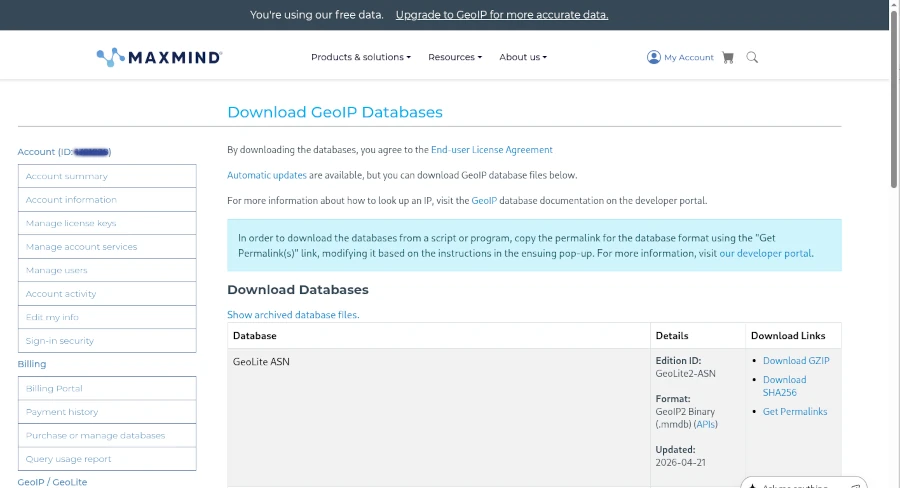
Once the first hurdle is cleared, we can get started. To use GeoIP2 in PHP applications, a suitable library is required. Using Composer as a dependency manager, the geoip2/geoip2 library can be included in its latest version.
Abonnement / Subscription
[English] This content is only available to subscribers.
[Deutsch] Diese Inhalte sind nur für Abonnenten verfügbar.
GeoIP2 can now be used in the source code for just a few targets.
Abonnement / Subscription
[English] This content is only available to subscribers.
[Deutsch] Diese Inhalte sind nur für Abonnenten verfügbar.
As you can see, the directory for the MaxMind GeoLite database must also be specified during initialization. This option is particularly suitable for those using a managed server or web space who have no control over the installed environment. However, you should avoid using PECL (PHP Extension Community Library), as it has been marked as deprecated and will be replaced by PIE (PHP Installer for Extensions) [4].
Integrating GeoIP2 globally for all PHP applications requires a bit more effort. The basic requirement is a functioning Apache 2/PHP installation on a Linux operating system. If this is the case, only a few steps are necessary:
- Install the maxminddb library
- Download the PIE PHAR library
- Install maxminddb for PIE and activate the extension in the php.ini file
- Deploy the GeoLite databases on the server
Before following this path, however, you should consider whether it would be better to deploy MaxMindDB as an Apache module. The most significant advantage of this approach is its high speed, which prevents the server from crashing even under heavy user load. The Apache module provides environment variables that can be used for filtering directly in the Apache configuration. The biggest challenge is compiling the Apache 2 module.
To keep this short workshop concise, I’ll demonstrate all the necessary steps in the php-apache:8.4 Docker container. Of course, it should be easy to adapt the corresponding commands slightly for a natively installed Apache HTTP Server.
Abonnement / Subscription
[English] This content is only available to subscribers.
[Deutsch] Diese Inhalte sind nur für Abonnenten verfügbar.
In line 13, we copy the mod_maxminddb version 1.3.0, previously downloaded from GitHub [5], into the container to compile it in the next step. The important addition in line 16, which suppresses the error message that automake version 1.6 is required, is crucial. Afterward, the module can be activated, and the databases downloaded from MaxMind should also be copied into the Docker container. Finally, the module configuration for Apache in the geoip.conf file must be configured and activated. The content of the configuration file is as follows:
Abonnement / Subscription
[English] This content is only available to subscribers.
[Deutsch] Diese Inhalte sind nur für Abonnenten verfügbar.
After a server restart, the changes should take effect. Success can be verified with a small PHP script.
<?php
	$country = $_SERVER['MM_COUNTRY_CODE'] ?? null;
	$city    = $_SERVER['MM_CITY_NAME'] ?? null;

echo "GeoIP2 Values: " . $country . " - " . $city;Ressourcen
Abonnement / Subscription
[English] This content is only available to subscribers.
[Deutsch] Diese Inhalte sind nur für Abonnenten verfügbar.



Leave a Reply
You must be logged in to post a comment.