Tag Archives: DevOps
Index & Abbreviations
Reply
[A]
[B]
[C]
[D]
[E]
[F]
[G]
[H]
[I]
[J]
[K]
[L]
[M]
[N]
[O]
[P]
[Q]
[R]
[S]
[T]
[U]
[V]
[W]
[Y]
[Z]
[X]
return to the table of content: Apache Maven Master Class
A
- agiles Manifest
- (Apache) Ant
- Archetypen (archetypes)
B
C
D
- Deploy
- Docker Maven Image
- DRY – Don’t repeat yourself [2]
- DSL – Domain Specific Language
E
- EAR – Enterprise Archive
- EJB – Enterprise Java Beans
- Enforcer Plugin
- EoL – End of Live
F
G
- GAV Parameter [2]
- Goal [2]
- GPG – GNU Privacy Guard
H
I
- IDE – Integrierte Entwicklungsumgebung
- Installation (Linux / Windows)
- inkrementelle Builds
- (Apache) Ivy
J
- JAR – Java Archive
- jarsigner Plugin
- JDK – Java Development Kit
K
- Keytool (Java)
- KISS – Keep it simple, stupid.
- Kochbuch: Maven Codebeispiele
L
M
N
O
- OWASP – Open Web Application Security Project [2]
P
- Plugin
- Production Candidate
- POM – Project Object Model
- Maven Properties
- Prozess
Q
R
S
T
- target – Verzeichnis
- Token Replacement
U
V
W
- WAR – Web Archive
X
Y
Z
[A]
[B]
[C]
[D]
[E]
[F]
[G]
[H]
[I]
[J]
[K]
[L]
[M]
[N]
[O]
[P]
[Q]
[R]
[S]
[T]
[U]
[V]
[W]
[Y]
[Z]
[X]
return to the table of content: Apache Maven Master Class
01. Fundamentals
02. Build Management & DevOps
04. Maven Project Directory Structures & Archetypes
Featureitis
You don’t have to be a software developer to recognize a good application. But from my own experience, I’ve often seen programs that were promising and innovative at the start mutate into unwieldy behemoths once they reach a certain number of users. Since I’ve been making this observation regularly for several decades now, I’ve wondered what the reasons for this might be.
The phenomenon of software programs, or solutions in general, becoming overloaded with details was termed “featuritis” by Brooks in his classic book, “The Mythical Man-Month.” Considering that the first edition of the book was published in 1975, it’s fair to say that this is a long-standing problem. Perhaps the most famous example of featureitis is Microsoft’s Windows operating system. Of course, there are countless other examples of improvements that make things worse.
The phenomenon of software programs, or solutions in general, becoming overloaded with details is what Brooks called “featuritis.” Windows users who were already familiar with Windows XP and then confronted with its wonderful successor Vista, only to be appeased again by Windows 7, and then nearly had a heart attack with Windows 8 and 8.1, were calmed down again at the beginning of Windows 10. At least for a short time, until the forced updates quickly brought them back down to earth. And don’t even get me started on Windows 11. The old saying about Windows was that every other version is junk and should be skipped. Well, that hasn’t been true since Windows 7. For me, Windows 10 was the deciding factor in completely abandoning Microsoft, and like many others, I bought a new operating system. Some switched to Apple, and those who couldn’t afford or didn’t want the expensive hardware, like me, opted for a Linux system. This shows how a lack of insight can quickly lead to the loss of significant market share. Since Microsoft isn’t drawing any conclusions from these developments, this fact seems to be of little concern to the company. For other companies, such events can quickly push them to the brink of collapse, and beyond.
One motivation for adding more and more features to an existing application is the so-called product life cycle, which is represented by the BCG matrix in Figure 1.
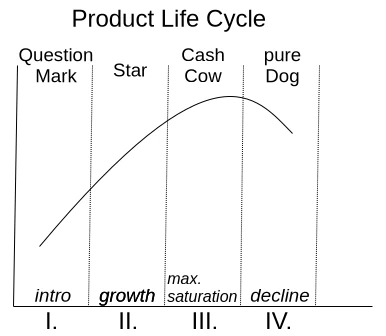
With a product’s launch, it’s not yet certain whether it will be accepted by the market. If users embrace it, it quickly rises to stardom and reaches its maximum market position as a cash cow. Once market saturation is reached, it degrades to a slow seller. So far, so good. Unfortunately, the prevailing management view is that if no growth is generated compared to the previous quarter, market saturation has already been reached. This leads to the nonsensical assumption that users must be forced to accept an updated version of the product every year. Of course, the only way to motivate a purchase is to print a bulging list of new features on the packaging.
Since well-designed features can’t simply be churned out on an assembly line, a redesign of the graphical user interface is thrown in as a free bonus every time. Ultimately, this gives the impression of having something completely new, as it requires a period of adjustment to discover the new placement of familiar functions. It’s not as if the redesign actually streamlines the user experience or increases productivity. The arrangement of input fields and buttons always seems haphazardly thrown together.
But don’t worry, I’m not calling for an update boycott; I just want to talk about how things can be improved. Because one thing is certain: thanks to artificial intelligence, the market for software products will change dramatically in just a few years. I don’t expect complex and specialized applications to be produced by AI algorithms anytime soon. However, I do expect that these applications will have enough poorly generated AI-generated code sequences, which the developer doesn’t understand, injected into their codebases, leading to unstable applications. This is why I’m rethinking clean, handcrafted, efficient, and reliable software, because I’m sure there will always be a market for it.
I simply don’t want an internet browser that has mutated into a communication hub, offering chat, email, cryptocurrency payments, and who knows what else, in addition to simply displaying web pages. I want my browser to start quickly when I click something, then respond quickly and display website content correctly and promptly. If I ever want to do something else with my browser, it would be nice if I could actively enable this through a plugin.
Now, regarding the problem just described, the argument is often made that the many features are intended to reach a broad user base. Especially if an application has all possible options enabled from the start, it quickly engages inexperienced users who don’t have to first figure out how the program actually works. I can certainly understand this reasoning. It’s perfectly fine for a manufacturer to focus exclusively on inexperienced users. However, there is a middle ground that considers all user groups equally. This solution isn’t new and is very well-known: the so-called product lines.
In the past, manufacturers always defined target groups such as private individuals, businesses, and experts. These user groups were then often assigned product names like Home, Enterprise, and Ultimate. This led to everyone wanting the Ultimate version. This phenomenon is called Fear Of Missing Out (FOMO). Therefore, the names of the product groups and their assigned features are psychologically poorly chosen. So, how can this be done better?
An expert focuses their work on specific core functions that allow them to complete tasks quickly and without distractions. For me, this implies product lines like Essentials, Pure, or Core.
If the product is then intended for use by multiple people within the company, it often requires additional features such as external user management like LDAP or IAM. This specialized product line is associated with terms like Enterprise, Company, Business, and so on.
The cluttered end result, actually intended for NOOPS, has all sorts of things already activated during installation. If people don’t care about the application’s startup and response time, then go for it. Go all out. Throw in everything you can! Here, names like Ultimate, Full, and Maximized Extended are suitable for labeling the product line. The only important thing is that professionals recognize this as the cluttered version.
Those who cleverly manage these product lines and provide as many functions as possible via so-called modules, which can be installed later, enable high flexibility even in expert mode, where users might appreciate the occasional additional feature.
If you install tracking on the module system beforehand to determine how professional users upgrade their version, you’ll already have a good idea of what could be added to the new version of Essentials. However, you shouldn’t rely solely on downloads as the decision criterion for this tracking. I often try things out myself and delete extensions faster than the installation process took if I think they’re useless.
I’d like to give a small example from the DevOps field to illustrate the problem I just described. There’s the well-known GitLab, which was originally a pure code repository hosting project. The name still reflects this today. An application that requires 8 GB of RAM on a server in its basic installation just to make a Git repository accessible to other developers is unusable for me, because this software has become a jack-of-all-trades over time. Slow, inflexible, and cluttered with all sorts of unnecessary features that are better implemented using specialized solutions.
In contrast to GitLab, there’s another, less well-known solution called SCM-Manager, which focuses exclusively on managing code repositories. I personally use and recommend SCM-Manager because its basic installation is extremely compact. Despite this, it offers a vast array of features that can be added via plugins.
I tend to be suspicious of solutions that claim to be an all-in-one solution. To me, that’s always the same: trying to do everything and nothing. There’s no such thing as a jack-of-all-trades, or as we say in Austria, a miracle worker!
When selecting programs for my workflow, I focus solely on their core functionality. Are the basic features promised by the marketing truly present and as intuitive as possible? Is there comprehensive documentation that goes beyond a simple “Hello World”? Does the developer focus on continuously optimizing core functions and consider new, innovative concepts? These are the questions that matter to me.
Especially in commercial environments, programs are often used that don’t deliver on their marketing promises. Instead of choosing what’s actually needed to complete tasks, companies opt for applications whose descriptions are crammed with buzzwords. That’s why I believe that companies that refocus on their core competencies and use highly specialized applications for them will be the winners of tomorrow.



Installing Python programs via PIP on Linux
Many years ago, the scripting language Python, named after the British comedy troupe, replaced the venerable Perl on Linux. This means that every Linux distribution includes a Python interpreter by default. A pretty convenient thing, really. Or so it seems! If it weren’t for the pesky issue of security. But let’s start at the beginning, because this short article is intended for people who want to run software written in Python on Linux, but who don’t know Python or have any programming experience. Therefore, a little background information to help you understand what this is all about.
All current Linux distributions derived from Debian, such as Ubuntu, Mint, and so on, throw a cryptic error when you try to install a Python program. To prevent important system libraries written in Python from being overwritten by the installation of additional programs and causing malfunctions in the operating system, a safeguard has been built in. Unfortunately, as is so often the case, the devil is in the details.
ed@P14s:~$ python3 -m pip install ansible
error: externally-managed-environment

× This environment is externally managed
╰─> To install Python packages system-wide, try apt install
    python3-xyz, where xyz is the package you are trying to
    install.

    If you wish to install a non-Debian-packaged Python package,
    create a virtual environment using python3 -m venv path/to/venv.
    Then use path/to/venv/bin/python and path/to/venv/bin/pip. Make
    sure you have python3-full installed.

    If you wish to install a non-Debian packaged Python application,
    it may be easiest to use pipx install xyz, which will manage a
    virtual environment for you. Make sure you have pipx installed.

See /usr/share/doc/python3.13/README.venv for more information.As a solution, a virtual environment will now be set up. Debian 12, and also Debian 13, which was just released in August 2025, use Python version 3. Python 2 and Python 3 are not compatible with each other. This means that programs written in Python 2 will not run in Python 3 without modification.
If you want to install any program in Python, this is done by the so-called package manager. Most programming languages have such a mechanism. The package manager for Python is called PIP. This is where the first complications arise. There are pip, pip3, and pipx. Such naming inconsistencies can also be found with the Python interpreter itself. Version 2 is started on the console with python, and version 3 with python3. Since this article refers to Debian 12 / Debian 13 and its derivatives, we know that at least Python 3 is used. To find out the actual Python version, you can also enter python3 -V in the shell, which shows version 3.13.5 in my case. If you try python or python2, you get an error message that the command could not be found.
Let’s first look at what pip, pip3, and pipx actually mean. PIP itself simply stands for Package Installer for Python [1]. Up to Python 2, PIP was used, and from version 3 onwards, we have PIP3. PIPX [2] is quite special and designed for isolated environments, which is exactly what we need. Therefore, the next step is to install PIPX. We can easily do this using the Linux package manager: sudo apt install pipx. To determine which PIP version is already installed on the system, we need the following command: python3 -m pipx --version, which in my case outputs 1.7.1. This means that I have the original Python 3 installed on my system, along with PIPX.
With this prerequisite, I can now install all possible Python modules using PIPX. The basic command is pipx install <module>. To create a practical example, we will now install Ansible. The use of pip and pip3 should be avoided, as they require installation and can lead to the cryptic error mentioned earlier.
Ansible [3] is a program written in Python and migrated to Python 3 starting with version 2.5. Here’s a brief overview of what Ansible itself is. Ansible belongs to the class of configuration management programs and allows for the fully automated provisioning of systems using a script. Provisioning can be performed, for example, as a virtual machine and includes setting hardware resources (RAM, HDD, CPU cores, etc.), installing the operating system, configuring the user, and installing and configuring other programs.
First, we need to install Ansible with pipx install ansible. Once the installation is complete, we can verify its success with pipx list, which in my case produced the following output:
ed@local:~$ pipx list
venvs are in /home/ed/.local/share/pipx/venvs
apps are exposed on your $PATH at /home/ed/.local/bin
manual pages are exposed at /home/ed/.local/share/man
   package ansible 12.1.0, installed using Python 3.13.5
- ansible-communityThe installation isn’t quite finished yet, as the command ansible --version returns an error message. The problem here is related to the Ansible edition. As we can see from the output of pipx list, we have the Community Edition installed. Therefore, the command is ansible-community --version, which currently shows version 12.2.0 for me.
If you prefer to type ansible instead of ansible-community in the console, you can do so using an alias. Setting the alias isn’t entirely straightforward, as parameters need to be passed to it. How to do this will be covered in another article.
Occasionally, Python programs cannot be installed via PIPX. One example is streamdeck-ui [4]. For a long time, Elgato’s StreamDeck hardware could be used under Linux with the Python-based streamdeck-ui. However, there is now an alternative called Boatswain, which is not written in Python and should be used instead. Unfortunately, installing streamdeck-ui results in an error due to its dependency on the ‘pillow’ library. If you try to use the installation script from the streamdeck-ui Git repository, you’ll find a reference to installing pip3, which is where streamdeck-ui can be obtained. When you then get to the point where you execute the command pip3 install --user streamdeck_ui, you’ll receive the error message “externally-managed-environment” that I described at the beginning of this article. Since we’re already using PIPX, creating another virtual environment for Python programs isn’t productive, as it will only lead to the same error with the pillow library.
As I’m not a Python programmer myself, but I do have some experience with complex dependencies in large Java projects, and I actually found the streamdeck-ui program to be better than Boatwain, I took a look around the GitHub repository. The first thing I noticed is that the last activity was in spring 2023, making reactivation rather unlikely. Nevertheless, let’s take a closer look at the error message to get an idea of how to narrow down the problem when installing other programs.
Fatal error from pip prevented installation. Full pip output in file:
    /home/ed/.local/state/pipx/log/cmd_pip_errors.log

pip seemed to fail to build package:
'pillow'A look at the corresponding log file reveals that the dependency on pillow is defined as less than version 7 and greater than version 6.1, resulting in the use of version 6.2.2. Investigating what pillow actually does, we learn that it was a Python 2 library used for rendering graphics. The version used in streamdeck-ui is a fork of pillow for Python 3 and will be available in version 12 by the end of 2025. The problem could potentially be resolved by using a more recent version of pillow. However, this will most likely require adjustments to the streamdeck-ui code, as some incompatibilities in the used functions have probably existed since version 6.2.2.
This analysis shows that the probability of getting streamdeck-ui to run under pip3 is the same as with pipx. Anyone who gets the idea to downgrade to Python 2 just to get old programs running should try this in a separate, isolated environment, for example, using Docker. Python 2 hasn’t received any support through updates and security patches for many years, which is why installing it alongside Python 3 on your operating system is not a good idea.
So we see that the error message described at the beginning isn’t so cryptic after all if you simply use PIPX. If you still can’t get your program to install, a look at the error message will usually tell you that you’re trying to use an outdated and no longer maintained program.
Resources
Abonnement / Subscription
[English] This content is only available to subscribers.
[Deutsch] Diese Inhalte sind nur für Abonnenten verfügbar.



RTFM – usable documentation

An old master craftsman used to say: “He who writes, remains.” His primary intention was to obtain accurate measurements and weekly reports from his journeymen. He needed this information to issue correct invoices, which was crucial to the success of his business. This analogy can also be readily applied to software development. It wasn’t until Ruby, the programming language developed in Japan by Yukihiro Matsumoto, had English-language documentation that Ruby’s global success began.
We can see, therefore, that documentation can be of considerable importance to the success of a software project. It’s not simply a repository of information within the project where new colleagues can find necessary details. Of course, documentation is a rather tedious subject for developers. It constantly needs to be kept up-to-date, and they often lack the skills to put their own thoughts down on paper in a clear and organized way for others to understand.
I myself first encountered the topic of documentation many years ago through reading the book “Software Engineering” by Johannes Siedersleben. Ed Yourdon was quoted there as saying that before methods like UML, documentation often took the form of a Victorian novella. During my professional life, I’ve also encountered a few such Victorian novellas. The frustrating thing was: after battling through the textual desert—there’s no other way to describe the feeling than as overcoming and struggling—you still didn’t have the information you were looking for. To paraphrase Goethe’s Faust: “So here I stand, poor fool, no wiser than before.”
Here we already see a first criticism of poor documentation: inappropriate length and a lack of information. We must recognize that writing isn’t something everyone is born with. After all, you became a software developer, not a book author. For the concept of “successful documentation,” this means that you shouldn’t force anyone to do it and instead look for team members who have a knack for it. This doesn’t mean, however, that everyone else is exempt from documentation tasks. Their input is essential for quality. Proofreading, pointing out errors, and suggesting additions are all necessary tasks that can easily be shared.
It’s highly advisable to provide occasional rhetorical training for the team or individual team members. The focus should be on precise, concise, and understandable expression. This also involves organizing your thoughts so they can be put down on paper and follow a clear and coherent structure. The resulting improved communication has a very positive impact on development projects.
Up-to-date documentation that is easy to read and contains important information quickly becomes a living document, regardless of the format chosen. This is also a fundamental concept for successful DevOps and agile methodologies. These paradigms rely on good information exchange and address the avoidance of information silos.
One point that really bothers me is the statement: “Our tests are the documentation.” Not all stakeholders can program and are therefore unable to understand the test cases. Furthermore, while tests demonstrate the behavior of functions, they don’t inherently demonstrate their correct usage. Variations of usable solutions are also usually missing. For test cases to have a documentary character, it’s necessary to develop specific tests precisely for this purpose. In my opinion, this approach has two significant advantages. First, the implementation documentation remains up-to-date, because changes will cause the test case to fail. Another positive effect is that the developer becomes aware of how their implementation is being used and can correct a flawed design in a timely manner.
Of course, there are now countless technical solutions that are suitable for different groups of people, depending on their perspective on the system. Issue and bug tracking systems, such as the commercial JIRA or the open-source Redmine, map entire processes. They allow testers to assign identified problems and errors in the software to a specific release version. Project managers can use release management to prioritize fixes, and developers document the implemented fixes. That’s the theory. In practice, I’ve seen in almost every project how the comment function in these systems is misused as a chat to describe the change status. The result is a bug report with countless useless comments, and any real, relevant information is completely missing.
Another widespread technical solution in development projects is the use of enterprise wikis. They enhance simple wikis with navigation and allow the creation of closed spaces where only explicitly authorized user groups receive granular permissions such as read or write. Besides the widely used commercial solution Confluence, there’s also a free alternative called BlueSpice, which is based on MediaWiki. Wikis allow collaborative work on a document, and individual pages can be exported as PDFs in various formats. To ensure that the wiki pages remain usable, it’s important to maintain clean and consistent formatting. Tables should fit their content onto a single A4 page without unwanted line breaks. This improves readability. There are also many instances where bulleted lists are preferable to tables for the sake of clarity.
This brings us to another very sensitive topic: graphics. It’s certainly true that a picture is often worth a thousand words. But not always! When working with graphics, it’s important to be aware that images often require a considerable amount of time to create and can often only be adapted with significant effort. This leads to several conclusions to make life easier. A standard program (format) should be used for creating graphics. Expensive graphics programs like Photoshop and Corel should be avoided. Graphics created for wiki pages should be attached to the wiki page in their original, editable form. A separate repository can also be set up for this purpose to allow reuse in other projects.
If an image offers no added value, it’s best to omit it. Here’s a small example: It’s unnecessary to create a graphic depicting ten stick figures with a role name or person underneath. Here, it is advisable to create a simple list, which is also easier to supplement or adapt.
But you should also avoid overloaded graphics. True to the motto “more is better,” overly detailed information tends to cause confusion and can lead to misinterpretations. A recommended book is “Documenting and Communicating Software Architectures” by Stefan Zörner. In this book, he effectively demonstrates the importance of different perspectives on a system and which groups of people are addressed by a specific viewpoint. I would also like to take this opportunity to share his seven rules for good documentation:
- Write from the reader’s perspective.
- Avoid unnecessary repetition.
- Avoid ambiguity; explain notation if necessary.
- Use standards such as UML.
- Include the reasons (why).
- Keep the documentation up-to-date, but never too up-to-date.
- Review the usability.
Anyone tasked with writing the documentation, or ensuring its progress and accuracy, should always be aware that it contains important information and presents it correctly and clearly. Concise and well-organized documentation can be easily adapted and expanded as the project progresses. Adjustments are most successful when the affected area is as cohesive as possible and appears only once. This centralization is achieved through references and hyperlinks, so that changes in the original document are reflected in the references.
Of course, there is much more to say about documentation; it’s the subject of numerous books, but that would go beyond the scope of this article. My main goal was to raise awareness of this topic, as paradigms like Agile and DevOps rely on a good flow of information.




BugChaser – The limits of test coverage
The paradigms now established in software engineering, such as Test-Driven Development (TDD) and Behavior-Driven Development (BDD), along with correspondingly easy-to-use tools, have opened up a new, pragmatic perspective on the topic of software testing. Automated tests are a crucial factor in commercial software projects. Therefore, in this context, a successful testing strategy is one in which test execution proceeds without human intervention.
Test automation forms the basis for achieving stability and reducing risk in critical tasks. Such critical tasks include, in particular, refactoring, maintenance, and bug fixes. All these activities share one common goal: preventing new errors from creeping into the code.
In his 1972 article “The Humble Programmer,” Edsger W. Dijkstra stated the following:
„Program testing can be a very effective way to show the presence of bugs, but is hopelessly inadequate for showing their absence.“
Therefore, simply automating test execution is not sufficient to ensure that changes to the codebase do not have unintended effects on existing functionality. For this reason, the quality of the test cases must be evaluated. Proven tools already exist for this purpose.
Before we delve deeper into the topic, let’s first consider what automated testing actually means. This question is quite easy to answer. Almost every programming language has a corresponding unit test framework. Unit tests call a method with various parameters and compare the return value with an expected value. If both values match, the test is considered passed. Additionally, it can also be checked whether an exception was thrown.
If a method has no return value or does not throw an error, it cannot be tested directly. Methods marked as private, or inner classes, are also not easily testable, as they cannot be called directly. These must be tested indirectly through public methods that call the ‘hidden’ methods.
When dealing with methods marked as private, it is not an option to access and test the functionality they represent using techniques such as the Reflection API. We must be aware that such methods are often also used to encapsulate code fragments to avoid duplication.
public boolean method() {
    boolean success = false;
    List collector = new ArryList();
    collector.add(1);
    collector.add(2);
    collector.add(3);

    sortAsc(collector);
    if(collector.getFirst().equals(1)) {
        success = true;
    }
    return success;
}

private void sortAsc(List collection) {
    collection.sort(
            (a, b) -> {
                return -1 * a.compareTo(b);
            });
}Therefore, to effectively write automated tests, it is necessary to follow a certain coding style. The preceding Listing 1 simply demonstrates what testable code can look like.
Since developers also write the corresponding component tests for their own implementations, the problem of difficult-to-test code is largely eliminated in projects that follow a test-driven approach. The motivation to test now lies with the developer, as this paradigm allows them to determine whether their implementation behaves as intended. However, we must ask ourselves: Is that all we need to do to develop good and stable software?
As we might expect with such questions, the answer is no. An essential tool for evaluating the quality of tests is achieving the highest possible test coverage. A distinction is made between branch and line coverage. To illustrate the difference more clearly, let’s briefly look at the pseudocode in Listing 2.
if( Expression-A OR Expression-B ) {
	print(‘allow‘);
} else {
	print(‘decline‘);
}
Our goal is to execute every line of code if possible. To achieve this, we already need two separate test cases: one for entering the IF branch and one for entering the ELSE branch. However, to achieve 100% branch coverage, we must cover all variations of the IF branch. In this example, that means one test that makes Expression A true, and another test that makes Expression B true. This results in a total of three different test cases.
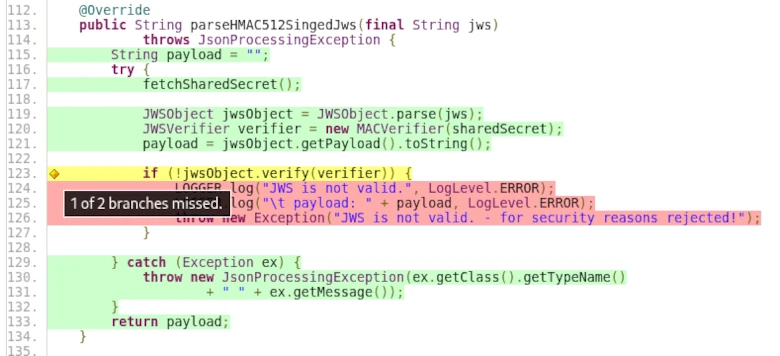
The screenshot from the TP-CORE project shows what such test coverage can look like in ‘real-world’ projects.
Of course, this example is very simple, and in real life, there are often constructs where, despite all efforts, it’s impossible to reach all lines or branches. Exceptions from third-party libraries that need to be caught but cannot be triggered under normal circumstances are a typical example.
For this reason, while we strive to achieve the highest possible test coverage and naturally aim for 100%, there are many cases where this is not feasible. However, a test coverage of 90% is quite achievable. The industry standard for commercial projects is 85% test coverage. Based on these observations, we can say that test coverage correlates with the testability of an application. This means that test coverage is a suitable measure of testability.
However, it must also be acknowledged that the test coverage metric has its limitations. Regular expressions and annotations for data validation are just a few simple examples of where test coverage alone is not a sufficient indicator of quality.
Without going too much into the implementation details, let’s imagine we had to write a regular expression to validate input against a correct 24-hour time format. If we don’t keep the correct interval in mind, our regular expression might be incorrect. The correct interval for the 24-hour format is 00:00 – 23:59. Examples of invalid values are 24:00 or 23:60. If we are unaware of this fact, errors can remain hidden in our application despite test cases, only to surface and cause problems when the application is actually used.
„… In a few cases, participants were unable to think of alternative solutions …“
The question here was whether error correction always represents the optimal solution. Beyond that, it would be necessary to clarify what constitutes an optimal solution in commercial software development projects. The statement that there are cases in which developers only know or understand one way of doing things is very illustrative. This is also reflected in our example of regular expressions (RegEx). Software development is a thought process that cannot be accelerated. Our thinking is determined by our imagination, which in turn is influenced by our experience.
This already shows us another example of sources of errors in test cases. A classic example is incorrect comparisons in collections, such as comparing arrays. The problem we are dealing with here is how variables are accessed: call by value or call by reference. With arrays, access is via call by reference, i.e., directly to the memory location. If you now assign an array to a new variable and compare both variables, they will always be the same because you are comparing the array with itself. This is an example of a test case that is essentially meaningless. However, if the implementation is correct, this faulty test case will never cause any problems.
This realization shows us that blindly striving for complete test coverage is not conducive to quality. Of course, it’s understandable that this metric is highly valued by management. However, we have also been able to demonstrate that one cannot rely on it alone. We therefore see that there is also a need for code inspections and refactorings for test cases. Since it’s impossible to read and understand all the code from beginning to end due to time constraints, it’s important to focus on problematic areas. But how can we find these problem areas? A relatively new technique helps us here. The theoretical work on this is already somewhat older; it just took a while for corresponding implementations to become available.