Abstract: Source Control Management (SCM) tools have a long tradition in the software development process and they inhabit an important part of the daily work in any development team. The first documented type of these systems SCCS appeared in 1975 and was described by Rochkind [1]. Til today a large number of other SCM systems have appeared in centralized or distributed forms. An example of centralized variants is Subversion (SVN) or for distributed solutions Git is a representative. Each new system brings many performance improvements and also a lot of new concepts. In “The History of Version Control” [2], Ruparelia gives an overview of the evolution of various free and commercial SCM systems. However, there is one basic use that all these systems have in common. Branching and merging. As simple as the concept seems: to fork a code baseline into a new branch and merge the changes back together later, for SCM systems is difficult to deal with. Giant pitfalls during branching and merging can cause a huge amount of merge conflicts that cannot be handled manually. This article discusses why and where semantic merge conflicts occur and what techniques can be used to avoid them.
To cite this article: Marco Schulz. Way out of the Merging-Hell. Journal of Research in Engineering and Computer Sciences. February 2024, Vol. 2, No. 1, pp. 28-43 doi: 10.13140/RG.2.2.27559.66727
Download the PDF: https://hspublishing.org/JRECS/article/view/343/295
1. Introduction
When we think about Source Control Management systems and their use, two core functionalities emerge. The most important and therefore the first function to be mentioned is the recording and management of changes to an existing code base. A single code change managed by SCM is called a revision. A revision can consist of any number of changes to only one file or to any number of files. This means a revision is equivalent to a version of the code base. Revisions usually have a ancestor and a descendant and this is forming a directed graph.
The second essential functionality is that SCM systems allow multiple developers to work on the same code base. This means that each developer creates a separate revision for the changes they make. This makes it very easy to track who made a change to a particular file at what time.
Especially the collaborative aspect can become a so-called merging hell if used clumsily. These problems can occur even with a simple linear approach, without further branching. It could happened that locally made changes can’t be integrated due to many semantic conflicts into a new revision. Therefore we discuss in detail in the following section why merge conflicts occur at all.
The term DevOps has been established in the software industry since around 2010. This describes the interaction between development (Dev) and operation (Ops). DevOps is a collection of concepts, methodologies around the software development process to ensure the productivity of the development team. The classical Configuration Management as it among other things in the “SWEBook – Guide to software engineering Body of knowledge” [5] was described is merged like also other special disciplines under the new term DevOps. Software Configuration Management concerns itself from technical view very intensively with the efficient use of SCM systems. This leads us to the Branch Models and from there directly to the next section which will discusses the different Merge strategies.
Another topic is where I examine selected SCM workflows and concepts of repository organization. This point is also an important part of the domain of Configuration Management. Many proven best practices can be described by the theory of expected conflict sets I introduce in last section before the conclusion. This leads to the thesis that the semantic merge conflicts arising in SCM systems are caused by a lack of Continuous Integration (CI) and may could be resolved recursively via partial merges.
2. How merge conflicts arise
If we think about how semantic merge conflicts arise in SCM systems, the pattern that occurs is always the same. The illustration does not require long-term or complex constructions with ramifications.
Even a simple test that can be performed in a few moments shows up the problem. Only one branch is needed, which is called main in a freshly created Git repository. A simple text file with the name test.txt is added to this branch. The file test.txt contains exactly one single line with the following content: “version=1.0-SNAPSHOT”. The text file filled in this way is first committed to the local repository and then pushed to the remote repository. This state describes revision 1 of the test.txt file and is the starting point for the following steps.
A second person now checks out the repository with the main branch to their own system using the clone command. The contents of test.txt are then changed as follows: “version=1.0.0” and transferred to the remote repository again. This gives the test.txt file revision 2.
Meanwhile, person 1 changes the content for test.txt in their own workspace to: “version=1.0.1” and commits the changes to their local repository.
If person 1 tries to push their changes to the shared remote repository, they will first be prompted to pull the changes they made in the meantime from the remote repository to the local repository. When this operation is performed, a conflict arises that cannot be resolved automatically.

Certainly, the remark would be justified at this point that Git is a decentralized SCM. The question arises whether the described attempt in this arrangement can be taken over also for centralized SCM systems? Would the centralized Subversion (SVN) terminate in the same result like the decentralized Git? The answer to this is a clear YES. The major difference between centralized and decentralized SCM systems is that decentralized SCM tools create a copy of the remote repository locally, which is not the case with centralized representatives. Therefore, decentralized solutions need two steps to create a revision in the remote repository, while centralized tools do not need the intermediate step via the local repository.

Before we now turn to the question of why the conflict occurred, let’s take a brief look at Figure 2.02, which once again graphically depicts the scenario in its sequences.
Using the following listing 2.01, the experiment can be recreate independently at any time. It is only important that the sequence of the individual steps is not changed.
//user 1 (ED)
git init -bare
git clone <repository>
touch test.txt >> version=1.0-SNAPSHOT
git add test.txt
git commit -m "create revision 1."
git push <repository>

//user 2 (Elmar Dott)
git clone test.txt
edit test.txt -> version=1.0.0
git commit -m "create revision 2."
git push <repository>

//user 1 (ED)
edit test.txt -> version=1.0.1
git commit -m "create revision 3."
git push <repository>
git pull - ! conflict !Listing 2.01: A test setup for creating a conflict on the command line.
The result of the described experiment is not surprising, because SCM systems are usually line-based. If we now have changes in a file in the same line, automatic algorithms like the 3-way-merge based on the O(ND) Difference Algorithm discussed by Myers [3] cannot make a decision. This is expected, because the change has a semantic meaning that only the author knows. This then leads to the user having to manually intervene to resolve the conflict.

To find a suitable solution for resolving the conflict, there are powerful tools that compare the changes of the two versions. The underlying theoretical work of 2-way-merge can be found, among others, in the paper syntactic software merging [4] by Buffenbarger.

To explore the problem further, we look at the ways in which different versions a file change can arise. Since SCM systems are line-based, we focus on the state that a single line can take:
- unchanged
- modified
- delete / removed
- add
- move
It can already be guessed that moving larger text blocks within a file can also lead to conflicts. Now objections could be raised that such a procedure is rather theoretical nature and has little practical reference. However, I must vehemently contradict this. Since I was confronted with exactly this problem very early in my professional career.
Imagine a graphical editor in which you can create BPMN processes, for example. Such an editor saves the process description in an XML file. So that it can then be processed programmatically. XML as pure ASCII text file can be placed problem-free with a SCM system under Configuration Management. If the graphical editor uses the event driven SAX implementation in Java for XML to edit the XML structure, the changed blocks are usually moved to the end of the context block within the file.
If different blocks within the file are processed simultaneously, conflicts will occur. As a rule, these conflicts cannot be resolved manually with reasonable effort. The solution at that time was a strict coordination between the developers to clarify when the file is released for editing.
In larger teams, which may also work in far distance together, this can lead to massive delays. A simple solution would be to lock the corresponding file so that no editing by another user is possible. However, this way is rather questionable in the long run. Let’s think of a locked file that cannot be processed further because the person in question fell ill at short notice.
It is much more elegant to introduce an automated step that formats such files according to a specified coding guide before a commit. However, care must be taken to strictly preserve the semantics within the file.
Now that we know the mechanisms of how conflicts arise and we can start thinking about a suitable strategy to avoid conflicts if possible. As we have already seen, automated procedures have some difficulties in deciding which change to use. Therefore, concepts should be found to avoid conflicts from the beginning. The goal is to keep the amount of conflicts manageable, so that manual processing can be done quickly, easily and secure.
Since conflicts in day-to-day business mainly occur when merging branches, we turn to the different branch strategies in the following section.
3. Branch models
In older literature, the term branch is often used as a synonym for terms such as stream or tree. In simple terms, a branch is the duplication of an object which can then be further modified in the different versions independently of each other.
Branching the main line into parallel dedicated development branches is one of the most important features of SCM systems that developers are regularly confronted with.
Although the creation of a new branch from any revision is effortless, an ill-considered branch can quickly lead to serious difficulties when merging the different branches later. To get a better grasp of the problem, we will examine the various reasons why it may be necessary to create branches from the main development branch.
A quite broad overview to different branch strategies gives the Git Flow. Before I continue with a detailed explanation, however, I would like to note that Git Flow is not optimally suited for all software development projects because of its complexity. This hint can be found with an explanation for some time on the blog of Vincent Driessen [6], who has described the Git Flow in the article “A successful Git branching model”.
This model was conceived in 2010, now more than 10 years ago, and not very long after Git itself came into being. In those 10 years, git-flow (the branching model laid out in this article) has become hugely popular in many a software team to the point where people have started treating it like a standard of sorts — but unfortunately also as a dogma or panacea. […] This is not the class of software that I had in mind when I wrote the blog post 10 years ago. If your team is doing continuous delivery of software, I would suggest to adopt a much simpler workflow (like GitHub flow) instead of trying to shoehorn git-flow into your team. […]
V. Driessen, 5 March 2020
- Main development branch: current development status of the project. In Subversion this branch is called trunk.
- Developer Branch: isolates the workspace of a developer from the main development branch in order to be able to store as many revisions of their own work as possible without influencing the rest of the team.
- Release Branch: an optional branch that is created when more than one release version is developed at the same time.
- Hotfix Branch: an optional branch that is only created when a correction (Bugfix) has to be made for an existing release. No further development takes place in this branch.
- Feature Branch: parallel development branch to the Main with a life cycle of at least one release cycle in order to encapsulate extensive functionalities.
If you look at the original illustration of Git Flow, you will see branches of branches. It is absolutely necessary to refrain from such a practice. The complexity that arises in this way can only be mastered through strong discipline.
A small detail in the conception of the Git Flow we see also with the idea beside a release Branch additionally a Hotfix Branch to create. Because in most cases the release branch is already responsible for the fixes. Whenever a release that is in production needs to be followed up with a fix, a branch is created from the revision of the corresponding release.
However, the situation changes when multiple release versions are under development. In this case it is highly recommended to keep the release changes always on the major development line and to branch off older releases as post-provisioning. This scenario should be reserved for major releases only, as they will contain API changes using the Semantic Versioning [7] and thus create per se incompatibilities. This strategy help to reduce the complexity of the branch model.
Now, however, for the release branches in which new functionality continues to be implemented, it is necessary to be able to supply the releases that are being created there with corrections. In order to have a distinction here the designation Hotfix Branch is very helpful. This is also reflected in the naming of the branches and is helpful for orientation in the repository.
If the name this branch is something like Hotfix branch, it will block the possibility of making further functional developments in this branch for the release in the future. In principle, branches of level 1 should be named Release_x.x. Branches of level 2 in turn should be called HotFix_x.x or BugFix_x.x etc. This pattern of naming fits in nicely with Semantic Versioning. Branches of a level higher than two should be strictly avoided. On the one hand, this increases the complexity of the repository structure, and on the other hand, it creates considerable effort in the administration and maintenance of subsequent components of an automated build and deploy pipeline.
The following figure puts what has just been described into a visual context. A technical description of Release Management from the perspective of Configuration Management via the creation of branches can be found in the paper “Expressions for Source Control Management Systems” [8], which proposes a vocabulary that helps to improve orientation in source repositories via the commit messages.

Certainly, an experienced configuration manager can correct unfavorably named Branches more or less easily with a little effort, depending on the SCM used. But it is important to remember that systems connected to the SCM, such as automation servers (also known as Build or CI servers), quality assurance tools such as SonarQube, etc., are also affected by such renaming. All this infrastructure and can not longer find the link to the original sources if the name of the branch got changed afterwards. Since this would be a disaster for Release Management, companies often refrain from refactoring the code repositories, which leads to very confusing graphs.
To ensure orientation in the repository, important revisions such as releases should be identified by a tag. This practice ensures that the complexity is not increased unnecessarily. All relevant revisions, so-called points of interests (POI), can be easily found again via a tag.
In contrast to branches, tags can be created arbitrarily in almost any SCM system and removed without leaving any residue. While Git supports the deletion of branches excellently, this is not easily possible with Subversion due to its internal structure.
It is also highly recommended to set an additional tag for releases that are in PRODUCTION. As soon as a release is no longer in production use, the tag that identifies a production release should be deleted. Current labels for releases in production allow you to decide very quickly from which release a resupply is needed.
Particularly in the case of very long-term projects, it is rarely possible to make a correction in the revision in which the error occurs for the first time because of the existing timeline, and it is not exactly sensible. For reasons of cost efficiency, this question is focused exclusively on the releases that are in production. We see that the use of release branches can lead to a very complex structure in the long run. Therefore it is a highly recommended strategy to close release branches that are no longer needed.
For this purpose an additional tag >EOL< can be introduced. EOL indicates that a branch has reached its end of lifetime. These measures visualize the current state of the branches in a repository and help to get a quick overview. In addition, it is also recommended to lock the closed release branches against unintentional changes. Many server solutions such as the SCM Manager or GitLab offer suitable tools for locking branches, directories and individual files. It is also strongly advised against deleting branches that are no longer needed and from which a release was created.
In this section, the different types of branches were introduced in their context. In addition, possibilities were shown how the orientation in the revisions of a repository can be ensured without having to read the source files. The following chapter discusses the various ways in which these branches can be merged.
The motivation of branches from the main development is already discussed in detail. Now it is time to inspect the various options for merging two branches.
4. Merging strategies
After we have discussed in detail the motivation for branches of the main development branch, it is now important to examine the different possibilities of merging two branches.
As I already demonstrated in the previous Chapter, conflicts can easily arise in the different versions of a file when merging, even in a linear progression. In this case it is a temporary branch that is immediately merged into a new revision as automatically as possible. If the automated merging fails, it is a semantic conflict that must be resolved manually. With clumsily chosen branch models, the number of such conflicts can be increased so massively that manual merging is no longer possible.

In Figure 4.01 we see the graph of the history of TortoisGit from the example of Listing 2. Although there is no additional branch at this point, we can see branches in the column of the graph. It is a representation of the different versions, which can continue to grow as more developers are involved.
A directed graph is therefore created for each object over time. If this object is frequently affected by edits due to its importance in the project, which are also made by different people, the complexity of the associated graph automatically increases. This effect is amplified if several branches have been created for this object.

The current version of the SCM tool Git supports three different merge strategies that the user can choose from. These are the classic merge, the rebase and the cherry picking.
Figure 4.02 shows a schematic representation of the three different merge strategies for the Git SCM. Let’s have a look in detail at what these different strategies are and how they can be used.
– Merge is the best known and most common variant. Here, the last revision of branch B and the last revision of branch A are merged into a new revision C.
– Rebase, is a feature included in SCM Git [9]. Rebase can be understood as a partial commit. This means that for each individual revision in branch B, the corresponding predecessor revision in master branch A is determined and these are merged individually into a new revision in the master. As a consequence, the history of Git is overwritten.
– Cherry picking allows selected revisions from branch A to be transferred to a second branch B.
During my work as a configuration manager, I have experienced in some projects that developers were encouraged to perform every merge as a rebase. Such a procedure is quite critical as Git overwrites the existing history. One effect is that it may could happen that important revisions that represent a release are changed. This means that the reproducibility of Releases is no longer given. This in turn has the consequence that corrections, as discussed in the section branch models, contain additional code, which in turn has to be tested. This of course destroys the possibility of a simple re-test for correction releases and therefore increases the effort involved.
A tried and tested strategy is to perform every merge as a classic merge. If the number of semantic conflicts that have occurred cannot be resolved manually, an attempt should be made to rebase. To ensure that the history is affected as little as possible, the branches should be as short-lived as possible and should not have been created before an existing release.
// preparing
git init -bare
git clone <repository>
touch file_1.txt >> Lorem ipsum dolor sit amet, consectetur adipiscing elit,
git commit -m "main branch add file 1"
touch file_2.txt >> Lorem ipsum dolor sit amet, consectetur adipiscing elit,
git commit -m "main branch add file 2"
touch file_3.txt >> Lorem ipsum dolor sit amet, consectetur adipiscing elit,
git commit -m "main branch add file 3"
touch file_4.txt >> Lorem ipsum dolor sit amet, consectetur adipiscing elit,
git commit -m "main branch add file 4"
touch file_5.txt >> Lorem ipsum dolor sit amet, consectetur adipiscing elit,
git commit -m "main branch add file 5"

// creating a simple history
file_5.txt add new line: sed do eiusmod tempor incididunt ut labore et dolore magna aliqua.
git commit -m "main branch edit file 5"
file_4.txt add new line: sed do eiusmod tempor incididunt ut labore et dolore magna aliqua.
git commit -m "main branchedit file 4"
file_3.txt extend line: sed do eiusmod tempor incididunt ut labore et dolore magna aliqua.
git commit -m "main branch edit file 3"
file_2.txt add new line: sed do eiusmod tempor incididunt ut labore et dolore magna aliqua.
git commit -m "main branch edit file 2"
file_1.txt add new line: sed do eiusmod tempor incididunt ut labore et dolore magna aliqua.
git commit -m "main branch edit file 1"

// create a branch from: "main branch add file 5"
git checkout -b develop
file_3.txt add new line: Content added by a develop branch.
git commit -m "develop branch edit file 3."
file_4.txt add new line: Content added by a develop branch.
git commit -m "develop branch edit file 4"

// rebase develop into main
git rebase mainListing 4.01: Demonstration of history change by using rebase.
If this experiment is reproduced, the conflicts resulting from the rebase must be resolved sequentially. Only when all individual sequences have been run through is the rebase completed locally. The experiment thus demonstrates what the term partial commit means, in which each conflict must be resolved for each individual commit. Compared to a simple merge, the rebase allows us to break down an enormous number of merge conflicts into smaller and less complex segments. This can enable us to manually resolve an initially unmanageable number of semantic merge conflicts.
However, this help does not come without additional risks. As Figure 4.03 shows us with the output of the log, the history is overwritten. In the experiment described, a develop branch was created by the same user in which the two files 3 and 4 were changed. The two revisions in the Branch in which files 3 and 4 were edited appeared after the rebase in the history for the main Branch.
If rebase is used excessively and without reflection, this can lead to serious problems. If a rebase overwrites a revision from which a release was created, this release cannot be reproduced again as the original sources have been overwritten. If a correction release is now required for this release for which the sources have been overwritten, this cannot be created without further ado. A simple retest is no longer possible and at least the entire test procedure must be run to ensure that no new errors have been introduced.

We can therefore already formulate an initial assumption at this point. Semantic conflicts that result from merging two objects into a new version very often have their origin in a branch strategy that is too complex. We will examine this hypothesis further in the following chapter, which is dedicated to a detailed exploration of the organization of repositories.
5. Code repository organization and quality gates
The example of Listing 2, which shows how a semantic merge conflict arises, demonstrates the problem at the lowest level of complexity. The same applies to the rebase experiment in Listing 4. If increased the complexity of these examples by involving more users who in turn work in different branches, a statistical correlation can be identified: The higher the number of files in a repository and the more users have write access to this repository, the more likely it is that different users will work on the same file at the same time. This circumstance increases the probability of semantic merge conflicts arising.
This correlation suggests that both the software architecture and the organization of the project in the code repository can also have a decisive influence on the possible occurrence of merge conflicts. Robert C. Martin suggests some problems in his book Clean Architecture [10].
This thesis is underlined by my own many years of project experience, which have shown that software modules that are kept as compact as possible and can be compiled independently of other modules are best managed in their own repository. This also results in smaller teams and therefore fewer people creating several versions of a file at the same time.
This contrasts with the paper “The issue of Monorepo and Polyrepo in large enterprises” [11] by Brousse. It cites various large companies that have opted for one solution or the other. The main motivation for using a Monorepo is the corporate culture. The main aim is to improve internal communication between teams and avoid information silos. In addition, Monorepos bring their own class of challenges, as the example cited from Microsoft shows.
[…] Microsoft scaled Git to handle the largest Git Monorepo in the world […]
Even though Brousse speaks positively about the use of Monorepos in his work, there are only a few companies that really use such a concept successfully. Which in turn raises the question of why other companies have deliberately chosen not to use Monorepos.
If we examine long-term projects that implement an application architecture as a monolith, we find identical problems to those that occur in a Monorepo. In addition to the statistical circumstances described above, which can lead to semantic merge conflicts, there are other aspects such as security and erosion of the architecture.
These problems are countered with a modular architecture of independent components with the loosest possible binding. Microservices are an example of such an architecture. A quote from Simon Brown suggests that many problems in software development can be traced back to Conway’s Law [12].
If you can’t build a monolith, what makes your think microservices are the answer?
This is because components of a monolith can also be seen as independent modules that can be outsourced to their own repository. The following rule has proven to be very practical for organizing the source code in a repository: Never use more than one technology, module, component or standalone context per repository. This results in different sections through a project. We can roughly distinguish between back-end (business logic) and front-end (GUI or presentation logic). However, a distinction by technology or programming language is also very useful. For example, several graphical clients in different technologies can exist for a back-end. This can be an Angular or Vue.js JavaScript web client for the browser or a JavaFX desktop application or an Android Mobile UI.
The elegant implementation of using multiple repositories often fails due to a lack of knowledge about the correct use of repository managers, which manage and provide releases of binary artifacts for projects. Instead of reusing artifacts that have already been created and tested and integrating them into an application in your own project via the dependency mechanism of the build tool, I have observed very unconventional and particularly error-prone integration attempts in my professional career.
The most error-prone integration of different modules into an application that I have experienced was done using so-called externals with SCM Subversion. A repository was created into which the various components were linked. Git uses a similar mechanism called submodules [13]. This decision limited the branch strategy in the project exclusively to the use of the main development branch. The release process was also very limited and required great care. Subsequent supplies for important error corrections proved to be particularly problematic. The use of submodules or externals should therefore be avoided at all costs.
Another point that is influenced by branching and merging are the various workflows for organizing collaboration in SCM systems. A very old and now newly discovered workflow is the so-called Dictatorship Workflow. This has its origins in the open source community and prevents faulty implementations from destroying the code base. The Dictator plays a central role as a gatekeeper. He checks every single commit in the repository and only the commits that meet the quality requirements are included in the main development branch. For very large projects with many contributions, a single person can no longer manage this task. Which is why the so-called Lieutenant was included as an additional instance.
With the open source code hosting platform GitHub, the Dictatorship workflow has experienced a new renaissance and is now called Pull Request. GitLab has tried to establish its own name with the term Merge Request.
This approach is not new in the commercial environment either. The entire architecture of IBM’s Rational Synergy, released in 1990, is based on the principle of the Dictatorship workflow. What has proven to be useful for open source projects has turned out to be more of a bottleneck in the commercial environment. Due to the pressure to provide many features in a project, it can happen that the Pull Requests pile up. This leads to many small branches, which in turn generate an above-average number of merge conflicts due to the accumulation, as the changes made are only made available to the team with a delay. For this reason, workflows such as Pull Requests should also be avoided in a commercial environment. To ensure quality, there are more effective paradigms such as continuous integration, code inspections and refactoring.


Christian Bird from Microsoft Research formulated very clearly in the paper The Effect of Branching Strategies on Software Quality [15] that the branch strategy does have an influence on software quality. The paper also makes many references to the repository organization and the team and organization structure. This section narrows down the context to semantic merge conflicts and reveals how negative effects increase with increasing complexity.
Conflict Sets
The paper “A State-ot-the-Art Survey on Software Merging” [16] written by Tom Mens in 2002 distinguishes between syntactic and semantic merge conflicts. While Mens mainly focuses on syntactic merge conflicts, this paper mainly deals with semantic merge conflicts.
In the practice-oriented specialist literature on topics that deal with Source Control Management as a sub-area of the disciplines of Configuration Management or DevOps, the following principle applies uni sono: keep branches as short-lived as possible or synchronize them as often as possible. This insight has already been taken up in many scientific papers and can also be found in “To Branch or Not to Branch” by Premraj et al [17], among others.
In order to clarify the influence of the branch strategy, I differentiate the branches presented in the section branch models into two categories. Backward-oriented branches, which are referred to below as reverse branches (RB), and forward-oriented branches, which are referred to as forward branches (FB).
Reverse branches are created after an initial release for subsequent supply. Whereas a release branch, developer branch, pull requests or a feature branch are directed towards the future. Since such forward branches are often long-lived and are processed for at least a few days until they are included in the main development branch, the period in which the main development branch is not synchronized into the forward branch is considered a growth factor for conflicts. As can be expressed as a function over time.
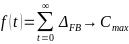
The number of conflicts arising for a forward branch increases significantly if there is a lot of activity in the main development branch and increases with each day in which these changes are not synchronized in the forward branch. The largest possible conflict set between the two branches therefore accumulates over time.
The number of all changes in a reverse branch is limited to the resolution of one error, which considerably limits the number of conflicts that arise. This results in a minimal conflict set for this category. This can be formulated in the following two axioms:
This also explains the practices for pessimistic version control and optimistic version control described by Mens in [16]. I already demonstrated that conflicts can arise even without branches. If the best practices described in this thesis are adopted, there is little reason to introduce practices such as code freeze, feature freeze or branch blocking. This is because all the strategies established from pessimistic version control to deal with semantic merge conflicts only lead to a new type of problem and prevent modern automation concepts in the software development process.
Conclusion
With a view to high automation in DevOps processes, it is important to simplify complex processes as much as possible. Such simplification is achieved through the application of established standards. An important standard is for example semantic versioning, which simplifies the view of releases in the software development process. In the agile context it is also better to talk about production candidates instead of release candidates.
The implementation phase is completed by a release and the resulting artifact is immutable. After a release, a test phase is initiated. The results of this test phase are assigned to the tested release and documented. Only after a defined number of releases, when sufficient functionality has been achieved, is a release initiated that is intended for productive use.
The procedure described in this way significantly simplifies the branch model in the project and allows the best practices suggested in this paper to be easily applied. As a result, the development team has to deal less with semantic merge conflicts. The few conflicts that arise can be easily resolved in a short time.
An important instrument to avoid long-lasting feature branches is to use the design pattern feature flag, also known as feature toggles. In the 2010 article Feature Flags [18], Martin Fowler describes how functionality in a software artifact can be enabled or disabled by a configuration in production use.
The fact that version control is still very important in software development is shown in various chapters in Quio Liang’s book [19] “Continuous Delivery 2.0 – Business leading DevOps Essentials”, published in 2022. In the standard literature for DevOps practitioners, rules for avoiding semantic merge conflicts are usually described very well. This paper shows in detail how conflicts arise and gives an appropriate explanation of why these conflicts occur. With this background knowledge, we can decide whether a merge or a rebase should be performed.
Future Work
Given the many different source control management systems currently available, it would be very helpful to establish a common query language for code repositories. This query language should act as an abstraction layer between the SCM and the client or server. Designed as a Domain Specific Language (DSL). It should not be a copy of well-known query languages such as SQL. In addition to the usual interactions, it would be desirable to find a way to formulate entire processes and define the associated roles.
References
[1] Marc J. Rochkind. 1975. The Source Code Control System (SCCS). IEEE Transactions on Software Engineering. Vol. 1, No. 4, 1975, pp. 364–370. doi: 10.1109/tse.1975.6312866
[2] Nayan B. Ruparelia. 2010. The History of Version Control. ACM SIGSOFT Software Engineering Notes. Vol. 35, 2010, pp. 5-9.
[3] Eugene W. Myers. 1983. An O(ND) Difference Algorithm and Its Variations. Algorithmica 1. 1986. pp. 251–266. https://doi.org/10.1007/BF01840446
[4] Buffenbarger, J. 1995. Syntactic software merging. Lecture Notes in Computer Science. Vol 1005, 1995. doi: 10.1007/3-540-60578-9_14
[5] P. Bourque, R. E. Fairley, 2014, SWEBook v 3.0 – Guide to the Software Engineering Body of Knowledge, IEEE, ISBN: 0-7695-5166-1
[6] V. Driessen, 2023, A successful Git branching model, https://nvie.com/posts/a-successful-git-branching-model/
[7] Tom Preston-Werner, 2023, Semantic Versioning 2.0.0, https://semver.org
[8] Marco Schulz. 2022. Expressions for Source Control Management Systems. American Journal of Software Engineering and Applications. Vol. 11, No. 2, 2022, pp. 22-30. doi: 10.11648/j.ajsea.20221102.11
[9] Git Rebase Documentation, 2023, https://git-scm.com/book/en/v2/Git-Branching-Rebasing
[11] Robert C. Martin, 2018, Clean Architecture, Pearson, ISBN: 0-13-449416-4
[12] Brousse N., 2019, The Issue of Monorepo and Polyrepo in large enterprises. Companion Proceedings of the 3rd International Conference on the Art, Science, and Engineering of Programming. No. 2, 2019, pp. 1-4. doi: 10.1145/3328433.3328435
[13] Melvin E. Conway, 1968, How do committees invent? Datamation. Vol. 14, No. 4, 1968, pp. 28–31.
[14] Git Submodules Documentation, 2023, https://git-scm.com/book/en/v2/Git-Tools-Submodules
[15] Shihab, Emad & Bird, Christian & Zimmermann, Thomas, 2012, The Effect of Branching Strategies on Software Quality. Proceedings of the ACM-IEEE International Symposium on Empirical Software Engineering and Measurement. pp. 301–310. doi: 10.1145/2372251.2372305
[16] Tom Mens. 2002. A State-ot-the-Art Survey on Software Merging. IEEE Transactions on Software Engineering. Vol. 28, 2002, pp. 449-462. doi: 10.1109/TSE.2002.1000449
[17] Premraj et al. 2011. To Branch or Not to Branch. pp. 81-90. doi: 10.1145/1987875.1987890
[18] Martin Fowler, 2023, Article Feature Flags https://martinfowler.com/bliki/FeatureFlag.html
[19] Qiao Liang, 2022, Continuous Delivery 2.0, CRC Press, ISBN: 9781032117997
Biography
Marco Schulz, also kown by his online identity Elmar Dott is an independent consultant in the field of large Web Application, generally based on the JavaEE environment. His main working field is Build-, Configuration- & Release-Management as well as software architecture. In addition his interests cover the full software development process and the discovery of possibilities to automate them as much as possible. Over the time of the last ten years he has authored a variety of technical articles for different publishers and speaks on various software development conferences. He is also the author of the book “Continuous Integration with Jenkins” published 2021 by Rheinwerk.