Index & Abbreviations

[A]

[B]

[C]

[D]

[E]

[F]

[G]

[H]

[I]

[J]

[K]

[L]

[M]

[N]

[O]

[P]

[Q]

[R]

[S]

[T]

[U]

[V]

[W]

[Y]

[Z]

[X]

Zurück zum Inhaltsverzeichniss: Apache Maven Master Class

A

B

C

D

E

F

G

H

I

J

K

L

M

N

O

P

Q

R

S

T

U

V

W

X

Y

Z

[A]

[B]

[C]

[D]

[E]

[F]

[G]

[H]

[I]

[J]

[K]

[L]

[M]

[N]

[O]

[P]

[Q]

[R]

[S]

[T]

[U]

[V]

[W]

[Y]

[Z]

[X]

Zurück zum Inhaltsverzeichniss: Apache Maven Master Class

Apache Maven Master Class

Apache Maven (Maven for short) was first released on March 30, 2002, as an Apache Top-Level Project under the free Apache 2.0 License. This license also allows free use by companies in a commercial environment without paying license fees.

The word Maven comes from Yiddish and means something like “collector of knowledge.”

Maven is a pure command-line program developed in the Java programming language. It belongs to the category of build tools and is primarily used in Java software development projects. In the official documentation, Maven describes itself as a project management tool, as its functions extend far beyond creating (compiling) binary executable artifacts from source code. Maven can be used to generate quality analyses of program code and API documentation, to name just a few of its diverse applications.

Benefits


  Online Course (yearly subsciption / 365 days)

Maven Master Class
m 3.47 Milli-Bitcoin

Target groups

This online course is suitable for both beginners with no prior knowledge and experienced experts. Each lesson is self-contained and can be individually selected. Extensive supplementary material explains concepts and is supported by numerous references. This allows you to use the Apache Maven Master Class course as a reference. New content is continually being added to the course. If you choose to become an Apache Maven Master Class member, you will also have full access to exclusive content.

Developer

  • Maven Basics
  • Maven on the Command Line
  • IDE Integration
  • Archetypes: Creating Project Structures
  • Test Integration (TDD & BDD) with Maven
  • Test Containers with Maven
  • Multi-Module Projects for Microservices

Build Manager / DevOps

  • Release Management with Maven
  • Deploy to Maven Central
  • Sonatype Nexus Repository Manager
  • Maven Docker Container
  • Creating Docker Images with Maven
  • Encrypted Passwords
  • Process & Build Optimization

Quality Manager

  • Maven Site – The Reporting Engine
  • Determine and evaluate test coverage
  • Static code analysis
  • Review coding style specifications

In-Person Live Training – Build Management with Apache Maven

JPoint Moscow 2023

Test Driven: from zero to hero

In the software industry, it is a common agreement that the code base has sufficient test automation. Because this is necessary for a stable DevOps process and secure refactoring. But the reality is completely different. Almost every project I joined during my career didn’t have any lines of test code. If we think about the fact that after more than 40 years, 80% of all commercial software projects fail, we should not be surprised. But this doesn’t have to be like this. In this talk, we demonstrate how easy it is to introduce, even in huge projects, a test-driven approach. The technical setup is a standard Java project with Apache Maven and JUnit 5.

Working with JSON in Java RESTful Services using Jackson

Since a long time the Java Script Object Notation [1] become as a lightweight standard to replace XML for information exchange between heterogeneous systems. Both technologies XML and JSON closed those gap to return simple and complex data of a remote method invocation (RMI), when different programming languages got involved. Each of those technologies has its own benefits and disadvantages. A good designed XML document is human readable but needs in comparing to JSON more payload when it send through the network. For almost every programming languages existing plenty implementations to deal with XML and also JSON. We don’t need to reinvent the wheel, to implement our own solution for handling JSON objects. But choosing the right library is not that easy might it seems.

The most popular library for JSON in Java projects is the one I already mentioned: Jackson [2]. because of its huge functionality. Another important point for choosing Jackson instead of other libraries is it’s also used by the Jersey REST Framework [3]. Before we start now our journey with the Java Frameworks Jersey and Jackson, I like to share some thoughts about things, I often observe in huge projects during my professional life. Because of this reason I always proclaim: don’t mix up different implementation libraries for the same technology. The reason is it’s a huge quality and security concern.

The general purpose for using JSON in RESTful applications is to transmit data between a server and a client via HTTP. To achieve that, we need to solve two challenges. First, on the server side, we need create form a Java object a valid JSON representation which we can send to the client. This process we call serialization. On the client side, we do the second step, which is exactly the opposite, we did on the server. De-serialization we call it, when we create a valid object from a JSON String.

In this article we will use on the server side and also on the client side Java as programming language, to deal with JSON objects. But keep in mind REST allows you to have different programming languages on the server and for the client. Java is always a good choice to implement your business logic on the server. The client side often is made with JavaScript. Also PHP, .NET and other programming Languages are possible.

In the next step we will have a look at the project architecture. All artifacts are organized by one Apache Maven Multi-Module project. It’s a good recommendation to follow this structure in your own projects too. The three artifacts we create are: api, server and client.

  • API: contain shared objects which will needed on the server and also client side, like domain objects and interfaces.
  • Server: producer of a RESTful service, depends on API.
  • Client: consumer of the RESTful service, depends on API.

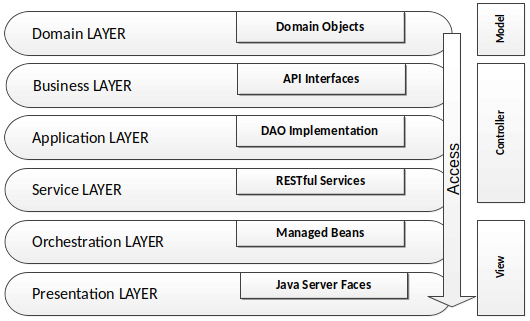
Inside of this artifacts an layer architecture is applied. This means the access to objects from a layer is only allowed to the direction of the underlying layers. In short: from top to down. The layer structure are organized by packages. Not every artifact contains every layer, only the ones which are implemented. The following picture draws an better understanding for the whole architecture is used.

The first piece of code, I’d like to show are the JSON dependencies we will need in the notation for Maven projects.

<dependency>
    <groupId>com.fasterxml.jackson.core</groupId>
    <artifactId>jackson-core</artifactId>
    <version>${version}</version>
</dependency>
<dependency>
    <groupId>com.fasterxml.jackson.core</groupId>
    <artifactId>jackson-annotations</artifactId>
    <version>${version}</version>
</dependency>
<dependency>
    <groupId>com.fasterxml.jackson.core</groupId>
    <artifactId>jackson-databind</artifactId>
    <version>${version}</version>
</dependency>
XML

Listing 1

In respect to the size of this article, I only focus how the JSON object is used in RESTful applications. It’s not a full workshop about RESTful (Micro) Services. As code base we reuse my open source GitHub project TP-ACL [4], an access control list. For our example I decided to sliced apart the Role – Functionality from the whole code base.

For now we need as first an Java object which we can serialize to an JSON String. This Domain Object will be the Class RolesDO and is located in the layer domain inside the API module. The roles object contains a name, a description and a flag that indicates if a role is allowed to delete.

@Entity
@Table(name = "ROLES")
public class RolesDO implements Serializable {

    private static final long serialVersionUID = 50L;

    @Id
    @Column(name = "NAME")
    private String name;

    @Column(name = "DESCRIPTION")
    private String description;

    @Column(name = "DELETEABLE")
    private boolean deleteable;

    public RolesDO() {
        this.deleteable = true;
    }

    public RolesDO(final String name) {
        this.name = name;
        this.deleteable = true;
    }

    //Getter & Setter
}
Java

Listing 2

So far so good. As next step we will need to serialize the RolesDO in the server module as a JSON String. This step we will do in the RolesHbmDAO which is stored in the implementation layer within the Server module. The opposite direction, the de-serialization is also implemented in the same class. But slowly, not everything at once. lets have as first a look on the code.

import com.fasterxml.jackson.core.JsonProcessingException;
import com.fasterxml.jackson.databind.ObjectMapper;

public class RolesDAO {

    public transient EntityManager mainEntityManagerFactory;

    public String serializeAsJson(final RolesDO role) 
            throws JsonProcessingException {
        ObjectMapper mapper = new ObjectMapper();
        return mapper.writeValueAsString(role);
    }

    public RolesDO deserializeJsonAsObject(final String json, final RolesDO role) 
            throws JsonProcessingException, ClassNotFoundException {
        ObjectMapper mapper = new ObjectMapper();
        return (RolesDO) mapper.readValue(json, Class.forName(object.getCanonicalName()));
    }

    public List<RolesDO> deserializeJsonAsList(final String json)
            throws JsonProcessingException, ClassNotFoundException {       
        ObjectMapper mapper = new ObjectMapper();
        return mapper.readValue(json, new TypeReference<List>() {});
    }

    public List listProtectedRoles() {

        CriteriaBuilder builder = mainEntityManagerFactory.getCriteriaBuilder();
        CriteriaQuery query = builder.createQuery(RolesDO.class);
        
        Root root = query.from(RolesDO.class);
        query.where(builder.isNull(root.get("deactivated")));
        query.orderBy(builder.asc(root.get("name")));

        return mainEntityManagerFactory.createQuery(query).getResultList();
    }
}
Java

Listing 3

The implementation is not so difficult to understand, but may at this point could the first question appear. Why the de-serilization is in the server module and not in the client module? When the client sends a JSON to the server module, we need to transform this to an real Java object. Simple as that.

Usually the Data Access Object (DAO) Pattern contains all functionality for database operations. This CRUD (create, read, update and delete) functions, we will jump over. If you like to get to know more about how the DAO pattern is working, you could also check my project TP-CORE [4] at GitHub. Therefore we go ahead to the REST service implemented in the object RoleService. Here we just grep the function fetchRole().

@Service
public class RoleService {

    @Autowired
    private RolesDAO rolesDAO;

    @GET
    @Path("/{role}")
    @Produces({MediaType.APPLICATION_JSON})
    public Response fetchRole(final @PathParam("role") String roleName) {
        Response response = null;
        try {
            RolesDO role = rolesDAO.find(roleName);
            if (role != null) {
                String json = rolesDAO.serializeAsJson(role);
                response = Response.status(Response.Status.OK)
                        .type(MediaType.APPLICATION_JSON)
                        .entity(json)
                        .encoding("UTF-8")
                        .build();
            } else {
                response = Response.status(Response.Status.NOT_FOUND).build();
            }

        } catch (Exception ex) {
            LOGGER.log("ERROR CODE 500 " + ex.getMessage(), LogLevel.DEBUG);
            response = Response.status(Response.Status.INTERNAL_SERVER_ERROR).build();
        }
        return response;
    }
}
Java

Listing 4

The big secret here we have in the line where we stick the things together. As first the RolesDO is created and in the next line the DAO calls the serializeAsJson() Method with the RoleDO as parameter. The result will be a JSON representation of the RoleDO. If the role exist and no exceptions occur, then the service is ready for consuming. In the case of any problem the service send a HTTP error code instead of the JSON.

Complex Services which combine single services to a process take place in the orchestration layer. At this point we can switch to the client module to learn how the JSON String got transformed back to a Java domain object. In the client we don’t have RolesHbmDAO to use the deserializeJsonAsObject() method. And of course we also don’t want to create duplicate code. This forbids us to copy paste the function into the client module.

As pendant to the fetchRole() on the server side, we use for the client getRole(). The purpose of both implementations is identical. The different naming helps to avoid confusions.

import com.fasterxml.jackson.core.JsonProcessingException;
import com.fasterxml.jackson.core.type.TypeReference;
import com.fasterxml.jackson.databind.ObjectMapper;

public class Role {
    private final String API_PATH
            = "/acl/" + Constraints.REST_API_VERSION + "/role";
    private WebTarget target;

    public RolesDO getRole(String role) throws JsonProcessingException {
        Response response = target
                .path(API_PATH).path(role)
                .request()
                .accept(MediaType.APPLICATION_JSON)
                .get(Response.class);
        LOGGER.log("(get) HTTP STATUS CODE: " + response.getStatus(), LogLevel.INFO);

        ObjectMapper mapper = new ObjectMapper();
        return mapper.readValue(response.readEntity(String.class), RolesDO.class);
    }
}
Java

Listing 5

As conclusion we have now seen the serialization and de-serialisation by using the Jackson library of JSON objects is not that difficult. In the most of the cases we just need three methods:

  • serialize a Java object to a JSON String
  • create a Java object from a JSON String
  • de-serialize a list of objects inside a JSON String to a Java object collection

This three methods I already introduced in Listing 2 for the DAO. To prevent duplicate code we should separte those functionality in an own Java Class. This is known as the design pattern Wrapper [5] also known as Adapter. For reaching the best flexibility I implemented the JacksonJsonTools from TP-CORE as Generic.

package org.europa.together.application;

import com.fasterxml.jackson.core.type.TypeReference;
import com.fasterxml.jackson.core..JsonProcessingException;
import com.fasterxml.jackson.databind.ObjectMapper;
import java.util.List;

public class JacksonJsonTools {

    private static final long serialVersionUID = 15L;

    public String serializeAsJsonObject(final T object)
            throws JsonProcessingException {
        try {
            ObjectMapper mapper = new ObjectMapper();
            return mapper.writeValueAsString(object);
        } catch (JsonProcessingException ex) {
            System.err.println(ex.getOriginalMessage());
        }
    }

    public T deserializeJsonAsObject(final String json, final Class object)
            throws JsonProcessingException, ClassNotFoundException {
        try {
            Class<?> clazz = Class.forName(object.getCanonicalName());
            ObjectMapper mapper = new ObjectMapper();
            return (T) mapper.readValue(json, clazz);
        } catch (JsonProcessingException ex) {
            System.err.println(ex.getOriginalMessage());
        }
    }

    public List deserializeJsonAsList(final String json)
            throws JsonProcessingException, ClassNotFoundException {
        try {
            ObjectMapper mapper = new ObjectMapper();
            return mapper.readValue(json, new TypeReference<List>() {
            });
        } catch (com.fasterxml.jackson.core.JsonProcessingException ex) {
            System.err.println(ex.getOriginalMessage());
        }
    }
}
Java

Listing 6

This and much more useful Implementations with a very stable API you find in my project TP-CORE for free usage.

Resources:

Abonnement / Subscription

[English] This content is only available to subscribers.

[Deutsch] Diese Inhalte sind nur für Abonnenten verfügbar.

jConf Peru 2022

Rolling Stones on stage: release me

Everyone does it, some even several times a day. But few are aware of the complex interlocking mechanisms that make up a complete software release. This is why it sometimes happens that a package gets in the way of the automated processing chain.
With a bit of theory and a typical example from the Java universe, I show how you can take a little pressure out of the software development process in order to achieve lean, slightly automated processes.

To deal with standards in your own projects is not something bad. A well define release process based on common standards increase your productivity. Learn in this talk how you are able to simplify your daily work.

Preventing SQL Injections in Java with JPA and Hibernate

When we have a look at OWASP’s top 10 vulnerabilities [1], SQL Injections are still in a popular position. In this short article, we discuss several options on how SQL Injections could be avoided.

When Applications have to deal with databases existing always high-security concerns, if an invader got the possibility to hijack the database layer of your application, he can choose between several options. Stolen the data of the stored users to flood them with spam is not the worst scenario that could happen. Even more problematic would be when stored payment information got abused. Another possibility of an SQL Injection Cyber attack is to get illegal access to restricted pay content and/or services. As we can see, there are many reasons why to care about (Web) Application security.

To find well-working preventions against SQL Injections, we need first to understand how an SQL Injection attack works and on which points we need to pay attention. In short: every user interaction that processes the input unfiltered in an SQL query is a possible target for an attack. The data input can be manipulated in a manner that the submitted SQL query contains a different logic than the original. Listing 1 will give you a good idea about what could be possible.

SELECT Username, Password, Role FROM User 
   WHERE Username = 'John Doe' AND Password = 'S3cr3t';
SELECT Username, Password, Role FROM Users
   WHERE Username = 'John Doe'; --' AND Password='S3cr3t';

Listing 1: Simple SQL Injection

The first statement in Listing 1 shows the original query. If the Input for the variables Username and Password is not filtered, we have a lack of security. The second query injects for the variable Username a String with the username John Doe and extends with the characters ‘; –. This statement bypasses the AND branch and gives, in this case, access to the login. The ‘; sequence close the WHERE statement and with — all following characters got un-commented. Theoretically, it is possible to execute between both character sequences every valid SQL code.

Of course, my plan is not to spread around ideas that SQL commands could rise up the worst consequences for the victim. With this simple example, I assume the message is clear. We need to protect each UI input variable in our application against user manipulation. Even if they are not used directly for database queries. To detect those variables, it is always a good idea to validate all existing input forms. But modern applications have mostly more than just a few input forms. For this reason, I also mention keeping an eye on your REST endpoints. Often their parameters are also connected with SQL queries.

For this reason, Input validation, in general, should be part of the security concept. Annotations from the Bean Validation [2] specification are, for this purpose, very powerful. For example, @NotNull, as an Annotation for the data field in the domain object, ensure that the object only is able to persist if the variable is not empty. To use the Bean Validation Annotations in your Java project, you just need to include a small library.

<dependency> 
    <groupId>org.hibernate.validator</groupId>
    <artifactId>hibernate-validator</artifactId>
    <version>${version}</version>
</dependency>

Listing 2: Maven Dependency for Bean Validation

Perhaps it could be necessary to validate more complex data structures. With Regular Expressions, you have another powerful tool in your hands. But be careful. It is not that easy to write correct working RegEx. Let’s have a look at a short example.

public static final String RGB_COLOR = "#[0-9a-fA-F]{3,3}([0-9a-fA-F]{3,3})?";
 
public boolean validate(String content, String regEx) {
    boolean test;
    if (content.matches(regEx)) {
        test = true;
    } else {
        test = false;
    }
    return test;
}

validate('#000', RGB_COLOR);

Listing 3: Validation by Regular Expression in Java

The RegEx to detect the correct RGB color schema is quite simple. Valid inputs are #ffF or #000000. The Range for the characters is 0-9, and the Letters A to F. Case insensitive. When you develop your own RegEx, you always need to check very well existing boundaries. A good example is also the 24 hours time format. Typical mistakes are invalid entries like 23:60 or 24:00. The validate method compares the input string with the RegEx. If the pattern matches the input, the method will return true. If you want to get more ideas about validators in Java, you can also check my GitHub repository [3].

In resume, our first idea to secure user input against abuse is to filter out all problematic character sequences, like — and so on. Well, this intention of creating a blocking list is not that bad. But still have some limitations. At first, the complexity of the application increased because blocking single characters like –; and ‘ could causes sometimes unwanted side effects. Also, an application-wide default limitation of the characters could cost sometimes problems. Imagine there is a text area for a Blog system or something equal.

This means we need another powerful concept to filter the input in a manner our SQL query can not manipulate. To reach this goal, the SQL standard has a very great solution we can use. SQL Parameters are variables inside an SQL query that will be interpreted as content and not as a statement. This allows large texts to block some dangerous characters. Let’s have a look at how this will work on a PostgreSQL [4] database.

DECLARE user String;
SELECT * FROM login WHERE name = user; 

Listing 4: Defining Parameters in PostgreSQL

In the case you are using the OR mapper Hibernate, there exists a more elegant way with the Java Persistence API (JPA).

String myUserInput;
 
@PersistenceContext
public EntityManager mainEntityManagerFactory;

CriteriaBuilder builder =
    mainEntityManagerFactory.getCriteriaBuilder();

CriteriaQuery<DomainObject> query =
    builder.createQuery(DomainObject.class);

// create Criteria
Root<ConfigurationDO> root =
    query.from(DomainObject.class);

//Criteria SQL Parameters
ParameterExpression<String> paramKey =
    builder.parameter(String.class);

query.where(builder.equal(root.get("name"), paramKey);

// wire queries together with parameters
TypedQuery<ConfigurationDO> result =
    mainEntityManagerFactory.createQuery(query);

result.setParameter(paramKey, myUserInput);
DomainObject entry = result.getSingleResult();

Listing 5: Hibernate JPA SQL Parameter Usage

Listing 5 is shown as a full example of Hibernate using JPA with the criteria API. The variable for the user input is declared in the first line. The comments in the listing explain the way how it works. As you can see, this is no rocket science. The solution has some other nice benefits besides improving web application security. At first, no plain SQL is used. This ensures that each database management system supported by Hibernate can be secured by this code.

May the usage looks a bit more complex than a simple query, but the benefit for your application is enormous. On the other hand, of course, there are some extra lines of code. But they are not that difficult to understand.

Resources


A briefly overview to Java frameworks

When you have a look at Merriam Webster about the word framework you find the following explanations:

  • a basic conceptional structure
  • a skeletal, openwork, or structural frame

May you could think that libraries and frameworks are equal things. But this is not correct. The source code calls the functionality of a library directly. When you use a framework it is exactly the opposite. The framework calls specific functions of your business logic. This concept is also know as Inversion of Control (IoC).

For web applications we can distinguish between Client-Side and Server-Side frameworks. The difference is that the client usually run in a web browser, that means to available programming languages are limited to JavaScript. Depending on the web server we are able to chose between different programming languages. the most popular languages for the internet are PHP and Java. All web languages have one thing in common. They produce as output HTML, witch can displayed in a web browser.

In this article I created an short overview of the most common Java frameworks which also could be used in desktop applications. If you wish to have a fast introduction for Java Server Application you can check out my Article about Java EE and Jakarta.

If you plan to use one or some of the discussed frameworks in your Java application, you just need to include them as Maven or Gradle dependency.

JUnit, TestNGTDD – unit testing
MockitoTDD mocking objects
JGiven, CucumberBDD – acceptance testing
Hibernate, iBatis, Eclipse LinkJPA- O/R Mapper
Spring Framework, Google GuiceDependency Injection
PrimeFaces, BootsFaces, ButterFacesJSF User Interfaces
ControlsFX, BootstrapFXJavaFX User Interfaces
Hazelcast, Apache KafkaEvent Stream Processing
SLF4J, Logback, Log4JLogging
FF4jFeature Flags

Before I continue I wish to telly you, that this frameworks are made to help you in your daily business as developer to solve problems. Every problem have multiple solutions. For this reason it is more important to learn the concepts behind the frameworks instead just how to use a special framework. During the last two decades since I’m programming I saw the rise and fall of plenty Frameworks. Examples of frameworks today almost nobody remember are: Google Web Toolkit and JBoss Seam.

The most used framework in Java for writing and executing unit tests is JUnit. An also often used alternative to JUnit is TestNG. Both solutions working quite equal. The basic idea is execute a function by defined parameters and compare the output with an expected results. When the output fit with the expectation the test passed successful. JUnit and TestNG supporting the Test Driven Development (TDD) paradigm.

If you need to emulate in your test case a behavior of an external system you do not have in the moment your tests are running, then Mockito is your best friend. Mockito works perfectly together with JUnit and TestNG.

The Behavioral Driven Development (BDD) is an evolution to unit tests where you are able to define the circumstances the customer will accepted the integrated functionality. The category of BDD integration tests are called acceptance tests. Integration tests are not a replacement for unit tests, they are an extension to them. The frameworks JGiven and Cucumber are also very similar both are like Mockito an extension for the unit test frameworks JUnit and TestNG.

For dealing in Java with relational databases we can choose between several persistence frameworks. Those frameworks allow you to define your database structure in Java objects without writing any line of SQL The mapping between Java objects and database tables happens in the background. Another very great benefit of using O/R Mapper like Hibernate, iBatis and eclipse link is the possibility to replace the underlying database sever. But this achievement is not so easy to reach as it in the beginning seems.

In the next section I introduce a technique was first introduced by the Spring Framework. Dependency Injection (DI). This allows the loose coupling between modules and an more easy replacement of components without a new compile. The solution from Google for DI is called Guice and Java Enterprise binges its own standard named CDI.

Graphical User Interfaces (GUI) are another category for frameworks. It depends on the chosen technology like JavaFX or JSF which framework is useful. The most of the provided controls are equal. Common libraries for GUI JSF components are PrimeFaces, BootsFaces or ButterFaces. OmniFaces is a framework to have standardized solution for JSF problems, like chaching and so on. Collections for JavaFX controls you can find in ControlsFX and BootstrapFX.

If you have to deal with Event Stream Processing (ESP) may you should have a look on Hazelcast or Apache Kafka. ESP means that the system will react on constantly generated data. The event is a reference to each data point which can be persisted in a database and the stream represent to output of the events.

In December a often used technology comes out of the shadow, because of a attacking vulnerability in Log4J. Log4J together with the Simple Logging Facade for Java (SLF4J) is one of the most used dependencies in the software industry. So you can imagine how critical was this information. Now you can imagine which important role Logging has for software development. Another logging framework is Logback, which I use.

Another very helpful dependency for professional software development is FF4J. This allows you to define feature toggles, also know as feature flags to enable and disable functionality of a software program by configuration.

This list could be much longer. I just tried to focus on the most used ones the are for Java programmers relevant. Feel free to leave a comment to suggest something I may forgot. If you share this article on