If you want to use your Git repository for collaborative editing of source code, you need a Git server. The Git server enables multiple developers to collaborate on the same code base. Installing the Git client on a Linux server is a first step towards your own server solution, but it is far from sufficient. In order to allow multiple people to access a code repository, we need access authorization. After all, the repository should be publicly accessible via the Internet. We want to use user management to prevent unauthorized people from reading and changing the contents of the repositories.
There are many excellent and convenient solutions for operating a Git server that should be preferred to a native server solution. The administration of a native Git server requires Linux knowledge and is carried out exclusively via the command line. Solutions such as the SCM-Manager have a graphical user interface and come with many useful tools for administering the server. These tools are not available with a native installation.
Why should you install Git as a native server? This question is quite easy to answer. The reason is when the server on which the code repository is to be made available has only a few hardware resources. RAM in particular is always a bit of a problem in this context. This is often the case with rented virtual private servers (VPS) or a small RaspberryPI. So we can see that it can make sense to want to run a native Git server.
As a prerequisite, we need a Linux server on which we can install the Git server. This can be a Debian or Ubuntu server. If you use CentOs or other Linux distributions, you must use your distribution’s package manager instead of APT to install the software.
In the first step, we start by updating the packages and installing the Git client.
Now, in the third step, we can create our Git repositories in the newly created home directory of the git user. These differ from the local workspace in that they do not have the source code checked out.
Unfortunately, we are not quite finished with our project yet. In the fourth step, we have to set the user authorization for the created repository. This is done by storing the public key on the Git server for SSH access. To do this, we copy the contents of our private key file into the /home/git/.ssh/authorized_keys file in a separate line. If you now want to deny existing users access, simply comment out the private key number with a #.
If everything has been done correctly, you can access the repository using the following command line command: git clone ssh://git@<IP>/~/<repo>
Replace with the actual server IP. For our example, the correct path for is project.git, so it is the directory we created for the Git repository.
Multiple repositories can be created on the native Git server. It is important to note that all authorized users have read and write access to all repositories created in this way. This can only be restricted by creating multiple users on the operating system of the Linux server that provides our Git repositories, to whom the repositories are then assigned.
We see that a native Git server installation can be implemented quickly, but it is not sufficient for commercial software development. If you like to experiment, you can create a virtual machine and try out this workshop in it.
The secure use of source control management (SCM) systems such as Git is essential for programmers (development) and system administrators (operations). This group of tools has a long tradition in software development and enables development teams to work together on a code base. Four questions are answered: When was the change made? Who made the change? What was changed? Why was something changed? It is therefore a pure collaboration tool.
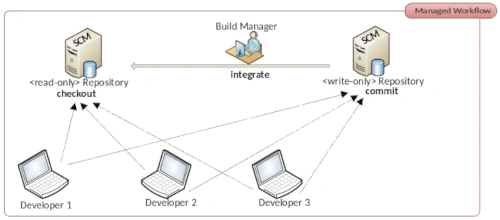
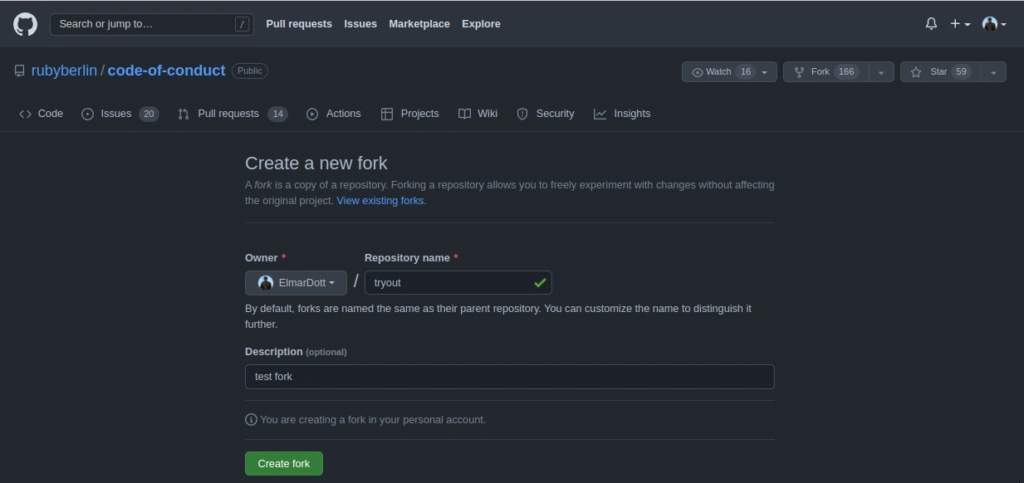
With the advent of the open source code hosting platform GitHub, so-called Pull Requests were introduced. Pull requests are a workflow in GitHub that allows developers to provide code changes for repositories to which they only have read access. Only after the owner of the original repository has reviewed the proposed changes and approved them are these changes integrated by him. This is also how the name comes about. A developer copies the original repository into his GitHub workspace, makes changes and requests the owner of the original repository to adopt the change. The latter can then accept the changes and if necessary adapt them himself or reject them with a reason.
Anyone who thinks that GitHub was particularly innovative is mistaken. This process is very old hat in the open source community. Originally, this procedure was called the Dictatorship Workflow. IBM’s commercial SCM Rational Synergy first published in 1990 is based precisely on the Dictatorship Workflow. With the class of distributed version management tools which Git also belongs to the Dictatorship Workflow is quite easy to implement. So it was obvious that GitHub would make this process available to its users. GitHub has chosen a much more appealing name. Anyone who works with the free DevOps solution GitLab, for example will know pull requests as merge requests. The most common Git servers now contain the pull request process. Without going into too much detail about the technical details of implementing pull requests we will focus our attention on the usual problems that open source projects face.
Developers who want to participate in an open source project are called maintainers. Almost every project has a short guide on how to support the project and which rules apply. For people who are learning to program, open source projects are ideal for quickly and significantly improving their own skills. For the open source project this means that you have maintainers with a wide range of skills and experience. If you don’t establish a control mechanism the code base will erode in a very short time.
If the project is quite large and there are a lot of maintainers working on the code base it is hardly possible for the owner of the repository to process all pull requests in a timely manner. To counteract this bottleneck the Dictatorship Workflow was expanded to the Dictatorship – Lieutenant Workflow. An intermediate instance was introduced that distributes the review of pull requests across several shoulders. This intermediate layer the so-called Lieutenants are particularly active maintainers with an already established reputation. The Dictator therefore only needs to review the Lieutenants’ pull requests. An immense reduction in workload that ensures that there is no backlog of features due to unprocessed pull requests. After all the improvements or extensions should be included in the code base as quickly as possible so that they can be made available to users in the next release.
This approach is still the standard in open source projects to ensure quality. You can never say who is involved in the project. There may even be one or two saboteurs. This idea is not so far-fetched. Companies that have strong competition for their commercial product from the free open source sector could come up with unfair ideas here if there were no regulations. In addition maintainers cannot be disciplined as is the case with team members in companies, for example. It is difficult to threaten a maintainer who is resistant to advice and does not adhere to the project’s conventions despite repeated requests with a pay cut. The only option is to exclude this person from the project.
Even if the problem of disciplining employees in commercial teams described above is not a problem. There are also difficulties in these environments that need to be overcome. These problems date back to the early days of version control tools. The first representatives of this species were not distributed solutions just centralized. CVS and Subversion (SVN) only ever keep the latest revision of the code base on the local development computer. Without a connection to the server you can actually not work. This is different with Git. Here you have a copy of the repository on your own computer, so you can do your work locally in a separate branch and when you are finished you bring these changes into the main development branch and then transfer them to the server. The ability to create offline branches and merge them locally has a decisive influence on the stability of your own work if the repository gets into an inconsistent state. Because in contrast to centralized SCM systems you can now continue working without having to wait for the main development branch to be repaired.
These inconsistencies arise very easily. All it takes is forgetting a file when committing and team members can no longer compile the project locally and are hampered in their work. The concept of Continuous Integration (CI) was established to overcome this problem. It is not as is often wrongly assumed about integrating different components into an application. The aim of CI is to keep the commit stage – the code repository – in a consistent state. For this purpose build servers were established which regularly check the repository for changes and then build the artifact from the source code. A very popular build server that has been established for many years is Jenkins. Jenkins originally emerged as a fork of the Hudson project. Build Servers now takes on many other tasks. That is why it makes a lot of sense to call this class of tools automation servers.
With this brief overview of the history of software development, we now understand the problems of open source projects and commercial software development. We have also discussed the history of the pull request. In commercial projects, it often happens that teams are forced by project management to work with pull requests. For a project manager without technical background knowledge, it makes a lot of sense to establish pull requests in his project as well. After all, he has the idea that this will improve code quality. Unfortunately, this is not the case. The only thing that happens is that a feature backlog is provoked and the team is forced to work harder without improving productivity. The pull request must be evaluated by a competent person. This causes unpleasant delays in large projects.
Now I often see the argument that pull requests can be automated. This means that the build server takes the branch with the pull request and tries to build it, and if the compilation and automated tests are successful, the server tries to incorporate the changes into the main development branch. Maybe I’m seeing something wrong, but where is the quality control? It’s a simple continuous integration process that maintains the consistency of the repository. Since pull requests are primarily found in the Git environment, a temporarily inconsistent repository does not mean a complete stop to development for the entire team, as is the case with Subversion.
Another interesting question is how to deal with semantic merge conflicts in an automatic merge. These are not a serious problem per se. This will certainly lead to the rejection of the pull request with a corresponding message to the developer so that the problem can be solved with a new pull request. However, unfavorable branch strategies can lead to disproportionate additional work.
I see no added value for the use of pull requests in commercial software projects, which is why I advise against using pull requests in this context. Apart from a complication of the CI / CD pipeline and increased resource consumption of the automation server which now does the work twice, nothing else has happened. The quality of a software project can be improved by introducing automated unit tests and a test-driven approach to implementing features. Here it is necessary to continuously monitor and improve the test coverage of the project. Static code analysis and activating compiler warnings bring better results with significantly less effort.
Personally, I believe that companies that rely on pull requests either use them for complicated CI or completely distrust their developers and deny that they do a good job. Of course, I am open to a discussion on the topic, perhaps an even better solution can be found. I would therefore be happy to receive lots of comments with your views and experiences about dealing with pull requests.
Why do we even need the option to save application configurations in text files? Isn’t a database sufficient for this purpose? The answer to this question is quite trivial. The information on how an application can connect to a database is difficult to save in the database itself.
Now you could certainly argue that you can achieve such things with an embedded database such as SQLite. That may be correct in principle. Unfortunately, this solution is not really practical for highly scalable applications. And you don’t always have to use a sledgehammer to crack a nut. Saving important configuration parameters in text files has a long tradition in software development. However, various text formats such as INI, XML, JSON and YAML have now become established for this use case. For this reason, the question arises as to which format is best to use for your own project.
INI Files
One of the oldest formats are the well-known INI files. They store information according to the key = value principle. If a key appears multiple times in such an INI file, the final value is always overwritten by the last entry that appears in the file.
; Example of an INI File[Section-name]key=value ; inlinetext="text configuration with spaces and \' quotas"string='can be also like this'char=passwort# numbers & digetsnumber=123hexa=0x123octa=0123binary=0b1111float=123.12# boolean valuesvalue-1=truevalue-0=false
INI
As we can see in the small example, the syntax in INI files is kept very simple. The [section] name is used primarily to group individual parameters and improves readability. Comments can be marked with either ; or #. Otherwise, there is the option of defining various text and number formats, as well as Boolean values.
Web developers know INI files primarily from the PHP configuration, the php.ini, in which important properties such as the size of the file upload can be specified. INI files are also still common under Windows, although the registry was introduced for this purpose in Windows 95.
Properties
Another very tried and tested solution is so-called property files. This solution is particularly common in Java programs, as Java already has a simple class that can handle properties. The key=value format is borrowed from INI files. Comments are also introduced with #.
In order to ensure type safety when reading .properties in Java programs, the TP-CORE library has an extended implementation. Despite the fact that the properties are read in as strings, the values can be accessed using typing. A detailed description of how the PropertyReader class can be used can be found in the documentation.
.property files can also be used as filters for substitutions in the Maven build process. Of course, properties are not just limited to Maven and Java. This concept can also be used in languages such as Dart, nodeJS, Python and Ruby. To ensure the greatest possible compatibility of the files between the different languages, exotic notation options should be avoided.
XML
XML has also been a widely used option for many years to store configurations in an application in a changeable manner. Compared to INI and property files, XML offers more flexibility in defining data. A very important aspect is the ability to define fixed structures using a grammar. This allows validation even for very complex data. Thanks to the two checking mechanisms of well-formedness and data validation against a grammar, possible configuration errors can be significantly reduced.
Well-known application scenarios for XML can be found, for example, in Java Enterprise projects (J EE) with web.xml or the Spring Framework and Hibernate configuration. The power of XML even allows it to be used as a Domain Specific Language (DSL), as is used in the Apache Maven build tool.
Thanks to many freely available libraries, there is an implementation for almost every programming language to read XML files and access specific data. For example, PHP, a language popular with web developers, has a very simple and intuitive solution for dealing with XML with the Simple XML extension.
JavaScript Object Notation, or JSON for short, is a relatively new technology, although it has been around for several years. JSON also has a corresponding implementation for almost every programming language. The most common use case for JSON is data exchange in microservices. The reason for this is the compactness of JSON. Compared to XML, the data stream to be transferred in web services such as XML RPC or SOAP with JSON is much smaller due to the notation.
There is also a significant difference between JSON and XML in the area of validation. Basically, there is no way to define a grammar like in XML with DTD or schema on the official JSON homepage [1]. There is a proposal for a JSON grammar on GitHub [2], but there are no corresponding implementations to be able to use this technology in projects.
A further development of JSON is JSON5 [3], which was started in 2012 and has been officially published as a specification in version 1.0.0 [4] since 2018. The purpose of this development was to significantly improve the readability of JSON for people. Important functions such as the ability to write comments were added here. JSON5 is fully compatible with JSON as an extension. To get a brief impression of JSON5, here is a small example:
{// commentsunquoted:'and you can quote me on that',singleQuotes:'I can use "double quotes" here',lineBreaks:"Look, Mom! \No \\n's!",hexadecimal: 0xdecaf,leadingDecimalPoint: .8675309,andTrailing: 8675309.,positiveSign: +1,trailingComma:'in objects',andIn:['arrays',],"backwardsCompatible":"with JSON",}
JSON5
YAML
Many modern applications such as the open source metrics tool Prometheus use YAML for configuration. The very compact notation is very reminiscent of the Python programming language. YAML version 1.2 is currently published.
The advantage of YAML over other specifications is its extreme compactness. At the same time, version 1.2 has a grammar for validation. Despite its compactness, the focus of YAML 1.2 is on good readability for machines and people alike. I leave it up to each individual to decide whether YAML has achieved this goal. On the official homepage you will find all the resources you need to use it in your own project. This also includes an overview of the existing implementations. The design of the YAML homepage also gives a good foretaste of the clarity of YAML files. Attached is a very compact example of a Prometheus configuration in YAML:
global:scrape_interval:15sevaluation_interval:15srule_files:# - "first.rules"# - "second.rules"#IP: 127.0.0.1scrape_configs:-job_name:prometheusstatic_configs:-targets:['127.0.0.1:8080']# SPRING BOOT WEB APP-job_name:spring-boot-samplescrape_interval:60sscrape_timeout:50sscheme:"http"metrics_path:'/actuator/prometheus'static_configs:-targets:['127.0.0.1:8888']tls_config:insecure_skip_verify:true
YAML
Resumee
All of the techniques presented here have been tried and tested in practical use in many projects. Of course, there may be some preferences for special applications such as REST services. For my personal taste, I prefer the XML format for configuration files. This is easy to process in the program, extremely flexible and, with clever modeling, also compact and extremely readable for people.
Ruby has been a well-established programming language for many years and can also be recommended to beginners. Ruby follows the object-oriented paradigm and contains many concepts to support OOP well. In addition, the Ruby on Rails framework makes it very easy to develop complex web applications.
The most difficult hurdle to overcome when getting started with Ruby is the installation of the entire development environment. For this reason, I have written this short tutorial on getting started with Ruby. So let’s start with the installation right away.
My operating system is a Debian 12 Linux and Ruby can be installed very easily with the sudo apt-get install ruby-full command. This procedure can be applied to all Debian-based Linux distributions such as Ubuntu. You can then use ruby -v to check the success in the bash.
If we now follow the tutorial on the Ruby on Rails homepage and want to install the Rails framework via gem rails, we already encounter the first problem. No libraries for Ruby can be installed due to missing authorizations. Now we could come up with the idea to install the libraries as superuser with sudo. Unfortunately, this solution is only temporary and prevents the libraries from being found correctly later in the development environment. It is better to create a folder for the GEMs in the user’s home directory and make this available via a system variable.
The above line must be entered at the end of the .bashrc file so that the changes remain persistent. It is important that is <user> replaced with the correct user name. The success of this action can be checked via gem environment and should result in an output similar to the one below.
With this setting, Ruby GEMs can now be installed without difficulty. Let’s try this out right away and install the Ruby on Rails framework, which supports us in the development of web applications: gem install rails. This should now run without error messages and with the command rails -v we can see if we were successful.
In the next step we can now create a new Rails project. Here I use the example from the Ruby on Rails documentation and write in the bash: rails new blog. This creates a corresponding directory called blog with the project files. After we have changed to the directory, we still need to install all dependencies. This is done via: bundle install.
Here we encounter another problem. The installation cannot be completed because there seems to be a problem with the psych library. The real problem, however, is that there is no support for YAML files at the operating system level. This can be fixed very quickly by installing the YAML package.
sudo apt-get install libyaml-dev
The problem with psych in Ruby on Rails has existed for a while and has been solved with the YAML installation so that the bundle install command now also runs successfully. Now we are also able to start the server for the Rails application: bin/rails server.
ed@:~/blog$bin/railsserver=> BootingPuma=> Rails7.1.3.3applicationstartingindevelopment=> Run`bin/rails server --help`for more startup optionsPumastartinginsinglemode...* Puma version: 6.4.2 (ruby3.1.2-p20)("The Eagle of Durango")* Min threads: 5* Max threads: 5* Environment: development* PID: 12316* Listening on http://127.0.0.1:3000* Listening on http://[::1]:3000UseCtrl-Ctostop
Bash
If we now call up the URL http://127.0.0.1:3000 in the web browser, we see our Rails web application.
With these steps, we have now created a functioning Ruby environment on our system. Now it’s time to decide on a suitable development environment. If you only occasionally adapt a few scripts, VIM and Sublime Text are sufficient as editors. For complex software projects, a full IDE should be used, as this simplifies the work considerably. The best recommendation is the paid IDE RubyMine from JetBrains. If you support Ruby open source projects as a developer, you can apply for a free license.
A freely available Ruby IDE is VSCode from Microsoft. However, a few plugins have to be integrated first and VSCode is not very intuitive for my taste. Ruby integration for the classic Java IDEs Eclipse and NetBeans are quite outdated and can only be made to work with a great deal of effort.
With this we have already discussed all the important points that are necessary to set up a functioning Ruby environment on your own system. I hope that this little workshop has significantly lowered the entry barrier to learning Ruby. If you like this article, please like it and recommend it to your friends.
¡Aprende a través del software! Mejora tu desempeño reflexionando sobre tu liderazgo. En este taller, desarrollará acciones concretas y adoptará hábitos de empoderamiento y un marco para gerentes de proyectos de software. ¡La casa proporciona los materiales! Si eres un profesional de TI/software y aspiras a un rol de liderazgo o quieres mejorar, este taller es para ti.
Heavy motivation to automate everything, even the automation itself, is the common understanding of the most DevOps teams. There seems to be a dire necessity to automate everything – even automation itself. This is common understanding and therefore motivation for most DevOps teams. Let’s have a look on typical Continuous Stupidities during a transformation from a pure Configuration Management to DevOps Engineer.
In my role as Configuration and Release Manager, I saw in close to every project I joined, gaps in the build structure or in the software architecture, I had to fix by optimizing the build jobs. But often you can’t fix symptoms like long running build scripts with just a few clicks. In his post I will give brief introduction about common problems in software projects, you need to overcome before you really think about implementing a DevOps culture.
Build logic can’t fix a broken architecture. A huge amount of SCM merging conflicts occur, because of missing encapsulation of business logic. A function which is spread through many modules or services have a high likelihood that a file will be touched by more than one developer.
The necessity of orchestrated builds is a hint of architectural problems.Transitive dependencies, missing encapsulation and a heavy dependency chain are typical reasons to run into the chicken and egg problem. Design your artifacts as much as possible independent.
Build logic have developed by Developers, not by Administrators. Persons which focused in Operations have different concepts to maintain artifact builds, than a software developer. A good anti pattern example of a build structure is webMethofs of Software AG. They don‘ t provide a repository server like Sonatype Nexus to share dependencies. The build always point to the dependencies inside a webMethods installation. This practice violate the basic idea of build automation, which mentioned in the book book ‚Practices of an Agile Developer‘ from 2006.
Not everything at once. Split up the build jobs to specific goals, like create artifact, run acceptance tests, create API documentation and generate reports. If one of the last steps fail you don’t need to repeat everything. The execution time of the build get dramatically reduced and it is easier to maintain the build infrastructure.
Don’t give to much flexibility to your build infrastructure. This point is strongly related to the first topic I explains. When a build manager have less discipline he will create extremely complex scripts nobody is able to understand. The JavaScript task runner Grunt is a example how a build logic can get messy and unreadable. This is one of the reason, why my favorite build tool for Java projects is always decided to Maven, because it takes governance of understandable builds.
There is no requirement to automate the automation. By definition have complex automation levels higher costs than simple tasks. Always think before, about the benefits you get of your automation activities to see if it make sens to spend time and money for it.
We do what we can, but can we what we do? Or in the words by Gardy Bloch „A fool with a tool is still a fool“. Understand the requirements of your project and decide based on that which tool you choose. If you don’t have the resources even the most professional solution can not support you. If you understood your problem you are be able to learn new professional advanced processes.
Build logic have run first on the local development environment. If your build runs not on your local development machine than don’t call it build logic. It is just a hack. Build logic have to be platform and IDE independent.
Don’t mix up source repositories. The organization of the sources into several folders inside a huge directory, creates just a complex build whiteout any flexibility. Sources should structured by technology or separate independent modules.
Many of the point I mentioned can understood by comparing the current Situation in almost every project. The solution to fix the things in a healthy manner is in the most cases not that complicated. It needs just a bit of attention and well planning. The most important advice I can give is follow the KISS principle. Keep it simple, stupid. This means follow as much as possible the standard process without modifications. You don’t need to reinvent the wheel. There are reasons why a standard becomes to a standard. Here is a short plan you can follow.
First: understand the problem.
Second: investigate about a standard solution for the process.
Third: develop a plan to apply the solution in the existing process landscape. This implies to kick out tools which not support standard processes.
If you follow step by step you own pan, without jumping to more far ten the ext point, you can see quite fast positive results.
By the way. If you think you like to have a guiding to reach a success DevOps process, don’t hesitate to contact me. I offer hands on Consulting and also training to build up a powerful DevOps team.
Linux turns more and more to a popular operating system for IT professional. One of the reasons for this movement are the server solutions. Stability and low resource consuming are some of the important characteristics for this choice. May you already played around with a Microsoft Server you will miss the graphical Desktop in a Linux Server. After a login into a Linux Server you just see the command prompt is waiting for your inputs.
In this short article I introduce you some helpful Linux programs to work with files on the command line. This allows you to gather information, for example from log files. Before I start I’d like to recommend you a simple and powerful editor named joe.
Ctrl + C – Abort the current editing of a file without saving changes Ctrl + KX – Exit the current editing and save the file Ctrl + KF – Find text in the current file Ctrl + V – Paste clipboard into document (CMD + V for Mac) Ctrl + Y – Delete current line where cursor is
To install joe on an Debian based Linux distribution you just need to type:
sudo apt-get install joe
1. When you need to find content in a huge text file GREP will be your best friend. GREP allows you to search for text pattern in files.
8.AWK is a programming language consider to manipulate data.
awk{print$2}file.log
Bash
Cookie Consent
[EN] We use cookies to improve your experience on our site. By using our site, you consent to cookies.
[DE] Wir verwenden Cookies, um Ihre Erfahrungen auf unserer Website zu verbessern. Durch die Nutzung unserer Website stimmen Sie Cookies zu.
This website uses cookies
Websites store cookies to enhance functionality and personalise your experience. You can manage your preferences, but blocking some cookies may impact site performance and services.
Essential cookies enable basic functions and are necessary for the proper function of the website.
Name
Description
Duration
Cookie Preferences
This cookie is used to store the user's cookie consent preferences.
30 days
These cookies are needed for adding comments on this website.
Name
Description
Duration
comment_author
Used to track the user across multiple sessions.
Session
comment_author_email
Used to track the user across multiple sessions.
Session
comment_author_url
Used to track the user across multiple sessions.
Session
These cookies are used for managing login functionality on this website.
Name
Description
Duration
wordpress_logged_in
Used to store logged-in users.
Persistent
wordpress_sec
Used to track the user across multiple sessions.
15 days
wordpress_test_cookie
Used to determine if cookies are enabled.
Session
Statistics cookies collect information anonymously. This information helps us understand how visitors use our website.
Matomo is an open-source web analytics platform that provides detailed insights into website traffic and user behavior.