High-performance hardware under Linux for local AI applications

Anyone wanting to experiment a bit with local LLM will quickly discover its limitations. Not everyone has a massively upgraded desktop PC with 2 TB of RAM and a CPU that could fry an egg under full load. A laptop with 32 GB of RAM, or in my case, a Lenovo P14s with 64 GB of RAM, is more typical. Despite this generous configuration, it often fails to load a more demanding AI model, as 128 GB of RAM is fairly standard for many of these models. And you can’t upgrade the RAM in current laptops because the chips are soldered directly onto the motherboard. We have the same problem with the graphics card, of course. That’s why I’ve made it a habit when buying a laptop to configure it with almost all the available options, hoping to be set for 5-8 years. The quality of the Lenovo ThinkPad series, in particular, hasn’t disappointed me in this regard. My current system is about two years old and is still running reliably.

I’ve been using Linux as my operating system for years, and I’m currently running Debian 13. Compared to Windows, Linux and Unix distributions are significantly more resource-efficient and don’t use their resources for graphical animations and complex gradients, but rather provide a powerful environment for the applications they’re used in. Therefore, my urgent advice to anyone wanting to try local LLMs is to get a powerful computer and run Linux on it. But let’s take it one step at a time. First, let’s look at the individual hardware components in more detail.

Let’s start with the CPU. LLMs, CAD applications, and even computer games all perform calculations that can be processed very effectively in parallel. For parallel calculations, the number of available CPU cores is a crucial factor. The more cores, the more parallel calculations can be performed.

Of course, the processors need to be able to quickly request the data for the calculations. This is where RAM comes into play. The more RAM is available, the more efficiently the data can be provided for the calculations. Affordable laptops with 32 GB of RAM are already available. Of course, the purchase price increases exponentially with more RAM. While there are certainly some high-end gaming devices in the consumer market, I wouldn’t recommend them due to their typically short lifespan and comparatively high price.

The next logical step in the hardware chain is the hard drive. Simple SSDs significantly accelerate data transfer to RAM, but there are still improvements. NVMe cards with 2 GB of storage capacity or more can reach speeds of up to 7000 MB/s in the 4th generation.

We have some issues with graphics cards in laptops. Due to their size and the required performance, the graphics cards built into laptops are more of a compromise than a true highlight. A good graphics card would be ideal for parallel calculations, such as those performed in LLMs (Large Linear Machines). As a solution, we can connect the laptop to an external graphics card. Thanks to Bitcoin miners in the crypto community, considerable experience has already been gained in this area. However, to connect an external graphics card to the laptop, you need a port that can handle that amount of data. USB 3 is far too slow for our purposes and would severely limit the advantages of the external graphics card due to its low data rate.

The solution to our problem is Thunderbolt. Thunderbolt ports look like USB-C, but are significantly faster. You can identify Thunderbolt by the small lightning bolt symbol (see Figure 1) on the cables or connectors. These are not the power supply connections. To check if your computer has Thunderbolt, you can use a simple Linux shell command.

ed@local: $ lspci | grep -i thunderbolt
00:07.0 PCI bridge: Intel Corporation Raptor Lake-P Thunderbolt 4 PCI Express Root Port #0
00:07.2 PCI bridge: Intel Corporation Raptor Lake-P Thunderbolt 4 PCI Express Root Port #2
00:0d.0 USB controller: Intel Corporation Raptor Lake-P Thunderbolt 4 USB Controller
00:0d.2 USB controller: Intel Corporation Raptor Lake-P Thunderbolt 4 NHI #0
00:0d.3 USB controller: Intel Corporation Raptor Lake-P Thunderbolt 4 NHI #1

In my case, my computer’s output shows that two Thunderbolt 4 ports are available.

To connect an external graphics card, we need a mounting system onto which a PCI card can be inserted. ANQUORA offers a good solution here with the ANQ-L33 eGPU Enclosure. The board can accommodate a graphics card with up to three slots. It costs between €130 and €200. A standard ATX power supply is also required. The required power supply wattage depends on the graphics card’s power consumption. It’s advisable not to buy the cheapest power supply, as the noise level might bother some users. The open design of the board provides ample flexibility in choosing a graphics card.

Selecting a graphics card is a whole other topic. Since I use Linux as my operating system, I need a graphics card that is supported by Linux. For accelerating LLMs, a graphics card with as many GPU cores as possible and a correspondingly large amount of internal memory is necessary. To make the purchase worthwhile and actually notice a performance boost, the card should be equipped with at least 8 GB of RAM. More is always better, of course, but the price of the card will then increase exorbitantly. It’s definitely worth checking the used market.

If you add up all the costs, the investment for an external GPU amounts to at least 500 euros. Naturally, this only includes an inexpensive graphics card. High-end graphics cards can easily exceed the 500-euro price point on their own. Anyone who would like to contribute their expertise in the field of graphics cards is welcome to contribute an article.

To avoid starting your shopping spree blindly and then being disappointed with the result, it’s highly advisable to consider beforehand what you want to do with the local LLM. Supporting programming requires less processing power than generating graphics and audio. Those who use LLMs professionally can save considerably by purchasing a high-end graphics card with self-hosted models compared to the costs of, for example, cloud code. The specification of LLMs depends on the available parameters. The more parameters, the more accurate the response and the more computing power is required. Accuracy is further differentiated by:

  • FP32 (Single-Precision Floating Point): Standard precision, requires the most memory. (e.g., 32 bits per parameter)
  • FP16 (Half-Precision Floating Point): Half the precision, halves the memory requirement compared to FP32, but can slightly reduce precision. (e.g., 16 bits per parameter / 4 bytes)
  • BF16 (Brain Floating Point): Another option for half-precision calculations, often preferred in deep learning due to its better performance in certain operations. (e.g., 16 bits per parameter / 2 bytes)
  • INT8/INT4 (Integer Quantization): Even lower precision, drastically reduces memory requirements and speeds up inference, but can lead to a greater loss of precision. (e.g., 8 bits per parameter / 1 byte)

Other factors influencing the hardware requirements for LLM include:

  • Batch Size: The number of input requests processed simultaneously.
  • Context Length: The maximum length of text that the model can consider in a query. Longer context lengths require more memory because the entire context must be held in memory.
  • Model Architecture: Different architectures have different memory requirements.

To estimate the memory consumption of a model, you can use the following calculation: Parameters * Accuracy = Memory consumption for the model.

7,000,000,000 parameters * 2 bytes/parameter (BF16) = 14,000,000,000 bytes = 14 GB

When considering hardware recommendations, you should refer to the model’s documentation. This usually only specifies the minimum or average requirements. However, there are general guidelines you can use.

  • Small models (up to 7 billion parameters): A GPU with at least 8 GB of VRAM should be sufficient, especially if you are using quantization.
  • Medium-sized models (7-30 billion parameters): A GPU with 16 GB to 24 GB of VRAM is recommended.
  • Large models (over 30 billion parameters): Multiple GPUs, each with at least 24 GB of VRAM, or a single GPU with a very large amount of VRAM (e.g., 48 GB, 80 GB) are required.
  • CPU-only: For small models and simple experiments, the CPU may suffice, but inference will be significantly slower than on a GPU. Here, a large amount of RAM is crucial (several GB / 32+).

We can see that using locally running LLMs can be quite realistic if you have the necessary hardware available. It doesn’t always have to be a supercomputer; however, most solutions from typical electronics retailers are off-the-shelf and not really suitable. Therefore, with this article, I have laid the groundwork for your own experiments.


Risk Cloud & Serverless

The cloud is one of the most innovative developments since the turn of the millennium and enables us to make widespread use of neural networks, which we popularly refer to as Large Language Models (LLM). This technological leap can only be surpassed by quantum computing. But enough of the buzzwords for SEO optimization, instead let’s take a look behind the scenes. Let’s start with what the cloud actually is and put all the marketing terms aside.

The best way to imagine the cloud is as a gigantic supercomputer made up of many small computers like building blocks. This theoretically allows you to combine any amount of CPU power, RAM and hard drive space. On this supercomputer, which runs in a data center, virtual machines can now be provided that simulate a real computer with freely definable hardware. In this way, the physical hardware resources can be optimally distributed among the provided virtual machines.

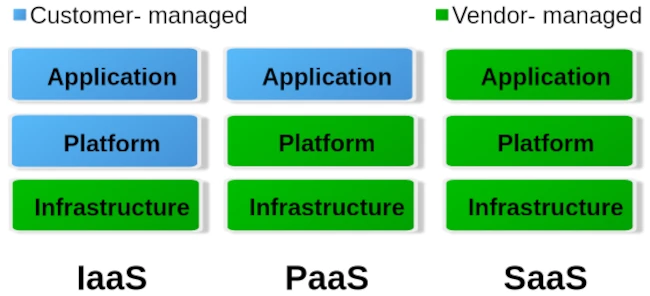
When it comes to cloud, we roughly distinguish between three different operating levels: Infrastructure as a Service (IaaS), Platform as a Service (PaaS) and Software as a Service. The image below gives an idea of ​​how these levels are divided.

To put it simply, you can say that with IaaS the provider only provides the hardware specification. So CPU, RAM, hard drive and internet connection. Via the administration software e.g. B. Kubernetes, you can now create your own virtual machines/containers and install the corresponding operating systems and services yourself. The entire responsibility for security and network routing lies with the customer. PaaS, on the other hand, already provides a rudimentary virtual machine including the selected operating system. What you ultimately install on this system above the operating system level is up to you. But here too, the issue of security is largely in the hands of the customer. For most hosting providers, typical PaaS products are so-called virtual servers. Users have the least freedom with SaaS. Here you usually only have permission to use software through a user account. Very typical SaaS products are email accounts, but also so-called managed servers. Managed servers are mostly used to provide your own websites. Here the version of the programming language and the database is specified by the server operator.

Managed servers in particular have a long tradition. They emerged at the turn of the millennium to provide an immediately usable environment for dynamic PHP websites with a MySQL database connection. The situation is similar with the serverless products that have recently become fashionable. Depending on your level of experience, you can now buy corresponding products from the major providers AWS, Google and Microsoft Azure.

The idea is to no longer operate your own servers for the services and thus outsource the entire hardware, operation and security effort to the cloud operators. In principle, this isn’t a bad idea, especially when it comes to small companies or startups that don’t have a lot of financial resources at their disposal or simply lack the administrative know-how for networks, Linux and server security.

Of course, serverless offerings that are completely managed externally quickly reach their limits. Especially if you want to provide your own developed individual serverless software in the cloud with as little effort as possible, you will come across many a stumbling block. A problem is often the flexible expandability when requirements change. You can certainly buy products from the various providers’ portfolios and combine them as you like like a building block set, but the costs incurred can quickly add up.

Basically, there is nothing wrong with a pay per use model (i.e. pay for what you use). At first glance, this is not a bad solution for people and organizations with small budgets. But here too, it’s the little details that can quickly grow into serious problems.

If you choose any cloud provider, you are well advised to avoid its proprietary management and automation products and instead use established general products if possible. If you commit yourself to one provider with all the consequences, it will only be possible to switch to another provider with great effort. Changes to the terms and conditions or continuously increasing costs are possible reasons for a forced change. Therefore, test whoever binds himself forever.

But also careless use of resources in cloud systems, e.g. B. due to incorrect configurations or unfavorable deployment strategies, can lead to an explosion in costs. Here you are well advised if there is the option to set limits and activate them. So that once you reach a certain amount, you will be informed that only a ‘certain’ quota is available. Especially with highly available services that suddenly receive an enormous number of new users, such limits can quickly lead to them being disconnected from the network. It is therefore always a good idea to use two cloud solutions, one for development and a separate one for the productive system, in order to minimize the offline risk.

Similar to stock market trading, you can also define limits for cloud services like AWS. Stop-loss orders on the stock market prevent you from selling a stock too cheaply or buying it too expensively. With the pay-per-use model, it’s not much different in the cloud. Here, you need to set appropriate limits with your provider to prevent bills from exceeding your available budget. These limits are also dynamic in the cloud. This means that the framework conditions are constantly changing, requiring the necessary limits to be regularly adjusted to meet current needs. To identify bottlenecks early, a robust monitoring system should be in place. The minimum requirement for an AWS node is determined by its requests. The upper limit of available resources is defined by the limit. Tools like IBM’s Kubecost can largely automate cost monitoring in Kubernetes clusters.

For cloud development environments, you should also keep a close eye on your own development and DevOps team. If an NPM Docker container of over 2 GB is created on the fly every time for a simple JavaScript Angular app, this strategy should definitely be questioned. Even if the cloud can allocate seemingly infinite resources dynamically, that doesn’t mean that this happens for free.

Of course, the issue of security is also an important factor. Of course, you can trust the cloud operator when he says that everything is encrypted and access to customer data and business secrets is not possible. One can certainly assume that the information that is to be accessed in most ventures rarely has any exciting or even exciting content that could be of interest to large cloud operators. If you still want to be on the safe side, you should write off the idea of ​​serverless completely and consider running your own cloud. Thanks to modern and free software, this is now easier than expected.

I have learned from personal experience that, given the complexity of modern web applications, efficient monitoring with Grafana and Prometheus or other solutions such as the ELK Stack or Slunk is essential. But some DevOps teams have difficulties with data collection and proper evaluation. IT decision-makers in particular are asked to get a technical overview so as not to fall for the well-sounding marketing traps of cloud and serverless.


The Future of Build Management

It’s not just high-level languages, which need to convert source code into machine code to make it executable, that require build tools. These tools are now also available for modern scripting languages ​​like Python, Ruby, and PHP, as their scope of responsibility continues to expand. Looking back at the beginnings of this tool category, one inevitably encounters make, the first official representative of what we now call a build tool. Make’s main task was to generate machine code and package the files into a library or executable. Therefore, build tools can be considered automation tools. It’s logical that they also take over many other recurring tasks that arise in a developer’s daily work. For example, one of the most important innovations responsible for Maven’s success was the management of dependencies on other program libraries.

Another class of automation tools that has almost disappeared is the installer. Products like Inno Setup and Wise Installer were used to automate the installation process for desktop applications. These installation routines are a special form of deployment. The deployment process, in turn, depends on various factors. First and foremost, the operating system used is, of course, a crucial criterion. But the type of application also has a significant influence. Is it, for example, a web application that requires a defined runtime environment (server)? We can already see here that many of the questions being asked now fall under the umbrella of DevOps.

As a developer, it’s no longer enough to simply know how to write program code and implement functions. Anyone wanting to build a web application must first get the corresponding server running on which the application will execute. Fortunately, there are now many solutions that significantly simplify the provisioning of a working runtime. But especially for beginners, it’s not always easy to grasp the whole topic. I still remember questions in relevant forums about downloading Java Enterprise, but only finding that the application server was included.

Where automation solutions were lacking in the early 2000s, the challenge today is choosing the right tool. There’s an analogy here from the Java universe. When the Gradle build tool appeared on the market, many projects migrated from Maven to Gradle. The argument was that it offered greater flexibility. Often, the ability to define orchestrated builds was needed—that is, the sequence in which subprojects are created. Instead of acknowledging that this requirement represented an architectural shortcoming and addressing it, complex and difficult-to-manage build logic was built in Gradle. This, in turn, made customizations difficult to implement, and many projects were migrated back to Maven.

From DevOps automations, so-called pipelines have become established. Pipelines can also be understood as processes, and these processes can, in turn, be standardized. The best example of a standardized process is the build lifecycle defined in Maven, also known as the default lifecycle. This process defines 23 sequential steps, which, broadly speaking, perform the following tasks:

  • Resolving and deploying dependencies
  • Compiling the source code
  • Compiling and running unit tests
  • Packaging the files into a library or application
  • Deploying the artifact locally for use in other local development projects
  • Running integration tests
  • Deploying the artifacts to a remote repository server.

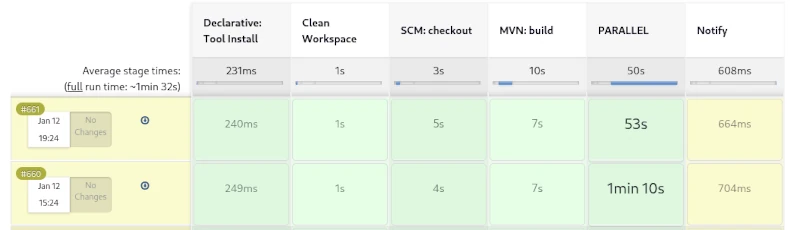
This process has proven highly effective in countless Java projects over the years. However, if you run this process as a pipeline on a CI server like Jenkins, you won’t see much. The individual steps of the build lifecycle are interdependent and cannot be triggered individually. It’s only possible to exit the lifecycle prematurely. For example, after packaging, you can skip the subsequent steps of local deployment and running the integration tests.

A weakness of the build process described here becomes apparent when creating web applications. Web frontends usually contain CSS and JavaScript code, which is also automatically optimized. To convert variables defined in SCSS into correct CSS, a SASS preprocessor must be used. Furthermore, it is very useful to compress CSS and JavaScript files as much as possible. This obfuscation process optimizes the loading times of web applications. However, there are already countless libraries for CSS and JavaScript that can be managed with the NPM tool. NPM, in turn, provides so-called development libraries like Grunt, which enable CSS processing and optimization.

We can see how complex the build process of modern applications can become. Compilation is only a small part of it. An important feature of modern build tools is the optimization of the build process. An established solution for this is creating incremental builds. This is a form of caching where only changed files are compiled or processed.

Jenkins Pipelines

But what needs to be done during a release? This process is only needed once an implementation phase is complete, to prepare the artifact for distribution. While it’s possible to include all the steps involved in a release in the build process, this would lead to longer build times. Longer local build times disrupt the developer’s workflow, making it more efficient to define a separate process for this.

An important condition for a release is that all used libraries must also be in their final release versions. If this isn’t the case, it cannot be guaranteed that subsequent releases of this version are identical. Furthermore, all test cases must run correctly, and a failure will abort the process. Additionally, a corresponding revision tag should be set in the source control repository. The finished artifacts must be signed, and API documentation must be created. Of course, the rules described here are just a small selection, and some of the tasks can even be parallelized. By using sophisticated caching, creating a release can be accomplished quickly, even for large monoliths.

Furthermore, by utilizing sophisticated caching, creating a release can be accomplished quickly, even for large monoliths. For Maven, for example, no complete release process, similar to the build process, has been defined. Instead, the community has developed a special plugin that allows for the semi-automation of simple tasks that arise during a release.

If we take a closer look at the topic of documentation and reporting, we find ample opportunities to describe a complete process. Creating API documentation would be just one minor aspect. Far more compelling about standardized reporting are the various code inspections, some of which can even be performed in parallel.

Of course, deployment is also essential. Due to the diversity of potential target environments, a different strategy is appropriate here. One possible approach would be broad support for configuration tools like Ansible, Chef, and Puppet. Virtualization technologies such as Docker and LXC containers are also standard in the age of cloud computing. The main task of deployment would then be provisioning the target environment and deploying the artifacts from a repository server. A wealth of different deployment templates would significantly simplify this process.

If we consistently extrapolate from these assumptions, we conclude that there can be different types of projects. These would be classic development projects, from which artifacts for libraries and applications are created; test projects, which in turn contain the created artifacts as dependencies; and, of course, deployment projects for providing the infrastructure. The area of ​​automated deployment is also reflected in the concepts of Infrastructure as Code and GitOps, which can be taken up and further developed here.


Clean Desk – More Than Just Security

As a child, I liked to reply to my mother that only a genius could master chaos when she told me to tidy my room. A very welcome excuse to shirk my responsibilities. When I started an apprenticeship in a trade after finishing school, the first thing my master craftsman emphasized was: keeping things tidy. Tools had to be put back in their bags after use, opened boxes of the same materials had to be refilled, and of course, there was also the need to sweep up several times a day. I can say right away that I never perceived these things as harassment, even if they seemed annoying at first. Because we quickly learned the benefits of the motto “keep things clean.”

Tools that are always put back in their place give us a quick overview of whether anything is missing. So we can then go looking for it, and the likelihood of things being stolen is drastically reduced. With work materials, too, you maintain a good overview of what’s been used up and what needs to be replaced. Five empty boxes containing only one or two items not only take up space but also lead to miscalculations of available resources. Finally, it’s also true that one feels less comfortable in a dirty environment, and cleanliness demonstrates to the client that one works in a focused and planned manner.

Due to this early experience, when the concept of Clean Desk was introduced as a security measure in companies a few years ago, I didn’t immediately understand what was expected of me. After all, the Clean Desk principle had been second nature to me long before I completed my computer science degree. But let’s start at the beginning. First, let’s look at what Clean Desk actually is and how to implement it.

Anyone who delves deeply into the topic of security learns one of the first things they learn: most successful attacks aren’t carried out using complicated technical maneuvers. They’re much more mundane and usually originate from within, not from the outside. True to the adage, opportunity makes the thief. When you combine this fact with the insights of social engineering, a field primarily shaped by the hacker Kevin Mitnick, a new picture emerges. It’s not always necessary to immediately place your own employees under suspicion. In a building, there are external cleaning staff, security personnel, or tradespeople who usually have easy access to sensitive areas. Therefore, the motto should always be: trust is good, but control is better, which is why a Clean Desk Policy is implemented.

The first rule is: anyone leaving their workstation for an extended period must switch off their devices. This applies especially at the end of the workday. Otherwise, at least the desktop should be locked. The concept behind this is quite simple: Security vulnerabilities cannot be exploited from switched-off devices to hack into the company network from the outside. Furthermore, it reduces power consumption and prevents fires caused by short circuits. To prevent the devices from being physically stolen, they are secured to the desk with special locks. I’ve personally experienced devices being stolen during lunch breaks.

Since I myself have stayed in hotels a lot, my computer’s hard drive is encrypted as a matter of course. This also applies to all external storage devices such as USB sticks or external SSDs. If the device is stolen, at least no one can access the data stored on it.

It goes without saying that secure encryption is only possible with a strong password. Many companies have specific rules that employee passwords must meet. It’s also common practice to assign a new password every 30 to 90 days, and this new password must be different from the last three used.

It’s often pointed out that passwords shouldn’t be written on a sticky note stuck to the monitor. I’ve never personally experienced this. It’s much more typical for passwords to be written under the keyboard or mousepad.

Another aspect to consider is notes left on desks, wall calendars, and whiteboards. Even seemingly insignificant information can be quite valuable. Since it’s rather difficult to decide what truly needs protecting and what doesn’t, the general rule is: all notes should be stored securely at the end of the workday, inaccessible to outsiders. Of course, this only works if lockable storage space is available. In sensitive sectors like banking and insurance, the policy even goes so far as to prohibit colleagues from entering their vacation dates on wall calendars.

Of course, these considerations also include your own wastebasket. It’s essential to ensure that confidential documents are disposed of in specially secured containers. Otherwise, the entire effort to maintain confidentiality becomes pointless if you can simply pull them out of the trash after work.

But the virtual desktop is also part of the Clean Desk Policy. Especially in times of virtual video conferences and remote work, strangers can easily catch a glimpse of your workspace. This reminds me of my lecture days when a professor had several shortcuts to the trash on his desktop. We always joked that he was recycling. Separate trash folders for Word, Excel, etc. files.

The Clean Desk Policy has other effects as well. It’s much more than just a security concept. Employees who consistently implement this policy also bring more order to their thoughts and can thus work through tasks one by one with greater focus, leading to improved performance. Personal daily planning is usually structured so that all started tasks can be completed by the end of the workday. This is similar to the trades. Tradespeople also try to complete their jobs by the end of the workday to avoid having to return for a short time the next day. A considerable amount of time is spent on preparation.

Implementing a Clean Desk Policy follows the three Ps (Plan, Protect & Pick). At the beginning of the day, employees decide which tasks need to be completed (Plan), and select the corresponding documents and necessary materials for easy access. At the end of the day, everything is securely stored. During working hours, it must also be ensured that no unauthorized persons have access to information, for example, during breaks. This daily, easy-to-implement routine of preparation and follow-up quickly becomes a habit, and the time required can be reduced to just a few minutes, so that hardly any work time is wasted.

With a Clean Desk Policy, the overwhelming piles of paper disappear from your desk, and by considering which tasks need to be completed each day, you can focus better on them, which significantly improves productivity. At the end of the day, you can also mentally cross some items off your to-do list, leading to greater satisfaction.


Spring Cleaning for Docker

Anyone interested in this somewhat specialized article doesn’t need an explanation of what Docker is and what this virtualization tool is used for. Therefore, this article is primarily aimed at system administrators, DevOps engineers, and cloud developers. For those who aren’t yet completely familiar with the technology, I recommend our Docker course: From Zero to Hero.

In a scenario where we regularly create new Docker images and instantiate various containers, our hard drive is put under considerable strain. Depending on their complexity, images can easily reach several hundred megabytes to gigabytes in size. To prevent creating new images from feeling like downloading a three-minute MP3 with a 56k modem, Docker uses a build cache. However, if there’s an error in the Dockerfile, this build cache can become quite bothersome. Therefore, it’s a good idea to clear the build cache regularly. Old container instances that are no longer in use can also lead to strange errors. So, how do you keep your Docker environment clean?

While docker rm <container-nane> and docker rmi <image-id> will certainly get you quite far, in build environments like Jenkins or server clusters, this strategy can become a time-consuming and tedious task. But first, let’s get an overview of the overall situation. The command docker system df will help us with this.

root:/home# docker system df
TYPE            TOTAL     ACTIVE    SIZE      RECLAIMABLE
Images          15        9         5.07GB    2.626GB (51%)
Containers      9         7         11.05MB   5.683MB (51%)
Local Volumes   226       7         6.258GB   6.129GB (97%)
Build Cache     0         0         0B        0B

Before I delve into the details, one important note: The commands presented are very efficient and will irrevocably delete the corresponding areas. Therefore, only use these commands in a test environment before using them on production systems. Furthermore, I’ve found it helpful to also version control the commands for instantiating containers in your text file.

The most obvious step in a Docker system cleanup is deleting unused containers. Specifically, this means that the delete command permanently removes all instances of Docker containers that are not running (i.e., not active). If you want to perform a clean slate on a Jenkins build node before deployment, you can first terminate all containers running on the machine with a single command.

Abonnement / Subscription

[English] This content is only available to subscribers.

[Deutsch] Diese Inhalte sind nur für Abonnenten verfügbar.

The -f parameter suppresses the confirmation prompt, making it ideal for automated scripts. Deleting containers frees up relatively little disk space. The main resource drain comes from downloaded images, which can also be removed with a single command. However, before images can be deleted, it must first be ensured that they are not in use by any containers (even inactive ones). Removing unused containers offers another practical advantage: it releases ports blocked by containers. A port in a host environment can only be bound to a container once, which can quickly lead to error messages. Therefore, we extend our script to include the option to delete all Docker images not currently used by containers.

Abonnement / Subscription

[English] This content is only available to subscribers.

[Deutsch] Diese Inhalte sind nur für Abonnenten verfügbar.
Another consequence of our efforts concerns Docker layers. For performance reasons, especially in CI environments, you should avoid using them. Docker volumes, on the other hand, are less problematic. When you remove the volumes, only the references in Docker are deleted. The folders and files linked to the containers remain unaffected. The -a parameter deletes all Docker volumes.

docker volume prune -a -f

Another area affected by our cleanup efforts is the build cache. Especially if you’re experimenting with creating new Dockerfiles, it can be very useful to manually clear the cache from time to time. This prevents incorrectly created layers from persisting in the builds and causing unusual errors later in the instantiated container. The corresponding command is:

docker buildx prune -f

The most radical option is to release all unused resources. There is also an explicit shell command for this.

docker volume prune -a -f

We can, of course, also use the commands just presented for CI build environments like Jenkins or GitLab CI. However, this might not necessarily lead to the desired result. A proven approach for Continuous Integration/Continuous Deployment is to set up your own Docker registry where you can deploy your self-built images. This approach provides a good backup and caching system for the Docker images used. Once correctly created, images can be conveniently deployed to different server instances via the local network without having to constantly rebuild them locally. This leads to a proven approach of using a build node specifically optimized for Docker images/containers to optimally test the created images before use. Even on cloud instances like Azure and AWS, you should prioritize good performance and resource efficiency. Costs can quickly escalate and seriously disrupt a stable project.

In this article, we have seen that in-depth knowledge of the tools used offers several opportunities for cost savings. The motto “We do it because we can” is particularly unhelpful in a commercial environment and can quickly degenerate into an expensive waste of resources.


Vibe coding – a new plague of the internet?

When I first read the term vibe coding, I first thought of headphones, chill music and transitioning into flow. The absolute state of creativity that programmers chase. A rush of productivity. But no, it became clear to me quite quickly that it was about something else.
Vibe coding is the name given to what you enter into an AI via the prompt in order to get a usable program. The output of the Large Language Model (LLM) is not yet the executable program, but rather just the corresponding source text in the programming language that the Vibe Coder specifies. Therefore, depending on which platform it is on, the Vibe Coder still needs the ability to make the whole thing work.

Since I’ve been active in IT, the salespeople’s dream has been there: You no longer need programmers to develop applications for customers. So far, all approaches of this kind have been less than successful, because no matter what you did, there was no solution that worked completely without programmers. A lot has changed since the general availability of AI systems and it is only a matter of time before LLM systems such as Copilot etc. also deliver executable applications.

The possibilities that Vibe Coding opens up are quite remarkable if you know what you are doing. Straight from Goethe’s sorcerer’s apprentice, who was no longer able to master the spirits he summoned. Are programmers now becoming obsolete? In the foreseeable future, I don’t think the programming profession will die out. But a lot will change and the requirements will be very high.

I can definitely say that I am open to AI assistance in programming. However, my experiences so far have taught me to be very careful about what the LLMs suggest as a solution. Maybe it’s because my questions were very specific and for specific cases. The answers were occasionally a pointer in a possible direction that turned out to be successful. But without your own specialist knowledge and experience, all of the AI’s answers would not have been usable. Justifications or explanations should also be treated with caution in this context.

There are now various offers that want to teach people how to use artificial intelligence. So in plain language, how to formulate a functioning prompt. I think such offers are dubious, because the LLMs were developed to understand natural (human) language. So what should you learn to formulate complete and understandable sentences?

Anyone who creates an entire application using Vibe Coding must test it extensively. So click through the functions and see if everything works as it should. This can turn into a very annoying activity that becomes more annoying with each run.

The use of programs created by Vibe Coding is also unproblematic as long as they run locally on your own computer and are not freely accessible as a commercial Internet service. Because this is exactly where the danger lurks. The programs created by Vibe Coding are not sufficiently protected against hacker attacks, which is why they should only be operated in closed environments. I can also well imagine that in the future the use of programs that are Vibe Coded will be prohibited in security-critical environments such as authorities or banks. As soon as the first cyber attacks on company networks through Vibe coding programs become known, the bans are in place.

Besides the question of security for Vibe Coding applications, modifications and extensions will be extremely difficult to implement. This phenomenon is well-known in software development and occurs regularly with so-called legacy applications. As soon as you hear that something has grown organically over time, you’re already in the thick of it. A lack of structure and so-called technical debt cause a project to erode over time to such an extent that the impact of changes on the remaining functionality becomes very difficult to assess. It is therefore likely that there will be many migration projects in the future to convert AI-generated codebases back into clean structures. For this reason, Vibe Coding is particularly suitable for creating prototypes to test concepts.

There are now also complaints in open source projects that every now and then there are contributions that convert almost half of the code base and add faulty functions. Of course, common sense and the many standards established in software development help here. It’s not like we haven’t had experience with bad code commits in open source before. This gave rise to the dictatorship workflow for tools like Git, which was renamed Pull Request by the code hosting platform GitHub.

So how can you quickly identify bad code? My current prescription is to check test coverage for added code. No testing, no code merge. Of course, test cases can also be Vibe Coded or lack necessary assertions, which can now also be easily recognized automatically. In my many years in software development projects, I’ve experienced enough that no Vibe Coder can even come close to bringing beads of sweat to my forehead.

My conclusion on the subject of Vibe Coding is: In the future, there will be a shortage of capable programmers who will be able to fix tons of bad production code. So it’s not a dying profession in the foreseeable future. On the other hand, a few clever people will definitely script together a few powerful isolated solutions for their own business with simple IT knowledge that will lead to competitive advantages. As we experience this transformation, the Internet will continue to become cluttered and the gems Weizenbaum once spoke of will become harder to find.


The Golden Ratio

When we look at images, we find those particularly aesthetically pleasing whose elements follow a specific ratio of lengths to areas. This principle of harmony is called the “Golden Ratio” and is widely used in nature.

One might think that in the age of graphics rendered by artificial intelligence, we no longer need the many fundamentals of graphic design. However, this is short-sighted, because on the one hand, we have to select the best option from the generated images. To make good decisions here, knowledge of proportions and aesthetics is essential. Furthermore, we must be able to clearly articulate our wishes in order to achieve an optimal result. Only things that we truly understand can we formulate clearly and unambiguously. Therefore, sound expertise is indispensable, especially when working with generative AI.

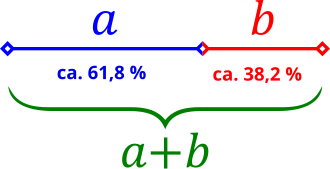
Geometrically, the Golden Ratio means that a line segment AB is divided into two segments of different lengths (a and b). If we now set a/b equal to the sum (a+b)/a, we obtain φ with the value 1.618. Incidentally, the exact value of φ is the square root of 5 (√5). The ratios of the lengths are approximately 3:2. The following graphic illustrates this relationship.

To apply the “Golden Ratio” to shapes, you don’t need to have passed advanced math courses in high school. All we need is the number φ. If we have a rectangle with a side length of one centimeter and multiply 1 by 1.618, we get 1.618. Now we can draw a rectangle with side lengths a = 1 and b = 1.618. The resulting ratio is perfect harmony and is called the “Golden Ratio.”

If we place our square with a side length of one centimeter inside this rectangle, we get a rectangular area B that can be divided according to the same pattern. If we repeat this process a few times, we get a tiled pattern. If we now draw an arc with a radius equal to the side length inside each of the resulting squares, we get a spiral. The shape in Figure 2 should already be familiar to most, and now you also know how it is created.

The spiral just described is also found in the so-called Fibonacci sequence. The Fibonacci sequence is a simple recursive addition of the two preceding numbers. Figure 3 shows how quickly the Fibonacci sequence can be calculated. As we can see, no advanced mathematical studies are necessary.

Where do we find the Golden Ratio used? Besides proportions in logos and other graphics, the Golden Ratio is often used in typography. The height ratios of small to large letters often follow a ratio of 1:1.618.

A typical scenario for applying the Golden Ratio is the positioning of objects within a graphic. To create a good illusion of depth, the objects need a corresponding ratio of heights to each other. But the way objects are positioned relative to each other also makes an image appear calm and harmonious or agitated and restless. So we have two ways of creating a mood in the viewer using the Golden Ratio. By deliberately disrupting the proportions, we achieve a certain restlessness, which can also be desirable. Such an inverted strategy can be used, for example, in advertising to stand out from the crowd and thus attract the viewer’s attention.


Featureitis

You don’t have to be a software developer to recognize a good application. But from my own experience, I’ve often seen programs that were promising and innovative at the start mutate into unwieldy behemoths once they reach a certain number of users. Since I’ve been making this observation regularly for several decades now, I’ve wondered what the reasons for this might be.

The phenomenon of software programs, or solutions in general, becoming overloaded with details was termed “featuritis” by Brooks in his classic book, “The Mythical Man-Month.” Considering that the first edition of the book was published in 1975, it’s fair to say that this is a long-standing problem. Perhaps the most famous example of featureitis is Microsoft’s Windows operating system. Of course, there are countless other examples of improvements that make things worse.

The phenomenon of software programs, or solutions in general, becoming overloaded with details is what Brooks called “featuritis.” Windows users who were already familiar with Windows XP and then confronted with its wonderful successor Vista, only to be appeased again by Windows 7, and then nearly had a heart attack with Windows 8 and 8.1, were calmed down again at the beginning of Windows 10. At least for a short time, until the forced updates quickly brought them back down to earth. And don’t even get me started on Windows 11. The old saying about Windows was that every other version is junk and should be skipped. Well, that hasn’t been true since Windows 7. For me, Windows 10 was the deciding factor in completely abandoning Microsoft, and like many others, I bought a new operating system. Some switched to Apple, and those who couldn’t afford or didn’t want the expensive hardware, like me, opted for a Linux system. This shows how a lack of insight can quickly lead to the loss of significant market share. Since Microsoft isn’t drawing any conclusions from these developments, this fact seems to be of little concern to the company. For other companies, such events can quickly push them to the brink of collapse, and beyond.

One motivation for adding more and more features to an existing application is the so-called product life cycle, which is represented by the BCG matrix in Figure 1.

With a product’s launch, it’s not yet certain whether it will be accepted by the market. If users embrace it, it quickly rises to stardom and reaches its maximum market position as a cash cow. Once market saturation is reached, it degrades to a slow seller. So far, so good. Unfortunately, the prevailing management view is that if no growth is generated compared to the previous quarter, market saturation has already been reached. This leads to the nonsensical assumption that users must be forced to accept an updated version of the product every year. Of course, the only way to motivate a purchase is to print a bulging list of new features on the packaging.

Since well-designed features can’t simply be churned out on an assembly line, a redesign of the graphical user interface is thrown in as a free bonus every time. Ultimately, this gives the impression of having something completely new, as it requires a period of adjustment to discover the new placement of familiar functions. It’s not as if the redesign actually streamlines the user experience or increases productivity. The arrangement of input fields and buttons always seems haphazardly thrown together.

But don’t worry, I’m not calling for an update boycott; I just want to talk about how things can be improved. Because one thing is certain: thanks to artificial intelligence, the market for software products will change dramatically in just a few years. I don’t expect complex and specialized applications to be produced by AI algorithms anytime soon. However, I do expect that these applications will have enough poorly generated AI-generated code sequences, which the developer doesn’t understand, injected into their codebases, leading to unstable applications. This is why I’m rethinking clean, handcrafted, efficient, and reliable software, because I’m sure there will always be a market for it.

I simply don’t want an internet browser that has mutated into a communication hub, offering chat, email, cryptocurrency payments, and who knows what else, in addition to simply displaying web pages. I want my browser to start quickly when I click something, then respond quickly and display website content correctly and promptly. If I ever want to do something else with my browser, it would be nice if I could actively enable this through a plugin.

Now, regarding the problem just described, the argument is often made that the many features are intended to reach a broad user base. Especially if an application has all possible options enabled from the start, it quickly engages inexperienced users who don’t have to first figure out how the program actually works. I can certainly understand this reasoning. It’s perfectly fine for a manufacturer to focus exclusively on inexperienced users. However, there is a middle ground that considers all user groups equally. This solution isn’t new and is very well-known: the so-called product lines.

In the past, manufacturers always defined target groups such as private individuals, businesses, and experts. These user groups were then often assigned product names like Home, Enterprise, and Ultimate. This led to everyone wanting the Ultimate version. This phenomenon is called Fear Of Missing Out (FOMO). Therefore, the names of the product groups and their assigned features are psychologically poorly chosen. So, how can this be done better?

An expert focuses their work on specific core functions that allow them to complete tasks quickly and without distractions. For me, this implies product lines like Essentials, Pure, or Core.

If the product is then intended for use by multiple people within the company, it often requires additional features such as external user management like LDAP or IAM. This specialized product line is associated with terms like Enterprise, Company, Business, and so on.

The cluttered end result, actually intended for NOOPS, has all sorts of things already activated during installation. If people don’t care about the application’s startup and response time, then go for it. Go all out. Throw in everything you can! Here, names like Ultimate, Full, and Maximized Extended are suitable for labeling the product line. The only important thing is that professionals recognize this as the cluttered version.

Those who cleverly manage these product lines and provide as many functions as possible via so-called modules, which can be installed later, enable high flexibility even in expert mode, where users might appreciate the occasional additional feature.

If you install tracking on the module system beforehand to determine how professional users upgrade their version, you’ll already have a good idea of ​​what could be added to the new version of Essentials. However, you shouldn’t rely solely on downloads as the decision criterion for this tracking. I often try things out myself and delete extensions faster than the installation process took if I think they’re useless.

I’d like to give a small example from the DevOps field to illustrate the problem I just described. There’s the well-known GitLab, which was originally a pure code repository hosting project. The name still reflects this today. An application that requires 8 GB of RAM on a server in its basic installation just to make a Git repository accessible to other developers is unusable for me, because this software has become a jack-of-all-trades over time. Slow, inflexible, and cluttered with all sorts of unnecessary features that are better implemented using specialized solutions.

In contrast to GitLab, there’s another, less well-known solution called SCM-Manager, which focuses exclusively on managing code repositories. I personally use and recommend SCM-Manager because its basic installation is extremely compact. Despite this, it offers a vast array of features that can be added via plugins.

I tend to be suspicious of solutions that claim to be an all-in-one solution. To me, that’s always the same: trying to do everything and nothing. There’s no such thing as a jack-of-all-trades, or as we say in Austria, a miracle worker!

When selecting programs for my workflow, I focus solely on their core functionality. Are the basic features promised by the marketing truly present and as intuitive as possible? Is there comprehensive documentation that goes beyond a simple “Hello World”? Does the developer focus on continuously optimizing core functions and consider new, innovative concepts? These are the questions that matter to me.

Especially in commercial environments, programs are often used that don’t deliver on their marketing promises. Instead of choosing what’s actually needed to complete tasks, companies opt for applications whose descriptions are crammed with buzzwords. That’s why I believe that companies that refocus on their core competencies and use highly specialized applications for them will be the winners of tomorrow.


Mismanagement and Alpha Geeks

When I recently picked up Camille Fournier’s book “The Manager’s Path,” I was immediately reminded of Tom DeMarco. He wrote the classic “Peopleware” and, in the early 2000s, published “Adrenaline Junkies and Form Junkies.” It’s a list of stereotypes you might encounter in software projects, with advice on how to deal with them. After several decades in the business, I can confirm every single word from my own experience. And it’s still relevant today, because people are the ones who make projects, and we all have our quirks.

For projects to be successful, it’s not just technical challenges that need to be overcome. Interpersonal relationships also play a crucial role. One important factor in this context, which often receives little attention, is project management. There are shelves full of excellent literature on how to become a good manager. The problem, unfortunately, is that few who hold this position actually fulfill it, and even fewer are interested in developing their skills further. The result of poor management is worn-down and stressed teams, extreme pressure in daily operations, and often also delayed delivery dates. It’s no wonder, then, that this impacts product quality.

One of the first sayings I learned in my professional life was: “Anyone who thinks a project manager actually manages projects also thinks a butterfly folds lemons.” So it seems to be a very old piece of wisdom. But what is the real problem with poor management? Anyone who has to fill a managerial position has a duty to thoroughly examine the candidate’s skills and suitability. It’s easy to be impressed by empty phrases and a list of big names in the industry on a CV, without questioning actual performance. In my experience, I’ve primarily encountered project managers who often lacked the necessary technical expertise to make important decisions. It wasn’t uncommon for managers in IT projects to dismiss me with the words, “I’m not a technician, sort this out amongst yourselves.” This is obviously disastrous when the person who’s supposed to make the decisions can’t make them because they lack the necessary knowledge. An IT project manager doesn’t need to know which algorithm will terminate the project faster. Evaluations can be used to inform decisions. However, a basic understanding of programming is essential. Anyone who doesn’t know what an API is and why version compatibility prevents modules that will later be combined into a software product from working together has no right to act as a decision-maker. A fundamental understanding of software development processes and the programming paradigms used is also indispensable for project managers who don’t work directly with the code.

I therefore advocate for vetting not only the developers you hire for their skills, but also the managers who are to be brought into a company. For me, external project management is an absolute no-go when selecting my projects. This almost always leads to chaos and frustration for everyone involved, which is why I reject such projects. Managers who are not integrated into the company and whose performance is evaluated based on project success, in my experience, do not deliver high-quality work. Furthermore, internal managers, just like developers, can develop and expand their skills through mentoring, training, and workshops. The result is a healthy, relaxed working environment and successful projects.

The title of this article points to toxic stereotypes in the project business. I’m sure everyone has encountered one or more of these stereotypes in their professional environment. There’s a lot of discussion about how to deal with these individuals. However, I would like to point out that hardly anyone is born a “monster.” People are the way they are, a result of their experiences. If a colleague learns that looking stressed and constantly rushed makes them appear more productive, they will perfect this behavior over time.

Camille Fournier aptly described this with the term “The Alpha Geek.” Someone who has made their role in the project indispensable and has an answer for everything. They usually look down on their colleagues with disdain, but can never truly complete a task without others having to redo it. Unrealistic estimates for extensive tasks are just as typical as downplaying complex issues. Naturally, this is the darling of all project managers who wish their entire team consisted of these “Alpha Geeks.” I’m quite certain that if this dream could come true, it would be the ultimate punishment for the project managers who create such individuals in the first place.

To avoid cultivating “alpha geeks” within your company, it’s essential to prevent personality cults and avoid elevating personal favorites above the rest of the team. Naturally, it’s also crucial to constantly review work results. Anyone who marks a task as completed but requires rework should be reassigned until the result is satisfactory.

Personally, I share Tom DeMarco’s view on the dynamics of a project. While productivity can certainly be measured by the number of tasks completed, other factors also play a crucial role. My experience has taught me that, as mentioned earlier, it’s essential to ensure employees complete all tasks thoroughly and thoroughly before taking on new ones. Colleagues who downplay a task or offer unrealistic, low-level assessments should be assigned that very task. Furthermore, there are colleagues who, while having relatively low output, contribute significantly to team harmony.

When I talk about people who build a healthy team, I don’t mean those who simply hand out sweets every day. I’m referring to those who possess valuable skills and mentor their colleagues. These individuals typically enjoy a high level of trust within the team, which is why they often achieve excellent results as mediators in conflicts. It’s not the people who try to be everyone’s darling with false promises, but rather those who listen and take the time to find a solution. They are often the go-to people for everything and frequently have a quiet, unassuming demeanor. Because they have solutions and often lend a helping hand, they themselves receive only average performance ratings in typical process metrics. A good manager quickly recognizes these individuals because they are generally reliable. They are balanced and appear less stressed because they proceed calmly and consistently.

Of course, much more could be said about the stereotypes in a software project, but I think the points already made provide a good basic understanding of what I want to express. An experienced project manager can address many of the problems described as they arise. This naturally requires solid technical knowledge and some interpersonal skills.

Of course, we must also be aware that experienced project managers don’t just appear out of thin air. They need to be developed and supported, just like any other team member. This definitely includes rotations through all technical departments, such as development, testing, and operations. Paradigms like pair programming are excellent for this. The goal isn’t to turn a manager into a programmer or tester, but rather to give them an understanding of the daily processes. This also strengthens confidence in the skills of the entire team, and mentalities like “you have to control and push lazy and incompetent programmers to get them to lift a finger” don’t even arise. In projects that consistently deliver high quality and meet their deadlines, there’s rarely a desire to introduce every conceivable process metric.


Blockchain – an introduction

The blockchain concept is a fundamental component of various crypto payment methods such as Bitcoin and Ethereum. But what exactly is blockchain technology, and what other applications does this concept have? Essentially, blockchain is structured like a backward-linked list. Each element in the list points to its predecessor. So, what makes blockchain so special?

Blockchain extends the list concept by adding various constraints. One of these constraints is ensuring that no element in the list can be altered or removed. This is relatively easy to achieve using a hash function. We encode the content of each element in the list into a hash using a hash algorithm. A wide range of hash functions are now available, with SHA-512 being a current standard. This hash algorithm is already implemented in the standard library of almost every programming language and can be used easily. Specifically, this means that the SHA-512 hash is generated from all the data in a block. This hash is always unique and never occurs again. Thus, the hash serves as an identifier (ID) to locate a block. An entry in the block is a reference to its predecessors. This reference is the hash value of the predecessor, i.e., its ID. When implementing a blockchain, it is essential that the hash value of the predecessor is included in the calculation of the hash value of the current block. This detail ensures that elements in the blockchain can only be modified with great difficulty. Essentially, to manipulate the element one wishes to alter, all subsequent elements must also be changed. In a large blockchain with a very large number of blocks, such an undertaking entails an enormous computational effort that is very difficult, if not impossible, to accomplish.

This chaining provides us with a complete transaction history. This also explains why crypto payment methods are not anonymous. Even though the effort required to uniquely identify a transaction participant can be enormous, if this participant also uses various obfuscation methods with different wallets that are not linked by other transactions, the effort increases exponentially.

Of course, the mechanism just described still has significant weaknesses. Transactions, i.e., the addition of new blocks, can only be considered verified and secure once enough successors have been added to the blockchain to ensure that changes are more difficult to implement. For Bitcoin and similar cryptocurrencies, a transaction is considered secure if there are five subsequent transactions.

To avoid having just one entity storing the transaction history—that is, all the blocks of the blockchain—a decentralized approach comes into play. This means there is no central server acting as an intermediary. Such a central server could be manipulated by its operator. With sufficient computing power, this would allow for the rebuilding of even very large blockchains. In the context of cryptocurrencies, this is referred to as chain reorganization. This is also the criticism leveled at many cryptocurrencies. Apart from Bitcoin, no other decentralized and independent cryptocurrency exists. If the blockchain, with all its contained elements, is made public and each user has their own instance of this blockchain locally on their computer, where they can add elements that are then synchronized with all other instances of the blockchain, then we have a decentralized approach.

The technology for decentralized communication without an intermediary is called peer-to-peer (P2P). P2P networks are particularly vulnerable in their early stages, when there are only a few participants. With a great deal of computing power, one could easily create a large number of so-called “Zomi peers” that influence the network’s behavior. Especially in times when cloud computing, with providers like AWS and Google Cloud Platform, can provide virtually unlimited resources for relatively little money, this is a significant problem. This point should not be overlooked, particularly when there is a high financial incentive for fraudsters.

There are also various competing concepts within P2P. To implement a stable and secure blockchain, it is necessary to use only solutions that do not require supporting backbone servers. The goal is to prevent the establishment of a master chain. Therefore, questions must be answered regarding how individual peers can find each other and which protocol they use to synchronize their data. By protocol, we mean a set of rules, a fixed framework for how interaction between peers is regulated. Since this point is already quite extensive, I refer you to my 2022 presentation for an introduction to the topic.

Another feature of blockchain blocks is that their validity can be easily and quickly verified. This simply requires generating the SHA-512 hash of the entire contents of a block. If this hash matches the block’s ID, the block is valid. Time-sensitive or time-critical transactions, such as those relevant to payment systems, can also be created with minimal effort. No complex time servers are needed as intermediaries. Each block is appended with a timestamp. This timestamp must, however, take into account the location where it is created, i.e., specify the time zone. To obscure the location of the transaction participants, all times in the different time zones can be converted to the current UTC 0.

To ensure that the time is correctly set on the system, a time server can be queried for the current time when the software starts, and a correction message can be displayed if there are any discrepancies.

Of course, time-critical transactions are subject to a number of challenges. It must be ensured that a transaction was carried out within a defined time window. This is a problem that so-called real-time systems have to deal with. The double-spending problem also needs to be prevented—that is, the same amount being sent twice to different recipients. In a decentralized network, this requires confirmation of the transaction by multiple participants. Classic race conditions can also pose a problem. Race conditions can be managed by applying the Immutable design pattern to the block elements.

To prevent the blockchain from being disrupted by spam attacks, we need a solution that makes creating a single block expensive. We achieve this by incorporating computing power. The participant creating a block must solve a puzzle that requires a certain amount of computing time. If a spammer wants to flood the network with many blocks, their computing power increases exorbitantly, making it impossible for them to generate an unlimited number of blocks in a short time. This cryptographic puzzle is called a nonce, which stands for “number used only once.” The nonce mechanism in the blockchain is also often referred to as Proof of Work (POW) and is used in Bitcoin to verify the blocks by the miners.

The nonce is a (pseudo)random number for which a hash must be generated. This hash must then meet certain criteria. These could be, for example, two or three leading zeros in the hash. To prevent arbitrary hashes from being inserted into the block, the random number that solves the puzzle is stored directly. A nonce that has already been used cannot be used again, as this would circumvent the puzzle. When generating the hash from the nonce, it must meet the requirements, such as leading zeros, to be accepted.

Since finding a valid nonce becomes increasingly difficult as the number of blocks in a blockchain grows, it is necessary to change the rules for such a nonce cyclically, for example, every 2048 blocks. This also means that the rules for a valid nonce must be assigned to the corresponding blocks. Such a set of rules for the nonce can easily be formulated using a regular expression (regex).

We’ve now learned a considerable amount about the ruleset for a blockchain. So it’s time to consider performance. If we were to simply store all the individual blocks of the blockchain in a list, we would quickly run out of memory. While it’s possible to store the blocks in a local database, this would negatively impact the blockchain’s speed, even with an embedded solution like SQLite. A simple solution would be to divide the blockchain into equal parts, called chunks. A chunk would have a fixed length of 2048 valid blocks, and the first block of a new chunk would point to the last block of the previous chunk. Each chunk could also contain a central rule for the nonce and store metadata such as minimum and maximum timestamps.

To briefly recap our current understanding of the blockchain ruleset, we’re looking at three different levels. The largest level is the blockchain itself, which contains fundamental metadata and configurations. Such configurations include the hash algorithm used. The second level consists of so-called chunks, which contain a defined set of block elements. As mentioned earlier, chunks also contain metadata and configurations. The smallest element of the blockchain is the block itself, which comprises an ID, the described additional information such as a timestamp and nonce, and the payload. The payload is a general term for any data object that is to be made verifiable by the blockchain. For Bitcoin and other cryptocurrencies, the payload is the information about the amount being transferred from Wallet A (source) to Wallet B (destination).

Blockchain technology is also suitable for many other application scenarios. For example, the hash values ​​of open-source software artifacts could be stored in a blockchain. This would allow users to download binary files from untrusted sources and verify them against the corresponding blockchain. The same principle could be applied to the signatures of antivirus programs. Applications and other documents could also be transmitted securely in governmental settings. The blockchain would function as a kind of “postal stamp.” Accounting, including all receipts for goods and services purchased and sold, is another conceivable application.

Depending on the use case, an extension of the blockchain would be the unique signing of a block by its creator. This would utilize the classic PKI (Public Key Infrastructure) method with public and private keys. The signer stores their public key in the block and creates a signature using their private key via the payload, which is then also stored in the block.

Currently, there are two freely available blockchain implementations: BitcoinJ and Web3j for Ethereum. Of course, it’s possible to create your own universally applicable blockchain implementation using the principles just described. The pitfalls, naturally, lie in the details, some of which I’ve already touched upon in this article. Fundamentally, however, blockchain isn’t rocket science and is quite manageable for experienced developers. Anyone considering trying their hand at their own implementation now has sufficient basic knowledge to delve deeper into the necessary details of the various technologies involved.